Budget problems usually start with one simple issue: teams ask for money one by one, but no one checks the full company picture first.
If I were setting a budget across departments, I’d keep the process tight and plain:
- set the total spend cap first
- name one owner per department
- use the same cost rules for every team
- compare leadership targets with department requests
- add a 3% to 10% reserve
- review budget vs. actuals every month
- track variances like timing, pricing, hiring, and one-off costs
- tie spend to results like CAC, pipeline, NRR, and hiring pace
The big idea is simple: a department budget is not just a spending plan. It is a runway control tool. A hire is not just salary. A software tool is not just one invoice. And a budget is not done when it gets approved.
Here’s the short version of what matters most:
| Area | What I’d check |
|---|---|
| Scope | Which departments are included, the budget period, and the total cap |
| Ownership | One budget owner per team and approval limits by dollar amount |
| Inputs | Last 12 months of actuals, mapped to the general ledger |
| Assumptions | Fully loaded headcount cost, contract timing, seat counts, renewals |
| Build | Top-down targets vs. bottom-up requests |
| Pressure test | Base, upside, and downside cases plus reserve rules |
| Review | Monthly actuals, YTD variance, and spend-to-outcome checks |
A clean cross-team budget comes down to this: decide the cap, standardize the math, log every change, and check results every month.
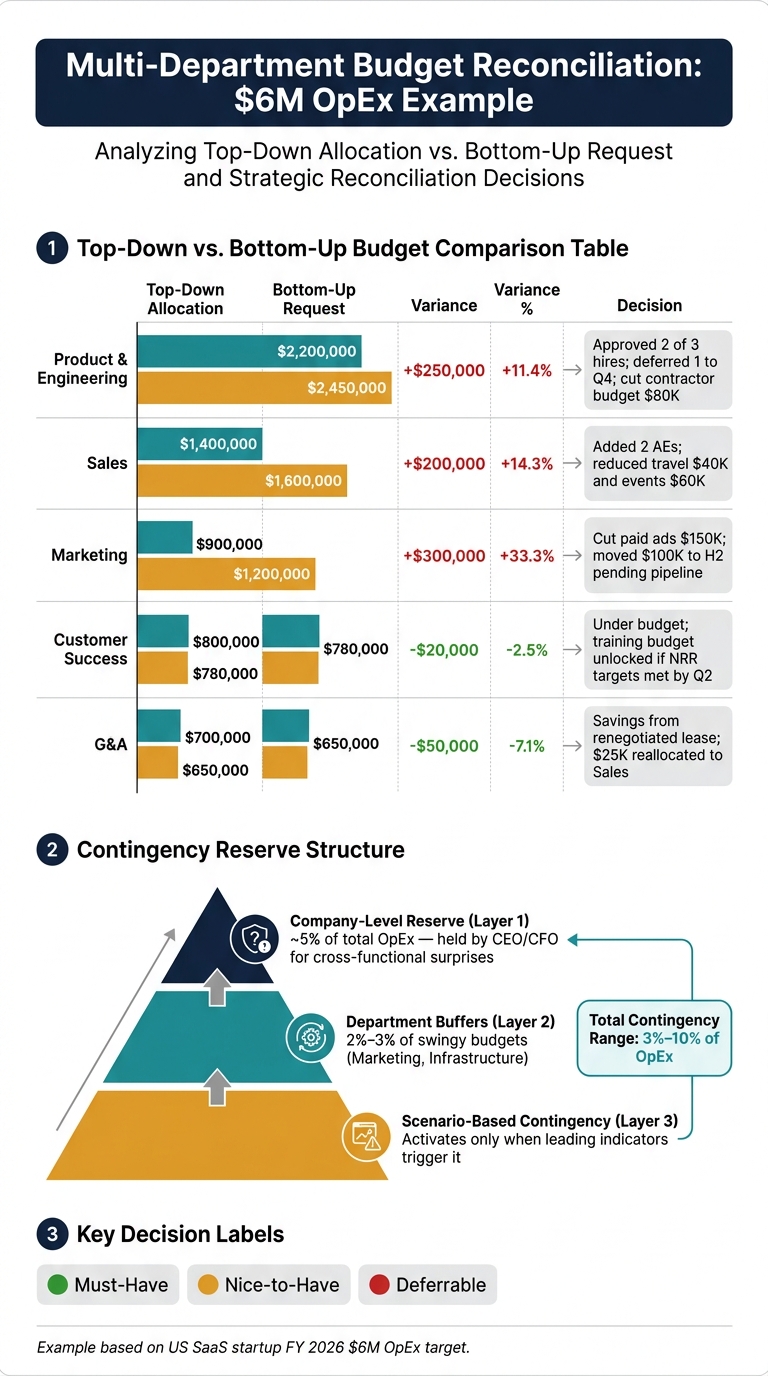
Multi-Department Budget Allocation: Top-Down vs. Bottom-Up Reconciliation
Webinar: How to build a departmental budget
sbb-itb-17e8ec9
1. Define Scope, Owners, and Guardrails
Before you assign even $1, lock down three things: which departments are in scope, the planning horizon, and the total spend cap. Skip any one of them, and the trouble usually shows up later as budget fights or surprise overruns.
List departments, budget period, and total spend limit
Start by listing every department that's in scope. Give separate lines to teams with their own goals and meaningful spend. Smaller teams can sit under G&A.
Then confirm the planning horizon. For most startups, a 12-month monthly budget works best, with quarterly rollups that match board updates. Also note whether the budget stays fixed for the year or gets updated on a rolling basis. That one call shapes how you'll deal with variances later.
After that, set the total spend cap. Base it on cash on hand, conservative revenue, and target runway. From there, split the cap across departments in a way that matches company strategy and runway.
Assign budget owners and approval thresholds
Each department needs one named owner, even if one leader runs more than one area. That owner reviews monthly actuals, approves routine spend within their limit, and explains material variances.
Approval thresholds help the team move without losing control. For most early-stage startups, a simple setup like this does the job:
| Approver | Spending Limit |
|---|---|
| Individual contributor | Up to $250 |
| Budget owner / manager | Up to $5,000 |
| Director / department head | Up to $25,000 |
| CFO / VP Finance | Up to $100,000 |
| CEO or board | Above $100,000 or strategic commitments, including contracts longer than 12 months |
Flag variances above 10% or $5,000, whichever is lower. If money moves across departments, require written justification, CFO approval for transfers above $10,000, and a shared budget change log. Also decide how to treat unused budget: lost, partly carried over, or fully rolled forward. Write that rule down so no one is guessing at quarter-end.
Next, tie those limits back to past spend and standard assumptions.
2. Gather Reliable Inputs and Standardize Assumptions
Once scope, owners, and approval limits are set, the next job is simple: make sure the numbers going into the budget are solid.
Pull historical actuals and map key cost drivers
Start with the latest 12 months of actuals. If the business changed in a big way, look back 18 to 24 months instead. That extra time helps you spot seasonality, hiring cycles, and campaign timing. Then reconcile those actuals to the general ledger.
The most useful categories to pull are payroll, benefits, software subscriptions, contractors, cloud or hosting spend, rent, insurance, legal, and taxes. These are common recurring cost centers, and they’re usually easier to forecast than one-off expenses.
After that, split each line into fixed and variable costs. That makes it clear which expenses stay steady and which move as the business grows.
Next, connect each department’s spend to the thing that actually drives it.
- Marketing costs usually follow ad spend, agency fees, and campaign volume.
- Sales costs tend to move with commissions, travel, and customer acquisition activity.
- Engineering costs often track cloud usage, infrastructure, and developer headcount.
- Support costs usually scale with ticket volume and staffing ratios.
This is where budgeting starts to feel less like guesswork. When spend is tied to a measurable unit, like dollars in ad spend, number of seats, number of hires, or monthly active users, assumptions are much easier to check and update.
Standardize assumptions for headcount, vendor spend, and timing
Here’s where teams often drift apart. One group budgets base salary only. Another includes benefits and payroll taxes. One team enters full annual contract amounts. Another spreads those costs by month.
That kind of mismatch creates noise fast.
Fix it by having every department use the same monthly format and the same definition of fully loaded cost: base salary, employer payroll taxes, benefits, bonuses, and any hiring or onboarding costs.
For vendor spend, each team should confirm:
- contract start dates
- renewal dates
- seat counts
- billing frequency
- expected price escalators
A software contract should reflect the number of active seats, not just last month’s invoice. If headcount moves, licensing costs move too.
On budgeting method, don’t force one approach onto every line item.
Use zero-based budgeting for discretionary or variable spend like marketing programs, travel, training, and test tools. In those areas, every line should earn its place from scratch.
Use incremental budgeting for stable, predictable costs like rent, baseline software, or long-running contracts. In those cases, adjusting the prior period’s actuals for known changes is faster and still accurate for low-volatility categories.
| Budgeting Method | Best For | Key Trait |
|---|---|---|
| Zero-based | Discretionary or fast-changing spend | Justifies each line from scratch; good for SaaS, vendor, and project spend |
| Incremental | Stable recurring costs | Adjusts prior-period actuals for inflation or known changes; faster for predictable lines |
| Driver-based | Cross-functional planning | Links spend to measurable drivers like headcount, volume, or usage |
3. Build, Reconcile, and Stress-Test Department Budgets
Once the inputs are solid, the next job is to put the budget together and check whether it can survive pressure. The assumptions from Section 2 should be the same ones you use to test whether each department request fits inside the company cap.
Compare top-down targets with bottom-up requests
Budgets tend to work better when leadership targets line up with what departments are asking for. The top-down view sets the outer limit: total annual OpEx cap, target EBITDA or burn, and company priorities. The bottom-up view adds the detail: current FTEs, proposed hires, role or title, level, fully loaded cost per FTE, start date, location, and monthly or quarterly timing for non-headcount spend.
Ask each department to send headcount and non-headcount requests separately. For headcount, use the same fully loaded cost assumptions from Section 2. For non-headcount spend, keep the categories consistent across teams, such as:
- software/SaaS
- marketing paid media
- contractors
- travel
- events
- miscellaneous
Include monthly or quarterly timing for each line. Also tag every request as must-have, nice-to-have, or deferrable. That makes tradeoffs much easier when the numbers get tight.
Finance then rolls everything up and compares the total with the company cap. If a request comes in over allocation, look at scope, timing, or rank. Send each variance back to the department owner for sign-off. What you want here is a written reconciliation that shows the tradeoffs in plain English.
If the total is over the cap, push the tradeoffs down to the department level. Here’s what that can look like for a US-based SaaS startup with a $6,000,000 FY 2026 OpEx target:
| Department | Top-Down Allocation (USD) | Bottom-Up Request (USD) | Variance (USD) | Variance (%) | Decision Notes |
|---|---|---|---|---|---|
| Product & Engineering | $2,200,000 | $2,450,000 | +$250,000 | +11.4% | Approved 2 of 3 new hires; deferred 1 to Q4; cut contractor budget by $80,000. |
| Sales | $1,400,000 | $1,600,000 | +$200,000 | +14.3% | Added 2 AEs tied to new logo targets; reduced travel by $40,000 and event spend by $60,000. |
| Marketing | $900,000 | $1,200,000 | +$300,000 | +33.3% | Scaled back paid ads by $150,000; kept brand campaign; moved $100,000 to H2 pending pipeline performance. |
| Customer Success | $800,000 | $780,000 | −$20,000 | −2.5% | Under budget; agreed to add a small training budget if NRR targets are met by Q2. |
| G&A | $700,000 | $650,000 | −$50,000 | −7.1% | Savings from renegotiated office lease; reallocated $25,000 to Sales for tools. |
This layout puts the gap and the decision in one place, which makes review a lot easier.
Add contingency, scenarios, and reallocation rules
A contingency reserve usually lands in the 3% to 10% of total OpEx range. One setup that works well uses three layers: a company-level reserve of about 5% of total OpEx, held by the CEO or CFO for cross-functional surprises; small department buffers in swingy areas like marketing and infrastructure, usually 2% to 3% of those budgets; and scenario-based contingency that turns on only if leading indicators support it.
For scenarios, set up base, downside, and upside cases, and tie each one to a clear trigger. If the trigger is fuzzy, the scenario won’t help much when things change fast.
Reallocation rules matter too. Set a firm threshold for moves within a department, and require CEO/CFO approval for transfers across departments. Cross-department moves should stay net-neutral to total OpEx unless they pull from contingency. Each reallocation should get a one-page write-up with the amount, where the money is moving from and to, the reason, and the expected impact. Log all of it in a budget changes register so the board can track the history.
That keeps changes controlled instead of turning the budget into a free-for-all.
Static annual budget vs. rolling budget updates
After reconciliation, decide how often you’re going to refresh the plan.
A static annual budget is set once, usually at the start of the fiscal year, and then changed only around the edges. It’s simple, familiar, and easy to explain to a board. The problem is that it can drift from reality pretty fast. KPMG’s 2025 research found that only 1% of firms hit their forecast exactly, and only 22% came within 5% on either side. For a startup, that gap can make the budget a weak tool for day-to-day decisions.
A rolling forecast takes a different route. It extends the planning horizon on a set cadence, usually quarterly, so you always have a 12-month forward view instead of a window that keeps getting shorter.
| Approach | Pros | Cons | Best For |
|---|---|---|---|
| Static annual budget | Simple, clear annual targets, low overhead, easy to communicate to investors | Gets outdated fast; less responsive to hiring or revenue shifts; can encourage "spend it or lose it" behavior | Later-stage or more predictable companies with stable cost structures |
| Rolling forecast | Always current, better runway visibility, more agile reallocation | Requires ongoing ownership, planning fatigue risk, moving targets if not managed carefully | Seed through Series C startups with frequent hiring or GTM changes |
A lot of startups land in the middle: a static board budget paired with a quarterly rolling reforecast.
4. Track Variances and Keep the Budget Useful
Once the budget is approved, the work changes. You’re no longer building the plan. You’re checking whether the business is following it.
That means reviewing actual spend against the budget every month. If you skip that step, the budget stops being a tool and turns into a file no one uses. The allocation work from Sections 1–3 only matters if you compare actuals to plan each month and act on what you see.
Review actuals by department every month
Set a fixed monthly close and review rhythm, then stick to it. Each department should get a monthly package with department P&Ls, budget vs. actual by category, and both monthly and YTD views. A cash runway view tied to actual burn also helps, along with a headcount report so payroll and hiring variances can be checked against what happened in the business.
Flag the main drivers behind each variance. For repeat misses or large misses, require a written explanation. YTD numbers matter here. A bad month doesn’t always mean the budget is off. In many cases, timing issues even out over a few months.
Each department owner should explain misses and sign off on the next step. When you flag a variance, label it by type:
- timing
- pricing
- hiring changes
- one-off costs
That simple label tells you a lot. Is this likely to happen again? Do you need to step in now, or just watch it for another month?
From there, tie spend back to operating results.
Tie spend to outcomes and document changes
Variance tracking only helps when it links dollars to results. For each department, review spend alongside one main metric and one support metric that show whether the money is doing what it was supposed to do.
- Sales & Marketing: cost per qualified opportunity, CAC, and pipeline generated per $1,000 spent
- Product & Engineering: features shipped per month and cycle time from idea to production
- Customer Success & Support: net revenue retention (NRR) and average ticket resolution time
- Operations & G&A: cost per employee and time to complete key back-office processes
Here’s the point in plain English: if Marketing spend goes up 30% and pipeline only moves 5%, something’s off in the allocation. That changes the conversation. Instead of asking, “Did we overspend?” you’re asking, “Did the spend do its job?”
Document every material decision right inside the variance table, including the date, owner, cause, and action. That way, no one has to dig through email threads later. Here’s a simple format that works:
| Department | Budget (USD) | Actual (USD) | Variance (USD) | Variance (%) | Explanation | Corrective Action |
|---|---|---|---|---|---|---|
| Marketing | $80,000 | $95,000 | +$15,000 | +18.8% | Paid social CPMs up 12% vs. plan (pricing variance). | Shift 20% of paid budget to higher-ROI channels. |
| Engineering | $120,000 | $110,000 | −$10,000 | −8.3% | Senior hire delayed 2 months (timing variance). | Accelerate recruiting; update delivery timelines. |
| Customer Support | $40,000 | $52,000 | +$12,000 | +30.0% | One-off contractor surge for a major release. | Plan a controlled contractor ramp for future launches. |
Keep a versioned budget file with dated revisions for board review and diligence. Use U.S. date formats like August 16, 2026 so the audit trail stays clear.
Use AI-backed reporting to shorten close-to-review time
The easiest way to keep this process on track is to automate the reporting work. AI-backed reporting can cut down the time between close and review by handling categorization, reconciliation, and department-level reporting.
Lucid Financials combines bookkeeping, forecasting, tax services, and CFO support in one platform. It also includes Slack access for fast budget questions and runway visibility.
Conclusion: A Practical Checklist for Cleaner Cross-Department Budget Decisions
Multi-department budgeting comes down to one thing: putting capital where it matters most while protecting runway. Every dollar you give one team is a dollar you can't use somewhere else. That's the whole point of this checklist.
Keep it simple. Define scope and ownership. Use solid inputs. Standardize assumptions. Reconcile top-down targets with bottom-up plans. Then stress-test the budget before it gets approved.
Once that groundwork is set, the job shifts from planning to upkeep. A budget isn't much use if it falls apart the moment spending starts.
Clear owners and approval limits help keep things moving. They cut bottlenecks, reduce surprise overruns, and make budget decisions easier to enforce.
After approval, review actuals every month and tie spend back to outcomes. That's how you tell if the allocation is doing its job or if money needs to move.
Lucid Financials brings bookkeeping, tax services, tax credits, and CFO support into one platform, with Slack integration for real-time spend and runway answers. That makes monthly review faster and day-to-day budget management a lot easier.
FAQs
How do I set a realistic total budget cap?
Set clear financial guardrails from the start. That means putting spending limits in place and making it clear who can approve which decisions.
It also helps to use a rolling 12–18 month forecast and update it every month or quarter. This gives you a steady view of burn rate and helps you spot cash crunches before they become a problem.
Leave room in the budget for surprises too. A contingency buffer of 5% to 20% of the total budget can give you breathing room when new opportunities come up or the market shifts.
If it makes sense for your setup, Lucid Financials can help you track performance with real-time insights and investor-ready reporting.
What counts in fully loaded headcount cost?
Fully loaded headcount cost includes all the costs tied to an employee, not just base salary. That means things like mandatory benefits, hiring and training, plus the tools and setup people need to do their jobs, such as office space and equipment.
Lucid Financials can help analyze and sort these costs, so you get a clearer view of your actual operating spend.
When should we use a rolling forecast instead of a static budget?
Use a rolling forecast when your business is growing fast, market conditions change often, or you need to adjust your finances more than twice a year.
A static budget gives you predictability. But it can also get rigid and out of date. A 12–18 month rolling forecast, updated monthly or quarterly, helps you stay flexible, move resources where they’re needed, and catch cash shortfalls before they turn into a serious problem.