If I had to boil this down to one point, it’s this: scenario simulation helps me decide where money goes before cash gets tight.
Instead of relying on one forecast, I compare a few paths - base, upside, downside, and stress - and tie each one to clear moves on hiring, marketing, and product spend. That matters because a small shift in growth, churn, or hiring timing can cut runway by months.
Here’s the short version:
- I start with a linked forecast built from current actuals
- I focus on 3 to 5 inputs that move results most
- I test multiple cases, not just one plan
- I connect each case to direct actions, like pausing hires if runway falls below 12 months
- I review the model every month and reset plans each quarter
A few numbers from the article show why this matters:
- Delaying 2 hires by one quarter can add 60 to 90 days of runway
- A miss in MRR growth by 20% for 2 straight months can be enough to switch to a downside plan
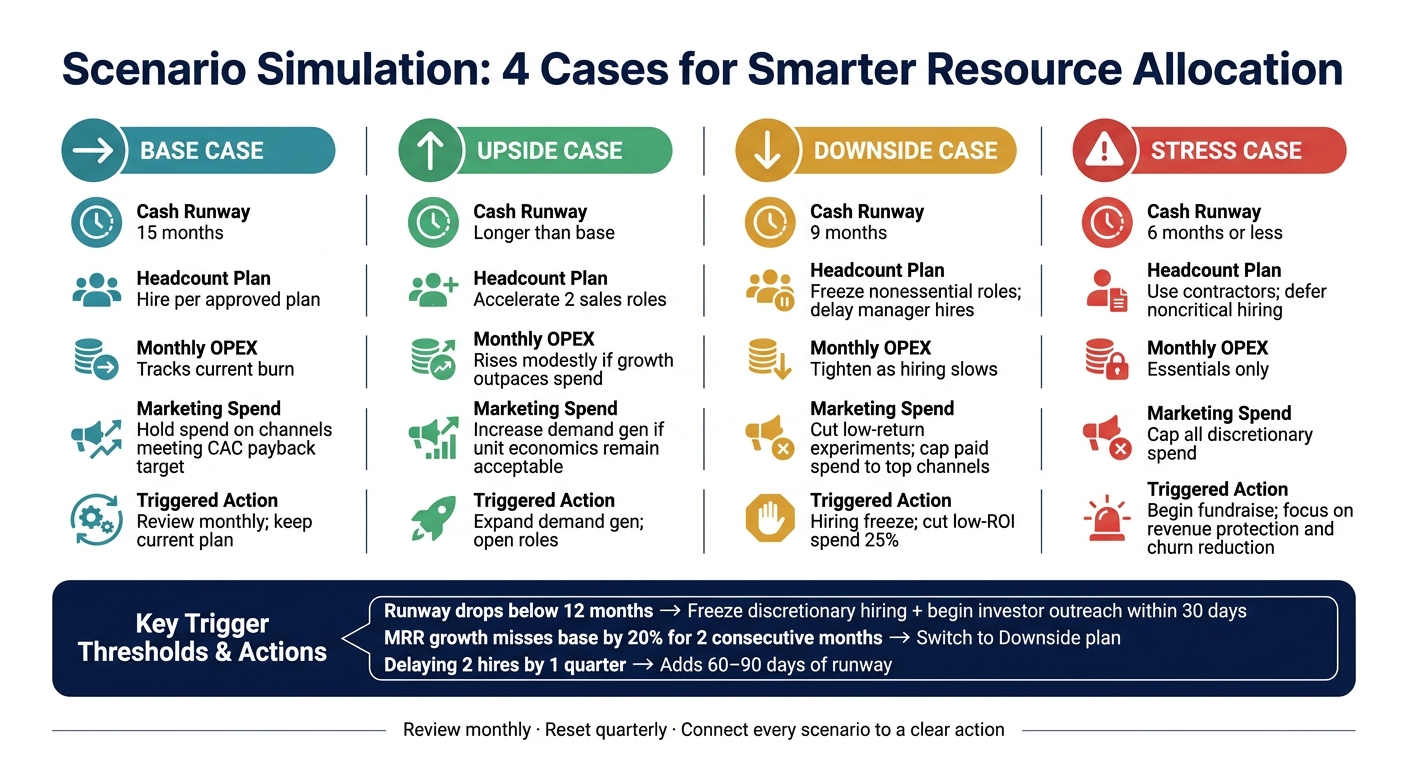
- A company with 15 months of runway in a base case can drop to 9 months in a downside case and 6 months or less in a stress case
In simple terms, scenario simulation turns finance from a static budget into a set of decision rules. That’s the main idea.
| Scenario | What I watch | Common response |
|---|---|---|
| Base | Current plan stays on track | Keep approved hiring and spend |
| Upside | Growth beats plan | Add sales capacity and spend more on channels that pay back |
| Downside | Growth slips or burn rises | Freeze non-core hires and cut weak spend |
| Stress | Cash gets short fast | Limit spending, delay hiring, and focus on revenue protection |
The core takeaway: I don’t use scenario simulation to predict the future. I use it to make better funding, hiring, and spending calls under different conditions.
Scenario Simulation: 4 Cases for Smarter Resource Allocation
Introduction to Scenario Planning
sbb-itb-17e8ec9
Step 1: Build a reliable baseline forecast
Before you run what-if cases, build a baseline from current actuals. This is your control forecast. Every other case should be measured against it.
Start with a three-statement financial foundation
Build a linked three-statement model: income statement, balance sheet, and cash flow statement. That way, when revenue, costs, or hiring change, the impact flows all the way through to cash.
Say monthly revenue goes from $250,000 to $300,000. On the income statement, that can look like a win. But the balance sheet and cash flow statement may still show strain if receivables climb or headcount grows. A three-statement setup shows the full picture, including how decisions affect runway and burn.
Pick the 3 to 5 drivers that move outcomes most
Focus on the 3 to 5 drivers that explain most of the movement. Common ones include:
- New sales
- Customer churn
- Gross margin
- Hiring timing
- Contractor spend
- Major vendor costs
Set up a central driver sheet so one input change updates the whole model. For example, if you move a sales hire from 06/01/2026 to 09/01/2026, payroll, commissions, revenue timing, and cash runway should all update on their own. That keeps your model tied to actual operating choices, not random edits across separate lines.
Make sure your data is clean enough to rely on
A baseline is only as good as the data under it. Use reconciled books, a clear chart of accounts, and current actuals you trust.
If your chart of accounts lumps payroll, contractor spend, and software costs into one bucket, the baseline gets blurry fast. You can't act with much confidence if the inputs are messy. Lucid Financials can clean up actuals and build an investor-ready baseline before you layer in scenarios.
With a trusted baseline in place, map each scenario to hiring, marketing, and product spend.
Step 2: Build scenarios and connect them to resource decisions
Build base, upside, downside, and stress cases
Start with your baseline. Then build four cases by changing only the drivers that move the numbers the most.
A simple setup works well:
- Base case
- Upside case
- Downside case
- Stress case
The point isn't to model every possible twist. It's to set a few clear paths and decide now what you'll do if things shift later.
Your stress case should be tough enough to be useful. For example, it can combine slower revenue with a later fundraise. That way, you're not scrambling when cash gets tight.
Once those cases are in place, connect each one to rules for hiring, marketing, and product work.
Map each scenario to hiring, marketing, and product spend
Each case needs a direct action rule. No gray area.
Upside means you can move faster on hiring and growth spend. Downside means you freeze nonessential hiring and put a hard cap on paid spend. Stress means you protect revenue and churn-reduction work first, then push everything else out.
This link between forecast and action should be explicit. For example, pause recruiting if runway drops below 12 months. Or add sales hires when pipeline coverage stays above target for a full quarter.
Even small moves can buy time. Delaying just two hires by one quarter can extend cash runway by 60 to 90 days.
Add a scenario comparison table
A side-by-side table makes the operating rule for each case easy to see. The Triggered Actions column is where the forecast turns into a decision.
| Scenario | Headcount Plan | Monthly OPEX | Marketing Spend | Cash Runway | Triggered Actions |
|---|---|---|---|---|---|
| Base | Hire per approved plan | Tracks current burn | Hold spend on channels meeting customer acquisition cost payback target | 15 months | Review monthly; keep current plan |
| Upside | Accelerate two sales roles | Rises modestly if growth outpaces spend | Increase demand gen if unit economics remain acceptable | Longer than base | Expand demand gen; open roles |
| Downside | Freeze nonessential roles; delay planned manager hires | Tighten as hiring slows | Cut low-return experiments; cap paid spend to top channels | 9 months | Hiring freeze; cut low-ROI spend 25% |
| Stress | Use contractors instead of full-time hires; defer noncritical hiring | Essentials only | Cap all discretionary spend | 6 months or less | Begin fundraise; focus product work on revenue protection and churn reduction; defer nonessential product work |
Those rules only help if you keep them current.
Step 3: Keep scenarios current with the right tools and rhythms
Those scenario rules only help if the model stays current. That means using tools and a review cadence that keep assumptions tied to today’s cash, burn, and hiring plan.
Look for tools that support driver-based updates and version control
Manual updates are one of the biggest reasons scenario planning slows down. If someone has to change every line item by hand, the model gets outdated fast.
Driver-based tools solve that by updating a small set of inputs - like headcount growth, conversion rate, or average contract value - and then recalculating the full model on their own. Version control adds another layer: each scenario stays linked to its assumptions, so the team can see what changed and why.
Look for tools that include:
- runway tracking
- linked three-statement modeling
- live actuals integration
- scenario version control
It also helps to have a simple rhythm in place. A good process makes it easy to refresh the model after each monthly close and then review assumptions in more depth during a quarterly planning session.
Use Lucid Financials to model what-if decisions faster

A good workflow needs a system that updates scenarios from live financial data.
Lucid Financials brings together AI forecasting, cash runway visibility, what-if modeling, bookkeeping, tax services, tax credits, and CFO support in one platform. It also includes Slack access for fast budget and hiring questions. Because the inputs stay tied to live accounting data, teams can move faster without working from old numbers. The Slack integration also helps speed up hiring and budget calls.
Tool capabilities table
| Capability | What it does | How it improves resource allocation |
|---|---|---|
| Scenario Version Control | Preserves assumptions behind each scenario | Shows what changed and why across planning cycles |
| AI Forecasting | Generates forecasts from current financial data | Surfaces risks earlier without manual modeling |
| Cash Runway Tracking | Tracks how spending and hiring affect cash timing | Lets leaders act before runway becomes a problem |
| Slack Access | Answers finance questions in Slack | Speeds up budget and hiring calls without a formal review |
| Investor Reporting | Produces board-ready reports from planning data | Keeps fundraising prep aligned with internal forecasts |
Once the tool keeps scenarios current, the next job is reviewing them on a fixed monthly and quarterly cadence.
Step 4: Turn scenarios into a repeatable decision process
Once your scenarios update on their own, the next move is simple: turn them into rules.
Tools and new data help, but scenarios only matter if they lead to action.
Set trigger points before conditions change
The aim is to decide what you'll do before you're under pressure. In plain English, that means setting clear thresholds tied to clear actions, so leadership doesn't have to start from zero every time something shifts.
A simple format works well: metric + threshold + duration + action + owner.
Each scenario should come with a response that's already decided. For example:
- If cash runway drops below 12 months, freeze discretionary hiring, cut nonessential spend by 10–20%, and begin investor outreach within 30 days.
- If MRR growth misses the base case by 20% for two consecutive months, pause planned hires and switch to the downside scenario as the operating plan.
- If net revenue retention falls below target for two consecutive quarters, pause expansion into new verticals and shift budget to customer success and product quality.
Put these triggers into a one- to two-page playbook. That way, the team can move without a long debate. It cuts delays and keeps everyone on the same page.
Review scenarios on a monthly and quarterly cadence
Each month, after close, check whether any trigger has fired and confirm which scenario is active. This doesn't need to turn into a marathon meeting. A 15–20 minute leadership review is usually enough to confirm the active scenario and flag any trigger.
Each quarter, reset hiring, budget, and product priorities based on the latest scenario set. Bring those same scenarios into board reviews too. When investors see a base, upside, and downside case - along with pre-planned actions for each - it shows discipline and builds confidence, especially when the downside case includes specific steps to protect runway.
Conclusion: Better allocation starts with better scenarios
Scenario simulation starts paying off when it shapes decisions.
Start with a baseline. Define triggers. Review them on a fixed schedule.
That's what turns a financial model into a decision-making tool - one that helps founders protect runway, invest with more confidence, and deal with surprises without scrambling.
FAQs
How do I choose the right scenario triggers?
Tie each scenario to 2–3 measurable drivers that have the biggest effect on runway. In most cases, that means the few numbers that can change the business fast, such as revenue growth, gross margin, burn rate, or sales cycle length. The goal is simple: focus on the metrics that move cash, not a long list of nice-to-have inputs.
Then set clear action thresholds based on metrics like cash runway and burn rate. If those numbers start moving in the wrong direction, your team should already know what happens next.
Build Base, Upside, and Downside scenarios. For each one, define trigger points tied to specific actions. For example, if results begin tracking toward the Downside case, you might pause non-essential hiring or cut discretionary spending. That way, you’re not making last-minute decisions under pressure.
Review trigger probabilities on a regular basis, and update your assumptions as actuals come in. A scenario plan only works if it reflects what’s happening now, not what you hoped would happen a quarter ago.
What data do I need before building scenarios?
Start with clean, reliable data. That means historical financials across the income statement, balance sheet, and cash flow statement, along with operating metrics like headcount, churn, and customer acquisition cost.
From there, standardize and validate the data. Then pinpoint the variables that matter most, such as revenue drivers and operating expenses. Pull it all into a single source of truth so your scenarios match current business conditions.
How often should I update my scenario model?
Update your scenario model on a set schedule that fits the pace of your business. Early-stage startups should review it every month. More established or scaling companies can review it every quarter.
If you use a rolling 12–18 month forecast, refresh it monthly or quarterly so your assumptions stay in line with current revenue, costs, and market conditions. If the business goes through a major change, update it more often.