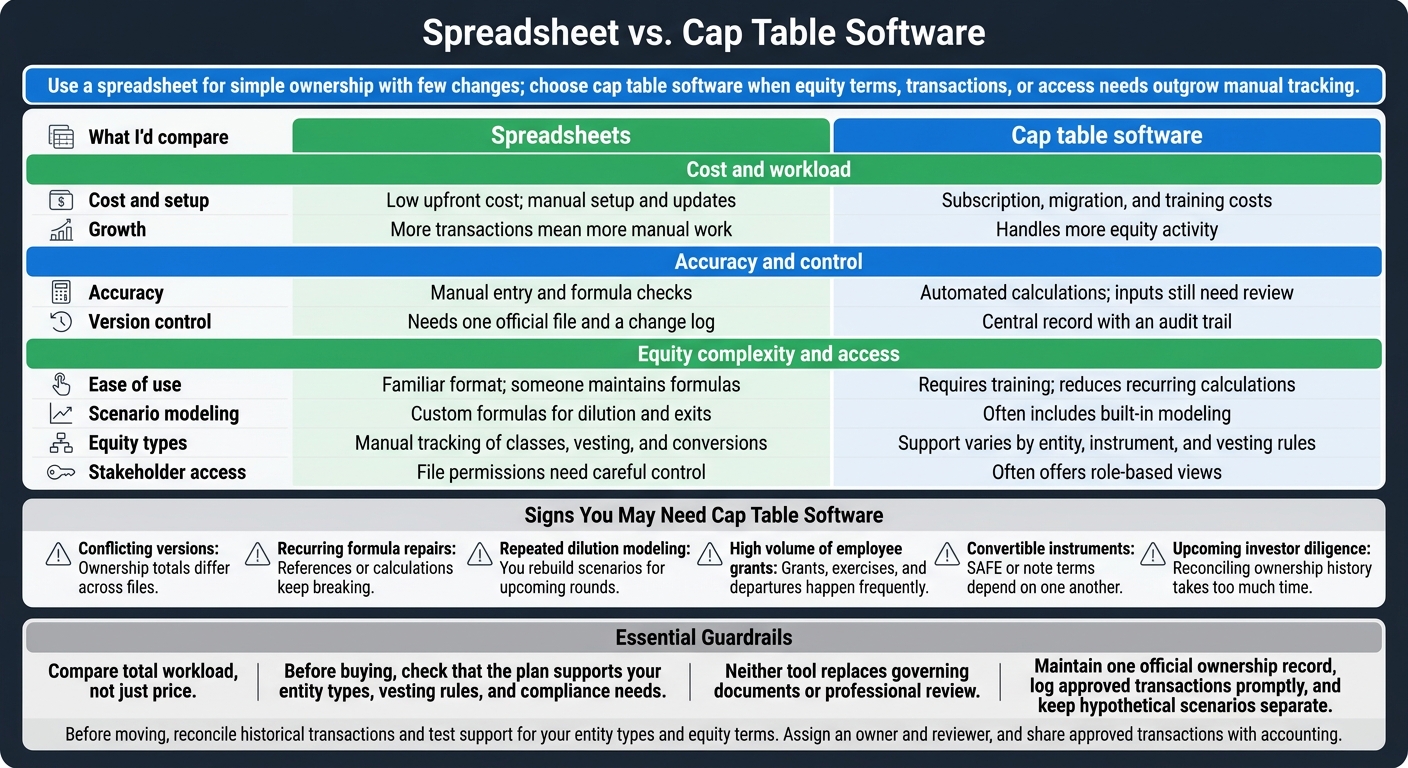
My rule: use a spreadsheet for simple ownership with few changes; choose cap table software when equity terms, transactions, or access needs outgrow manual tracking. Before choosing, I’d compare total cost - including setup, subscriptions, and time spent checking records - not just the price.
Both tools track ownership, grants, and conversions. But neither replaces signed agreements or legal and tax review. For example, 100 shares out of 1,000 outstanding shares equals 10% ownership; options or convertible instruments can change the fully diluted percentage.
Quick Comparison
| What I’d compare | Spreadsheets | Cap table software |
|---|---|---|
| Cost and setup | Low upfront cost; manual setup and updates | Subscription, migration, and training costs |
| Accuracy | Manual entry and formula checks | Automated calculations; inputs still need review |
| Growth | More transactions mean more manual work | Handles more equity activity |
| Ease of use | Familiar format; someone maintains formulas | Requires training; reduces recurring calculations |
| Version control | Needs one official file and a change log | Central record with an audit trail |
| Scenario modeling | Custom formulas for dilution and exits | Often includes built-in modeling |
| Equity types | Manual tracking of classes, vesting, and conversions | Support varies by entity, instrument, and vesting rules |
| Stakeholder access | File permissions need careful control | Often offers role-based views |
I’d consider switching when conflicting files, broken formulas, frequent grants, or investor diligence make updates hard to keep current. Before moving, I’d reconcile past transactions and test the software with your entity types and equity terms.
<u>The tool is only part of the process.</u> I’d assign an owner and a reviewer, keep hypothetical scenarios separate, and share approved equity transactions with accounting so ownership records and financial reports stay aligned.
Cap Table Software vs. Spreadsheets: Which Fits?
Fundraising 101: What’s a Cap Table? 📊
sbb-itb-17e8ec9
How Spreadsheets Track Ownership
A spreadsheet brings signed equity documents and issued securities together in one workbook. Formulas calculate each holder’s ownership percentage. Track outstanding ownership and fully diluted ownership separately, and label the assumptions behind each. This flexibility helps early on, but it also leaves room for manual errors.
You can customize columns and model dilution or exit scenarios. Someone still needs to update the inputs and check the formulas.
When a Spreadsheet Is Enough
Spreadsheets work best when ownership is simple and changes are rare. At that small scale, the manual workload is easier to handle. Even then, assign someone to keep the workbook updated.
Where Errors and Version Conflicts Arise
When multiple people edit the file, version control becomes a weak point. Duplicate files and updates made out of order can cause confusion. Accuracy slips when someone enters the wrong share count, overwrites a formula, shares a conflicting version, or leaves out a transaction.
Keep one authoritative workbook, record each change, and check the spreadsheet against the signed legal records. A correct total can still hide missing records.
As equity gets more complex, new investors, vesting schedules, and different share classes or rights add work beyond percentage calculations. Before using the spreadsheet for fundraising or exit planning, make sure it accounts for approvals and signed source documents.
How Cap Table Software Organizes Equity Records
Cap table software keeps one live record instead of multiple workbook copies, reducing version conflicts. Some tools use AI to pull key data from signed equity documents, including SAFEs, stock purchase agreements, and option grants. Links to source documents let reviewers trace each entry back to the signed agreement. This setup helps improve accuracy before the platform handles calculations and access.
Calculations, Access, and Reports
Software can track vesting and model financing scenarios. Check whether it supports time-based, milestone-based, or hybrid vesting, along with pro-rata rights modeling. Role-based portals let employees and investors view their holdings without seeing the full cap table.
Check support for each entity’s ownership structure. Not every tool supports LLC membership interests, multiple-entity structures, or international equity plans. Ask for a demo using your entity types and equity terms.
Setup Costs and Data Review
Budget for document collection, migration, training, and routine transaction entry. Before importing data, gather signed agreements and reconcile historical transactions. Confirm whether onboarding includes migration help and whether 409A valuations cost extra.
Automation does not replace legal or tax review. Put one person in charge of entering approved transactions, and review records after financings or major grants.
Comparing Accuracy, Scalability, Ease of Use, and Cost
As ownership activity increases, compare tools by the manual work they require. Compare total workload, not just price. Spreadsheets may cost little up front, but grants, conversions, and financings add reconciliation work.
| Criterion | Spreadsheets | Cap table software |
|---|---|---|
| Setup cost | Low up-front cost; manual setup | Subscription plus migration/configuration |
| Accuracy | Requires manual checks | Automates calculations; still depends on clean inputs |
| Scalability | More transactions require more manual updates | Designed for higher equity activity |
| Version control | File versions are easy to lose track of | Centralized audit trail |
| Scenario modeling | Custom formulas and separate scenarios | Often includes built-in what-if modeling |
| Complex equity types | Requires manual modeling | Built for more complex structures |
| Stakeholder access | File-sharing permissions need careful management | Role-based, read-only stakeholder access |
| Best fit | Simple ownership with infrequent changes | Frequent transactions or complex equity structures |
Before buying, check that the plan supports your entity types, vesting rules, and compliance needs.
Neither tool replaces governing documents or professional review. Even correct calculations can use the wrong terms.
If these tradeoffs are already affecting your workflow, software is usually the next step.
Signs You May Need Cap Table Software
Use this checklist to assess complexity:
- Conflicting versions: Ownership totals differ across files.
- Recurring formula repairs: References or calculations keep breaking.
- Repeated dilution modeling: You rebuild scenarios for upcoming rounds.
- High volume of employee grants: Grants, exercises, and departures happen frequently.
- Convertible instruments: SAFE or note terms depend on one another.
- Upcoming investor diligence: Reconciling ownership history takes too much time.
Assess each entity separately. Even an entity with few owners can be complex when convertible instruments are involved.
Conclusion: Match the Tool to Your Ownership Structure
Compare cost, accuracy, and the tool’s ability to grow with your needs. Use a spreadsheet for simple, stable ownership. Move to software when transaction volume, equity complexity, or access needs exceed what manual tracking can handle. Weigh the time saved against setup, subscription, and training costs - not just the monthly fee.
Keep Ownership Records Accurate
How you maintain records matters as much as the tool. Assign one person to update them and another to approve changes. Reconcile records before switching systems so you start with clean data, then review them after funding rounds or large grants.
Maintain one official ownership record, log approved transactions promptly, and keep hypothetical scenarios separate. Automation doesn’t replace checking the underlying agreements.
Connect Ownership Records With Financial Reporting
Keep ownership data aligned with accounting and tax workflows. Share approved transaction data with accounting so financial reports and the cap table reflect the same equity activity.
FAQs
How do I verify my cap table after migration?
Check every entry against signed legal documents, including stock purchase agreements, board consents or resolutions, and financing paperwork. Reconcile historical records to set a clean baseline. Then verify that vesting terms, grant details, deadlines, and 83(b) filings match the agreements.
Schedule periodic audits and reconcile equity records quarterly against signed documentation and your financial close process. This keeps ownership records accurate and ready for investor review. [2][3][4]
How should I model SAFE dilution?
Build a pro forma cap table to model SAFE conversion before a priced round closes. Don’t rely on static spreadsheets alone. Include SAFE principal, valuation caps, discount rates, accrued interest where applicable, new investor capital, and your target option pool refresh.
Model stacked SAFEs together to see how they dilute founder ownership. Track fully diluted ownership - including issued shares, options, warrants, and unconverted SAFEs - so your projections reflect the legal terms.
What security features should I look for?
When comparing cap table software, check its security controls: SOC 2 compliance, advanced encryption for data at rest and in transit, and secure authentication such as OAuth 2.0. Look for least-privilege, role-based access controls, with view-only access for most users and editing restricted to admins [2].
Also look for audit trails and version tracking. These let you trace every change during investor due diligence and compliance reviews [3][4].