If your API can move money, weak rate limits can turn a traffic spike into duplicate payments, stuck queues, and failed downstream calls.
I’d boil this guide down to four jobs: pick the right limit rules, enforce them in the right places, tell clients how to retry, and watch production data before changing thresholds. The article makes one point clear: rate limiting is not just about blocking traffic. It’s about keeping payment flows steady during predictable spikes like payroll runs, month-end closes, and tax season.
Here’s the short version:
- Define the policy first: decide who the limit applies to, what you count, and how long the window lasts.
- Match the algorithm to the endpoint: token bucket for short bursts, sliding window for strict rolling limits, leaky bucket for steady downstream flow, and fixed window only where boundary spikes are acceptable.
- Treat endpoint types differently: money-moving writes need tighter caps than reads and exports.
- Enforce limits in layers: broad limits at the gateway, route-level checks in services, and shared counters in Redis or a similar store.
- Make 429 responses usable: include
Retry-After, rate-limit headers, stable error codes, and arequest_id. - Use idempotency keys for payment writes: retries after a
429or timeout should return the first result, not create a second charge. - Publish clear client rules: define quotas, reset timing, and retry behavior in plain English.
- Track production signals: watch 429 rate, p95/p99 latency, 5xx errors, and per-client burst patterns.
- Test before changing limits: if one shard starts slowing down above 400 requests per minute, setting a live cap at 300 per minute leaves room for error.
A few numbers from the article show how this works in practice. Stripe uses a 100 requests/second live-mode global limit per account, while payout creation is capped at 15 requests/second. Plaid also splits limits by level, including 5 requests per Item per minute, 30 per Item per hour, and 1,200 requests per client per minute for some balance calls. That pattern matters: one global cap is usually not enough for financial APIs.
My main takeaway: I’d keep limits strict on payment creation, allow more room for reads, require idempotency on transaction writes, and never set production thresholds above what load tests have already shown the system can handle.
How API Rate Limiting Actually Works and How to Build Your Own
sbb-itb-17e8ec9
Step 1: Choose the Right Algorithm and Policy for Each Endpoint
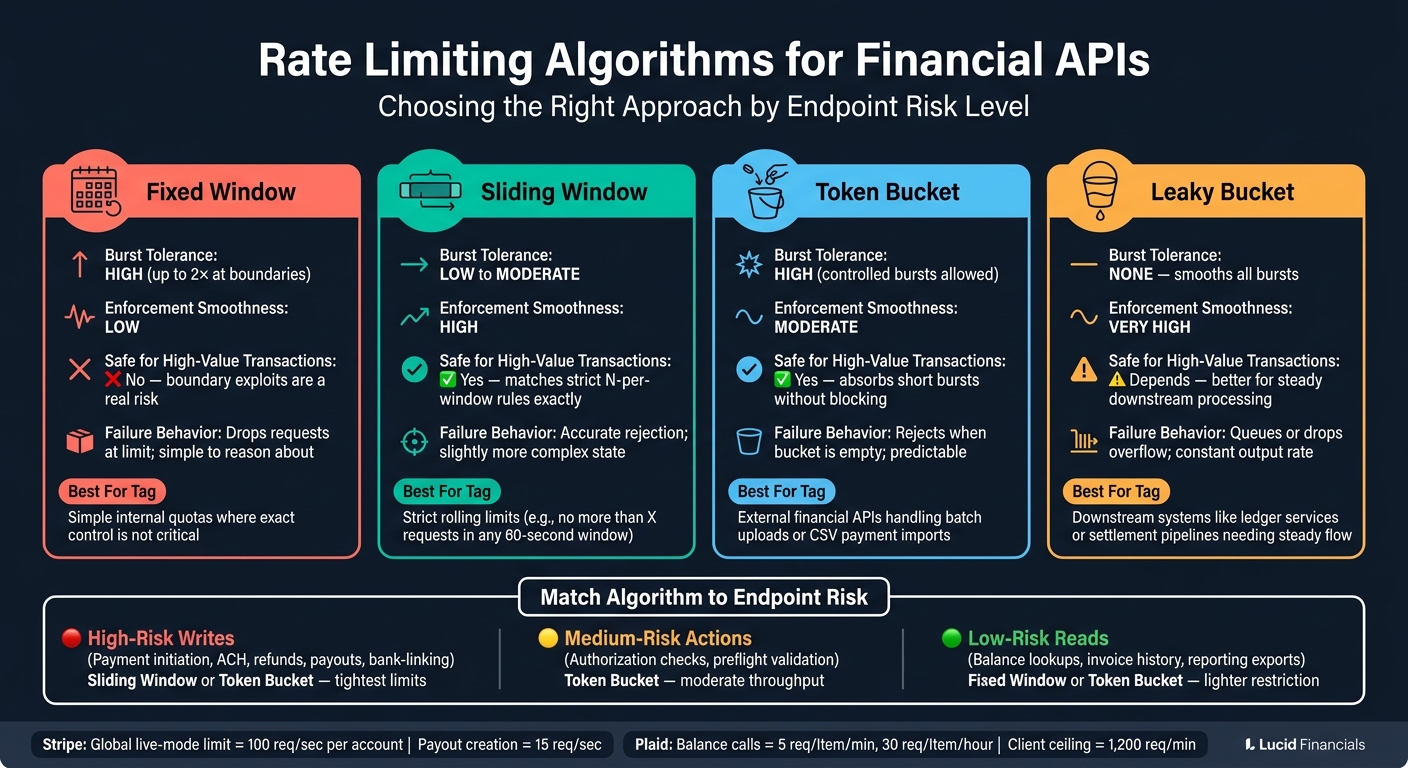
Rate Limiting Algorithms for Financial APIs: A Visual Comparison
Use the scope, unit, and window defined above to match each endpoint to a policy.
Fixed Window, Sliding Window, Token Bucket, and Leaky Bucket: When to Use Each
Fixed window counts requests inside a set time block, then resets. That sounds simple, but there's a catch: clients can send traffic right before the reset and right after it, which can effectively double the allowed rate at the boundary. For payment initiation and refund endpoints, that's a bad tradeoff. For simple internal quotas, though, it can still work when exact control doesn't matter much.
Sliding window tracks requests across a rolling time span. Use it when the rule is no more than X requests in any rolling 60-second window, because the enforcement lines up with the rule exactly.
Token bucket gives each client a bucket that fills at a steady rate, and each request uses one token. This is a common pick for external financial APIs. Why? Because it lets you handle short, valid bursts - like a user uploading a batch of payments after a CSV import - without shutting them down on the spot.
Leaky bucket queues and drains requests at a constant rate no matter how fast they arrive. This works well when a downstream system, such as a ledger service or settlement pipeline, needs a steady flow instead of sharp spikes.
| Algorithm | Burst Tolerance | Enforcement Smoothness | Good for High-Value Transactions | Failure Behavior |
|---|---|---|---|---|
| Fixed Window | High (2× at boundaries) | Low | No - boundary exploits are a real risk | Drops requests at the limit; simple to reason about |
| Sliding Window | Low to moderate | High | Yes - matches strict N-per-window rules | Accurate rejection; slightly more complex state |
| Token Bucket | High (controlled) | Moderate | Yes - absorbs short bursts without blocking | Rejects when the bucket is empty; predictable |
| Leaky Bucket | None - smooths all bursts | Very high | Depends - better for steady downstream processing | Queues or drops overflow; constant output rate |
Group Endpoints by Financial Risk and Cost
Apply tighter limits where a mistake can move money or change account state.
High-risk writes - payment initiation, ACH submission, refunds, payouts, and bank-linking - should get the tightest limits and the most cautious algorithms. One duplicate call here can lead to duplicate money movement or downstream clearing errors.
Medium-risk actions, such as authorization checks and preflight validation, don't move funds directly. So they can usually support moderate throughput.
Low-risk reads - balance lookups, invoice history, and reporting exports - can handle high call volume with lighter restriction.
Stripe's documented limits show this tiered setup in practice. Their live-mode global limit is 100 requests per second per account, and payout creation is capped at 15 requests per second. That sends a pretty clear message: high-risk write operations get a stricter policy of their own instead of sharing the global ceiling.
Set Limits That Match Business and System Capacity
Set limits from measured capacity, not guesswork.
If load testing shows payment latency climbing fast above 400 requests per minute per shard, then a production limit of 300 payment initiations per minute per account gives you breathing room. In the same way, if reporting infrastructure handles 8,000 calls per hour without strain, a 5,000-calls-per-hour limit per client leaves space for multiple active clients and background jobs.
AWS reliability guidance advises testing any limit you plan to set and not raising limits beyond what testing has validated.
Start low. Then move limits up only when production data shows there's room.
Once the policy is set, apply it the same way across the API stack.
Step 2: Implement Rate Limiting Across the API Stack
Once you set limits, you need to enforce them the same way across the whole stack. The safest setup is layered: put broad controls at the edge, apply tighter checks inside services, and use shared state so every node follows the same policy.
Apply Coarse Limits at the Gateway and Fine-Grained Limits in Services
Set per-API-key and per-IP caps at the gateway, and make anonymous traffic more restricted than authenticated traffic. In plain English: logged-in clients get higher caps, anonymous clients get lower ones. Let the gateway deal with broad abuse, and let services handle route-level risk.
The strictest limits should sit on high-risk write routes, while read-only routes can use lighter caps. For example, a payments service can place a tighter cap on POST /payments requests per client. Plaid’s production limits show the same multi-layer pattern: /accounts/balance/get is capped at 5 requests per Item per minute and 30 per Item per hour, while also applying a 1,200 requests per client per minute ceiling. Use separate counters for the resource and the tenant.
Store Counters Safely in Distributed Systems
In a distributed setup, local counters drift apart fast. That’s why you need a shared counter store such as Redis.
Use atomic increments and expiry checks so two nodes can’t both approve the same request right at the limit. Lua scripts are a common way to keep the read, increment, and expiry checks atomic on Redis. If you’re using a sliding window, a Redis sorted set fits well: each request adds a timestamped entry, old entries outside the window get pruned, and the count check happens in the same script.
For your highest-risk endpoints, like wire transfers or bulk payouts, don’t rely on rough enforcement. Send those rate-limit decisions through a centralized store and keep a small internal buffer below the public limit. That extra gap helps absorb minor issues from clock drift or network delay across nodes.
Design Responses Clients Can Act On
When a client hits a limit, return HTTP 429 Too Many Requests and include headers that tell them when they can try again. The most useful set includes X-RateLimit-Limit, X-RateLimit-Remaining, X-RateLimit-Reset, and Retry-After. Also return a stable error code, the window duration, and request_id so debugging doesn’t turn into guesswork.
For payment and ledger endpoints, add mandatory idempotency keys on top of this. If a client retries a POST /payments after a 429 or a short network failure, the server can use the Idempotency-Key header to spot the request as a duplicate and return the original response instead of creating a second transaction. That’s the guardrail that stops duplicate charges when clients retry after throttling or a flaky connection.
Store the idempotency key with the payment record in the same transaction. Reject payment submissions that don’t include a key, and reject reused keys tied to different parameters. That’s what makes retries safe in financial APIs.
These client rules set up the usage contracts in Step 3.
Step 3: Define Client Contracts, Retries, and Usage Rules
Once enforcement and 429 responses are live, the next job is simple: tell clients exactly how to behave. If retry rules are vague, people fill in the gaps on their own. That’s when avoidable errors start piling up.
Document Usage Plans and Endpoint Quotas Clearly
A rate-limit policy only works when clients can build against it with confidence. Each published limit should spell out five things: scope, quota, window, reset rule, and the 429 response and retry rule. Leave out even one, and integrators are left guessing.
Put the limits in plain English right next to the numbers. For example: Up to 300 payment creation requests per minute per account, resets at each minute boundary. That kind of wording removes guesswork fast.
A small table in your API docs helps a lot. Use columns for endpoint, limit, reset window, and the entity the rule applies to. It also helps to keep the wording in your docs aligned with the wording in your 429 response headers.
Choose Between Hard Rejection, Queuing, and Soft Throttling
Pick the lightest control that still protects money movement and response times.
| Policy | User experience | Settlement timing | Best for |
|---|---|---|---|
| Hard rejection | Immediate failure with a clear error | No delay; request is not processed | Real-time card authorization, instant payment submission |
| Queuing | Request is accepted, processed later | Delayed but eventually completed | Nightly ledger posting, bulk reconciliation |
| Soft throttling | Request succeeds more slowly or at reduced pace | Minor delay within the same workflow | Invoice sync jobs, statement imports |
Use Backoff and Jitter Without Risking Duplicate Money Movement
Once limits are public, clients need retry rules that fit the risk level of each endpoint.
For read-only endpoints like balance lookups or transaction searches, retries are usually low risk. Use exponential backoff with jitter: start at about 500–1,000 ms, double the delay after each failed attempt, add randomness so clients don’t all retry at once, and cap the delay at 30–60 seconds. If the server sends a Retry-After header, follow that value. It should be treated as the main wait time instead of calculating a new one.
For transaction-creating endpoints, be much more careful. Retry in sequence, use backoff, and only retry after transient failures. Keep retries to 1–3 attempts, and use idempotency keys so the server returns the original result instead of creating a second transaction.
Step 4: Monitor, Test, and Adjust Limits as Volume Grows
Once clients follow your 429 and retry rules, production traffic tells you if your limits are too strict or too loose. That’s when the job shifts from setup to observation. You put limits in place, then watch how they behave as traffic changes.
Track the Metrics That Reveal Stress and Abuse
The signals that matter most are 429 volume, p95/p99 latency, 5xx error rates, per-client request rates, and bursts on high-risk endpoints like ACH initiation or payment posting. Set alerts when your 429 error rate goes above 1% of total requests, or when remaining rate-limit capacity falls below 20%.
This is the stuff that helps your team act, not just stare at dashboards:
| Metric | What It Reveals | Risk Signal |
|---|---|---|
| 429 rate on money-movement endpoints | Clients hitting write limits | Potential fraud, bot activity, or misconfigured retries |
| 429 rate on reporting/export endpoints | Heavy read demand | Likely legitimate month-end batch jobs |
| p95/p99 latency spike | Tail slowdown or saturation | SLA breach risk or rate limiter becoming a bottleneck |
| Per-client burst rate | Concentrated demand from one tenant | Noisy neighbor or misconfigured integration |
| 5xx error rate rising with low 429s | Capacity saturation without throttling | Limits may be too lenient; infrastructure under stress |
| Fraud alerts per 1,000 transactions | Abnormal transaction patterns | Correlate with 429 spikes to detect scripted attacks |
If p99 latency starts climbing, that’s a warning sign. The limiter may be slowing the system down instead of protecting it.
Once production shows where the pressure points are, test those same burst patterns before you lift any thresholds.
Load-Test Before Setting Production Thresholds
Don’t guess at production limits. Test them.
Run load tests that combine steady reads, bursty writes, and long-running exports. That mix is much closer to what happens in production than testing each endpoint by itself. Real traffic is messy. Your test plan should be too.
For financial APIs, a few scenarios are worth modeling on purpose:
- A month-end reporting cycle may drive about 50,000 API calls per hour to export endpoints as customers reconcile accounts.
- A biweekly payroll run can create tens of thousands of ACH initiation calls between 9:00 AM and 1:00 PM local time.
- Tax season can bring sustained read and write spikes near the April filing deadline.
If your limits hold under those conditions with acceptable p99 latency and very few 429s, you have a solid starting point.
Conclusion: Build Limits That Protect Money Movement Without Blocking Growth
Use production data and load-test results to recalibrate limits before the next spike in volume. Good rate limits absorb expected surges - payroll runs, month-end closes, and tax season - without blocking legitimate traffic or putting financial integrity at risk.
For Lucid Financials, rate-aware integrations help keep bookkeeping, payroll, and investor reporting stable as transaction volume grows.
FAQs
How do I choose limits for each endpoint?
Start by looking at historical usage data so you can set a baseline for normal customer behavior. That gives you a grounded starting point instead of guessing.
Use a tiered setup for rate limits. For example, you might set a standard cap of 100 requests per minute for regular users, then apply tighter limits to sensitive endpoints like transaction processing or authentication.
It also helps to start on the conservative side. Then adjust in small steps based on false positives. If too many normal users get blocked, loosen the limit a bit. If risky traffic slips through, tighten it.
Write down your approach and review usage patterns on a regular basis. That makes it easier to spot anomalies, explain why limits were set a certain way, and keep security in balance with a smooth user experience.
Why are idempotency keys critical after a 429?
After a 429 Too Many Requests response, idempotency keys let your application retry safely without creating duplicate transactions or duplicate data.
Here’s why they matter: when you get a rate-limit response, it may be unclear whether the first request made it to the server before the limit kicked in. The idempotency key gives the server a way to spot the retry as the same request, so it doesn’t process the same action twice. That helps prevent duplicate charges, duplicate records, and messy financial reporting.
Which rate-limiting algorithm fits payment APIs best?
There isn’t a single best algorithm for financial APIs. The best setup is usually a layered one: variable, risk-based limits plus hard rules.
Put rate limiting at the API gateway so enforcement stays consistent across endpoints. Then tighten limits for sensitive actions like authentication and transaction processing. Fixed thresholds help stop basic resource exhaustion, while AI-driven anomaly detection can spot patterns that slip just under normal limits.