I’d choose a funding simulation tool by testing two things first: when cash runs out and how financing changes ownership. Compare $2 million now with $3 million six months later, then check the cash gap and dilution - not just the funding total.
Here’s how I’d sort these five tools for evaluation:
- Quantari: Short-term cash planning, with documented 30-, 60-, and 90-day projections.
- Runway: Hiring and spending scenarios that affect runway and funding timing.
- Causal: Linked formulas for testing revenue, costs, and cash assumptions.
- Carta: Financing scenarios focused on ownership and dilution.
- Model Reef: Side-by-side funding and cash-flow scenarios, with AI functions still to verify.
Quick Comparison
| Tool | Main use to evaluate | What I’d check |
|---|---|---|
| Quantari | Cash forecasts | Forecast limits and accounting connections |
| Runway | Hiring and expense planning | Scenario access and data updates |
| Causal | Formula-based scenarios | Formula accuracy and linked outputs |
| Carta | Equity modeling | Financing terms and cap-table accuracy |
| Model Reef | Funding comparisons | Cash-to-ownership links and AI functions |
These are starting points, not verified feature guarantees. I’d compare AI functions, integrations, setup needs, current U.S. pricing, and startup-stage fit before paying. Then I’d use <u>reconciled financial data and finance review</u> to check one scenario before building more.
AI Powered Scenario Analysis | Course Module
sbb-itb-17e8ec9
Funding Simulation Tools at a Glance
This table separates verified features from unsupported claims. The supplied sources do not verify tool-specific features or pricing for any of these five tools.
| Tool | Verified funding details* | Verified AI functions | Verified integrations | Pricing and terms | Startup-stage fit |
|---|---|---|---|---|---|
| Quantari | Unverified | Unverified | Unverified | Pricing and terms unverified | Stage fit unverified |
| Runway | Unverified | Unverified | Unverified | Pricing and terms unverified | Stage fit unverified |
| Causal | Unverified | Unverified | Unverified | Pricing and terms unverified | Stage fit unverified |
| Carta | Unverified | Unverified | Unverified | Pricing and terms unverified | Stage fit unverified |
| Model Reef | Unverified | Unverified | Unverified | Pricing and terms unverified | Stage fit unverified |
Funding details cover cash needs, runway, fundraising timing, valuation, dilution, and investor payouts. “Unverified” means the supplied sources do not verify the information.
Before adding a tool to your shortlist, ask for a demo that shows these funding outputs. Request a written quote in U.S. dollars that spells out billing terms, minimum commitments, and setup fees.
The tool-by-tool sections below explain each platform’s role in funding simulation, which claims have support, and what still needs verification. Use those reviews to assess the funding decisions you need to test.
What Funding Simulations Should Show
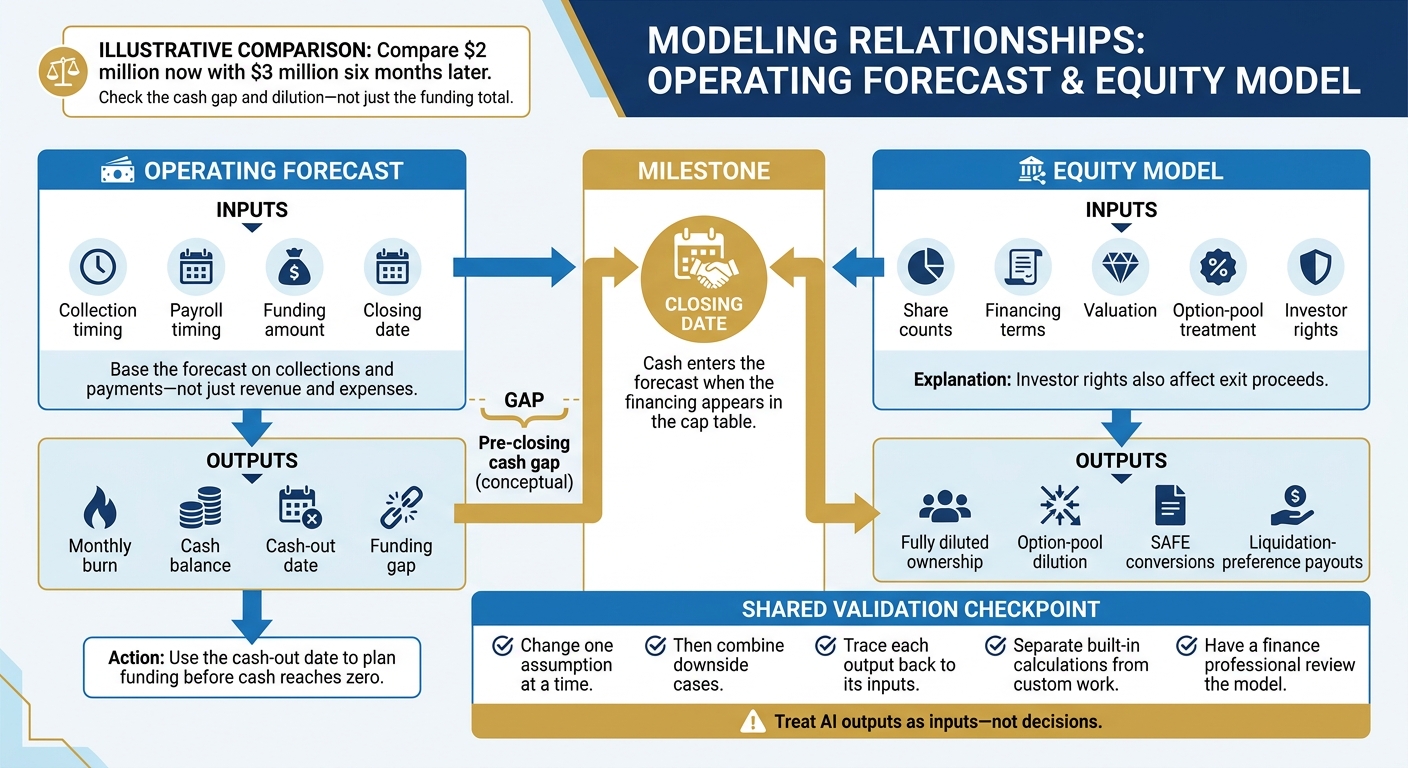
How Funding Timing Connects Cash Runway and Dilution
Cash Needs, Ownership, and Exit Proceeds
An operating forecast shows when cash runs out and how much funding the business needs. An equity model shows how that funding dilutes ownership. Base the forecast on collections and payments - not just revenue and expenses.
The closing date connects the forecast to the cap table: cash enters the forecast when the financing appears in the cap table. Investor rights also affect exit proceeds. Before relying on any tool below, check that its funding simulation provides these minimum outputs.
Example: Funding Amount, Timing, and Valuation
Start with a simple scenario: change one assumption at a time. Then combine downside cases to see how cash shortfalls and ownership change together.
Compare how each tool shows the effect on both runway and dilution. Track the cash gap and the date funding is next needed, not just ending cash. Once you’ve built the scenario, check every output against its underlying assumptions.
Outputs to Check
Check monthly burn, cash balance, cash-out date, funding gap, fully diluted ownership, option-pool dilution, SAFE conversions, and liquidation-preference payouts.
Trace each output back to its inputs, including collection timing, payroll timing, closing date, share counts, and financing terms. Use the cash-out date to plan funding before cash reaches zero.
Separate built-in calculations from custom work. A tool that forecasts cash may not handle SAFE conversions or other custom financing logic. Those calculations may need custom formulas, a spreadsheet, or a separate workflow.
Have a finance professional review the model. Treat AI outputs as inputs - not decisions.
1. Quantari
Quantari is an AI CFO tool built for cash planning. Its strength is operating cash forecasts - not dilution or investor-rights modeling. It can help founders plan the cash side of fundraising, but ownership math needs a separate tool.
Financing Terms
Quantari does not document direct cap-table or investor-preference modeling. Calculate equity, SAFE, and convertible-note terms separately, keeping cash timing apart from cap-table math.
To compare immediate funding with delayed funding, track how each assumption changes cash balance, runway, and burn.
Operating Forecasts
Quantari documents 30-, 60-, and 90-day cash-flow projections. Once funding timing is clear, use those forecasts to test how hiring, pricing, and spending changes affect cash and runway.
AI and Integrations
Quantari’s conversational interface lets users ask questions in plain English and receive guidance. Public listings show connections to QuickBooks Online and bank data. Before using that data for forecasts, check that it’s complete and correctly categorized.
| Area | What to check |
|---|---|
| Onboarding | Connect supported accounting and financial accounts, then check categorization and historical data completeness before forecasting. |
| Reporting | Check 30-, 60-, and 90-day projections, cash balance, runway, and accounts receivable/accounts payable (AR/AP) visibility. |
Pricing and Stage Fit
Pricing differs across sources, so verify current rates before subscribing. Quantari suits founders who need short-term cash visibility; venture financing terms still need separate modeling.
2. Runway
Runway is a financial planning platform that tracks burn, hiring, and expenses. It helps you test how operating changes affect funding timing, rather than calculate cap-table math.
Setup
Compare hiring and expense assumptions across base and delayed-closing scenarios. This helps you see whether you need to secure funding earlier or seek a larger round.
Cost
The supplied sources don’t establish Runway’s pricing or access to scenarios. Confirm both during your evaluation.
Reports
Check how hiring changes, spending changes, and funding delays affect the zero-cash date. Use those outputs to determine whether the issue is operating spend, funding timing, or round size.
Integration Depth
If the outputs look right, check the data connectors behind them. Confirm which integrations are available and how often the data updates during a demo.
3. Causal
Use Causal when your funding model relies on linked formulas and you need to test what-if changes fast.
Setup
Causal turns plain-English assumptions into linked formulas for scenario models. In a live demo, check that revenue, hiring, expenses, and cash flow stay connected as assumptions change.
Cost
Pricing is unverified in the source material. Request a current quote and confirm which features come with each tier.
Reports
During the demo, test whether changing one assumption updates the full funding model.
| Area | What to verify |
|---|---|
| Model flexibility | Revenue, hiring, expenses, and cash flow stay linked across funding scenarios. |
| Usability | Founders can trace and edit AI-generated formulas that affect cash needs. |
| Collaboration | Teams can share models and control edits. |
| Investor outputs | Outputs include assumptions, funding needs, cash balances, dilution, and exit payouts - and update when inputs change. |
Integration Depth
Check which inputs sync automatically and which need imports. Then test whether updates flow through every linked scenario without manual edits.
4. Carta
Use Carta for equity-specific funding questions: how a round changes ownership, dilution, and investor holdings.
Setup
Carta models a financing round’s effect on share price, dilution, and ownership. Check which equity records the model requires and whether document processing can pull data from your legal documents.
Cost
The provided material doesn’t include pricing. Request a quote for scenario modeling, Carta Answers, and document-processing features.
Reports
Carta lets you compare ownership, valuation, share price, dilution, and investor holdings before and after a financing round.
| Area | What to verify |
|---|---|
| Equity records | Check that share counts, ownership percentages, and investor holdings match your cap table and supporting documents. |
| Financing administration | Confirm that the workflow supports your round structure. |
| Operating cash forecasts | Use Carta for equity math; model cash needs and runway in a separate operating forecast. |
Integration Depth
If your team keeps cap-table data in documents, check how extracted data moves into the model. Carta Answers lets users ask cap-table questions in natural language, while document processing can extract data from legal documents. Confirm current availability and access during a demo.
5. Model Reef
Model Reef puts funding amount, timing, valuation, and ownership in one view. It’s positioned for side-by-side funding comparisons, with options to change the funding amount, closing date, and pre- or post-money valuation. AI depth is unverified.
Setup
Bring historical financials to the demo and test whether the forecast updates correctly when you change assumptions.
Cost
Request a written quote that covers implementation, accounting connections, scenario limits, and support.
Reports
Ask for a side-by-side comparison, such as $2 million now versus $3 million six months later, and check how valuation changes affect ownership.
| Area | What to verify |
|---|---|
| Pricing | Pricing is unverified; confirm current U.S. fees and contract terms. |
| Setup | Confirm required inputs, implementation time, and who maps the data. |
Integration Depth
Ask the vendor to trace an updated account balance from QuickBooks or Xero into the forecast, then into each scenario.
Prepare Your Financial Inputs
Before running a funding scenario, start with reconciled books and clean, standardized data. Use consistent dates, account categories, and reporting periods so you can compare cash burn, runway, and dilution across scenarios.
Document your assumptions for revenue growth, CAC, churn, headcount costs, and runway. Test base, upside, and downside cases using the same baseline data. Link revenue and spending: a higher-growth case should include the hiring and customer acquisition costs needed to support that growth.
Include financing terms, option-pool treatment, and investor rights in your model inputs. Have finance and legal advisers review those inputs - and how they affect the results - before using them in negotiations or securities issuance materials.
If your team needs cleaner source data first, Lucid Financials can prepare the accounting, tax, and investor-ready CFO reporting inputs that feed funding models for Seed- to Series C-stage startups.
Conclusion: Choose a Tool for Your Funding Question
Choose based on the funding decision you need to make - not the AI label. Focus on cash needs, dilution, and exit proceeds.
The table below pairs each tool with the funding question it may help answer and the capabilities you’ll need to check.
| Funding question | Tool to evaluate | Capabilities to verify | Supporting workflow |
|---|---|---|---|
| When should we seek funding? | Quantari | Cash forecasting | Finance review |
| How would hiring change our runway? | Runway | Headcount and expense planning | Approved hiring plans and staffing assumptions |
| How would slower growth change our funding needs? | Causal | Driver-based modeling | Consistent revenue and spending assumptions |
| How much would the round dilute ownership, and how would proceeds be allocated? | Carta | Dilution and cap-table analysis | Verified cap table and review of financing terms |
| How do different operating plans affect cash needs? | Model Reef | Cash-flow scenarios | Regular forecast-to-actual reviews |
Treat these matches as a shortlist. Check each product’s current availability and documented capabilities.
After choosing a tool, validate one scenario before expanding the model. Confirm pricing, onboarding requirements, data connections, and the features included in your plan. Use clean inputs and human review to check the results before making funding decisions.
FAQs
How far ahead should I model my funding needs?
Model your funding needs over 18 to 36 months. This gives you a long-term plan while keeping enough detail to track short-term cash flow.
Keep three scenarios: a base case for your standard growth plan, a downside case to identify survival triggers, and an upside case for aggressive scaling. Planning for all three helps you prepare for fundraising delays. Many startups misjudge their liquidity and face longer funding timelines than expected.
How can I validate AI-generated funding forecasts?
Start with clean, centralized, standardized data. Before modeling, reconcile accounting, payroll, and banking records to remove duplicates and resolve inconsistencies. Keep formats consistent: MM/DD/YYYY for dates and $1,000.00 for currency.
Review flagged transactions regularly and update business rules to maintain accuracy. Have experts compare AI forecasts with actual financial performance so projections stay grounded in accurate, verifiable data.
How much cash buffer should I plan for funding delays?
Use AI-driven scenario modeling to stress-test your cash position under a downside (P10) scenario. Pinpoint when cash would run out and how much extra capital - say, $500,000 - you’d need if milestones shift.
Investors often expect startups to start their next funding round after spending just 50% of their current capital. Use the downside model to set your fundraising timeline, not just plan for a cash shortfall.