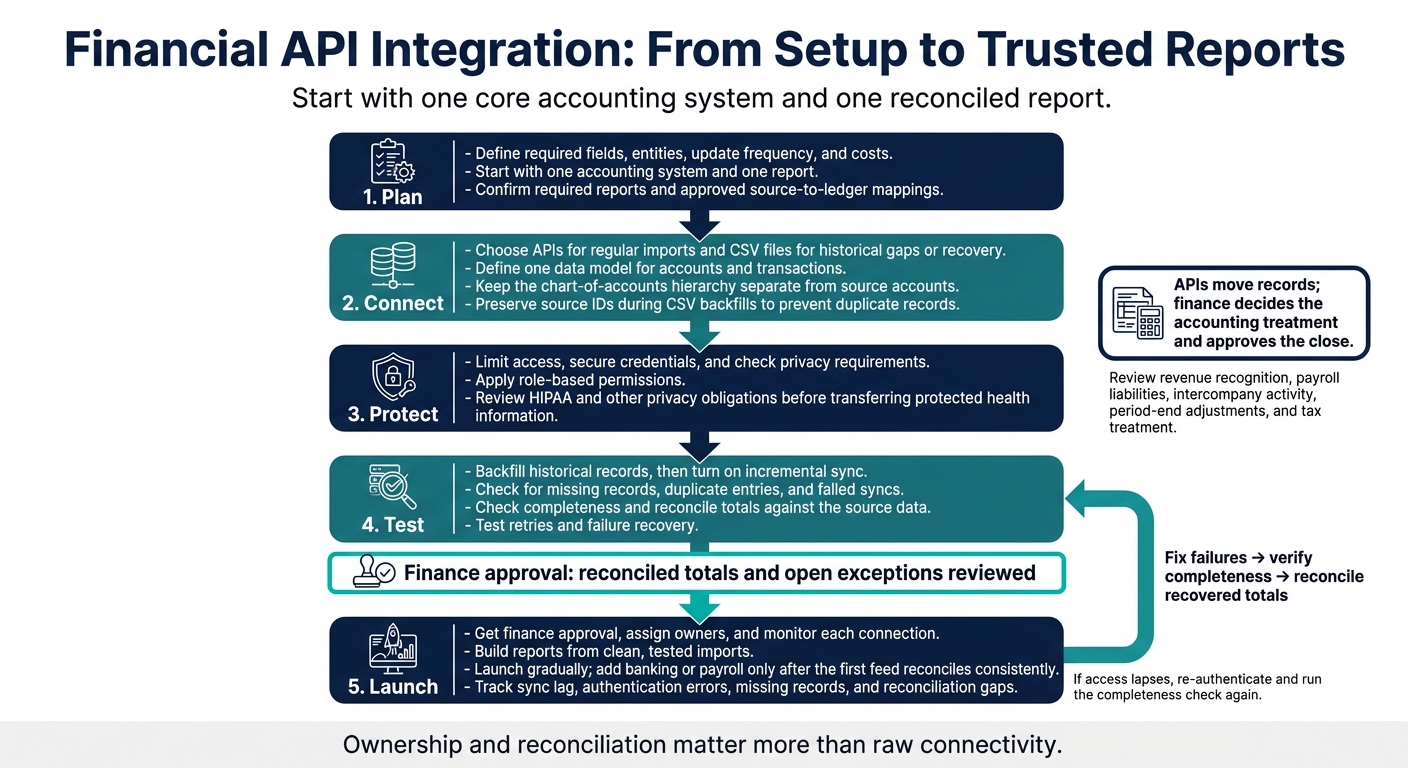
I start financial API integration with one accounting system and one report - not every connection at once. Before I use imported data, I check that records reach the right accounts and totals match the source.
My checklist covers the full path from setup to reporting:
- Plan: Define required fields, entities, update frequency, and costs.
- Connect: Choose APIs for regular imports and CSV files for historical gaps or recovery.
- Protect: Limit access, secure credentials, and check privacy requirements.
- Test: Check for missing records, duplicate entries, and failed syncs.
- Launch: Get finance approval, assign owners, and monitor each connection.
The goal is numbers you can use, not just data that arrives. I keep <u>accounting review and reconciliation</u> in place as banking, payments, payroll, and other sources are added.
Financial API Integration: From Setup to Trusted Reports
Retrieve Free Financial Data Using Python with Alpha Vantage API
sbb-itb-17e8ec9
2. Choose Data Sources and Integration Architecture
With requirements defined, compare data sources by coverage, reliability, and sync model. Match your sources and sync methods to the fields, entities, and update frequency your reports need.
Assess API Coverage, Reliability, and Cost
Check record- and field-level coverage for the general ledger, bank transactions, payroll data, and any CRM or e-commerce records your reports use. Review public status pages and historical change logs to check uptime and how often breaking changes occur. Confirm that CSV backfills can fill gaps in historical data.
Budget for development, monitoring, backfills, and maintenance. Check that the model can scale across entities, departments, users, and locations while keeping the level of detail needed for planning.
Choose an Access Model and Sync Method
Choose an access pattern that retains every required field. Use direct API access for live imports and CSVs to fill historical gaps. Assign connection owners and use role-based access for multi-entity setups.
Standardize Data Across Sources and Entities
Define one data model for accounts and transactions. Apply the same normalization rules across sources so entity, location, department, and account reporting stays consistent.
Keep the chart-of-accounts hierarchy separate from source accounts, and label reporting categories with tags. Preserve source IDs during CSV backfills to prevent duplicate records, and reconcile cross-source activity before reporting.
Once the data model and architecture are set, secure credentials, webhook access, and connection permissions before testing or connecting live financial systems.
3. Secure Financial Data and Access
Set Up Authorization and Protect Credentials
Before connecting production systems, use Company Settings to apply consistent security rules. Store API credentials securely and limit who can access them.
Verify Webhooks and Limit Data Access
Manage users, roles, and permissions through User Access so only users with permission can view or change sensitive financial data. Use Organization Settings for platform-wide controls, and check the Company Menu for active integration status and settings.
Check Privacy and Compliance Requirements
Review HIPAA and other privacy obligations before transferring protected health information.
Once access controls and compliance checks are in place, move to backfilling, testing, and monitoring the connection.
4. Build, Test, and Maintain API Connections
Once access is secured, test the connection before using it for reporting.
Backfill Records and Set Up Incremental Sync
Start by backfilling historical records from CSV or Excel so past reports and opening balances match the source system. Then turn on incremental sync to keep bank, payroll, and accounting data current.
Test Data Accuracy and Failure Recovery
A successful API response doesn't mean all your data arrived. Check completeness and reconcile totals against the source data before using imports in dashboards, forecasts, or board reports.
If access lapses, re-authenticate and run the completeness check again.
Monitor Sync Health and Fix Failures
Track sync lag, authentication errors, missing records, and reconciliation gaps to keep reporting accurate. Check the Lucid Status page for outages and the Change Log for breaking updates.
Use these common failure patterns to narrow down the problem.
| Symptom | Cause | Check | Fix |
|---|---|---|---|
| Stale balances or sync lag | Delayed synchronization | Compare the last successful sync with source activity; check Lucid Status and the Change Log. | After syncing resumes, reconcile affected accounts. |
| Missing transactions | Incomplete backfill | Compare source records with imported data. | Fill gaps with the import tool, then reconcile totals. |
| Authorization failures | Lapsed access | Review connection status in Settings > Integrations. | Re-authenticate and verify access. |
5. Prepare Financial Reports and Launch
Once sync and reconciliation are stable, use the imported data to build reports and prepare for rollout.
Build Reconciled Financial Reports
Build reports on cash management, payroll obligations, and budget versus actuals from clean, tested imports. If you manage multiple entities, apply consolidation eliminations to prevent double-counting. Use that same reconciled data to report operating metrics, including cash flow, burn rate, and runway.
Keep daily alerts separate from final close reports. Clearly label actuals, estimates, and forecasts. Save audit snapshots of approved reports and period-end adjustments, and assign someone to review unresolved exceptions before report sign-off.
Add Accounting Review for Complex Reporting
API output still needs finance review for revenue recognition, payroll liabilities, intercompany activity, period-end adjustments, and tax treatment. APIs move records; finance decides the accounting treatment and approves the close.
Check Launch Readiness and Assign Owners
Follow the rollout sequence: plan, prototype one source, build, validate, launch gradually, and operate. Complete this checklist before launch, not after.
- [ ] Reports and mappings: Confirm required reports, entity coverage, and approved source-to-ledger mappings.
- [ ] Production readiness: Check that access controls and sync monitoring are ready, retries have been tested, and the update cadence meets reporting needs.
- [ ] Validation and approval: Check imports against API sync totals. Get finance approval on reconciled totals and open exceptions.
- [ ] Operations: Name technical and finance owners, and define who will review exceptions.
6. Conclusion: Start Small and Verify the Numbers
After launch, keep the scope narrow until the first connection is stable. Start with one core accounting system and one reconciled report. Add banking or payroll only after the first feed reconciles consistently.
Use API access if it provides the fields you need and you can handle the upkeep. Keep CSV as a recovery option, not the default, and use it for unsupported sources and backfills. Choose a sync method based on your reporting schedule and your ability to restore missing records - not just whether real-time data is available.
Limit permissions and map incoming records to one account hierarchy. Assign owners to reconnect failed connections and check recovered totals. Require an accounting review whenever new entities or rollups change the totals to keep reports accurate. Ownership and reconciliation matter more than raw connectivity.
FAQs
How much should my startup budget for financial API integration?
Your budget depends on whether you build an integration yourself or use an existing platform. Building and maintaining a single direct API integration can cost more than $10,000, with development taking about four weeks.
Lucid Financials combines data connectivity, bookkeeping, and reporting starting at $150 per month. This option avoids high upfront development costs and resource demands while supporting secure, scalable data flows [3].
How do I choose the right sync frequency?
Match how often your external data updates to your business needs, such as revenue recognition or cash flow forecasting. Start by mapping your data sources and checking each source’s update schedule.
For time-sensitive tasks that need current data, use webhooks and event-driven integrations to sync in real time. This removes manual data entry and reduces errors [3]. For less urgent tasks, such as daily monitoring, a scheduled sync may be enough [4].
How should I handle corrected or deleted source transactions?
Build your governance framework around auditability: log every data transformation and preserve original records. This lets you trace errors and keep reporting reliable.
Set up automated validation rules at data entry, and use AI or machine learning tools to spot and resolve inconsistencies. Regularly audit records across integrated systems to keep financial data accurate, consistent, and audit-ready [3].