I use bank sync to track cash - not to assume it’s safe to spend. My first checks are the feed’s last update, available funds, and upcoming bills, payroll, and taxes.
Here’s how I turn imported bank activity into a cash plan:
- Connect and protect accounts: Include all business accounts, assign each to its legal owner, and limit access.
- Review the records: Match payments and deposits, fix missing or duplicate entries, and reconcile statements monthly.
- Plan ahead: Build a 13-week forecast using expected collection dates and scheduled payments. Keep restricted funds separate.
- Set checks and alerts: Review cash and feed failures daily, forecast changes weekly, and reconciliations monthly. Give each issue an owner.
My rule: <u>current balances are not the same as checked books</u>. Even with professional support, I verify review duties and flag sync gaps before using a report to approve spending.
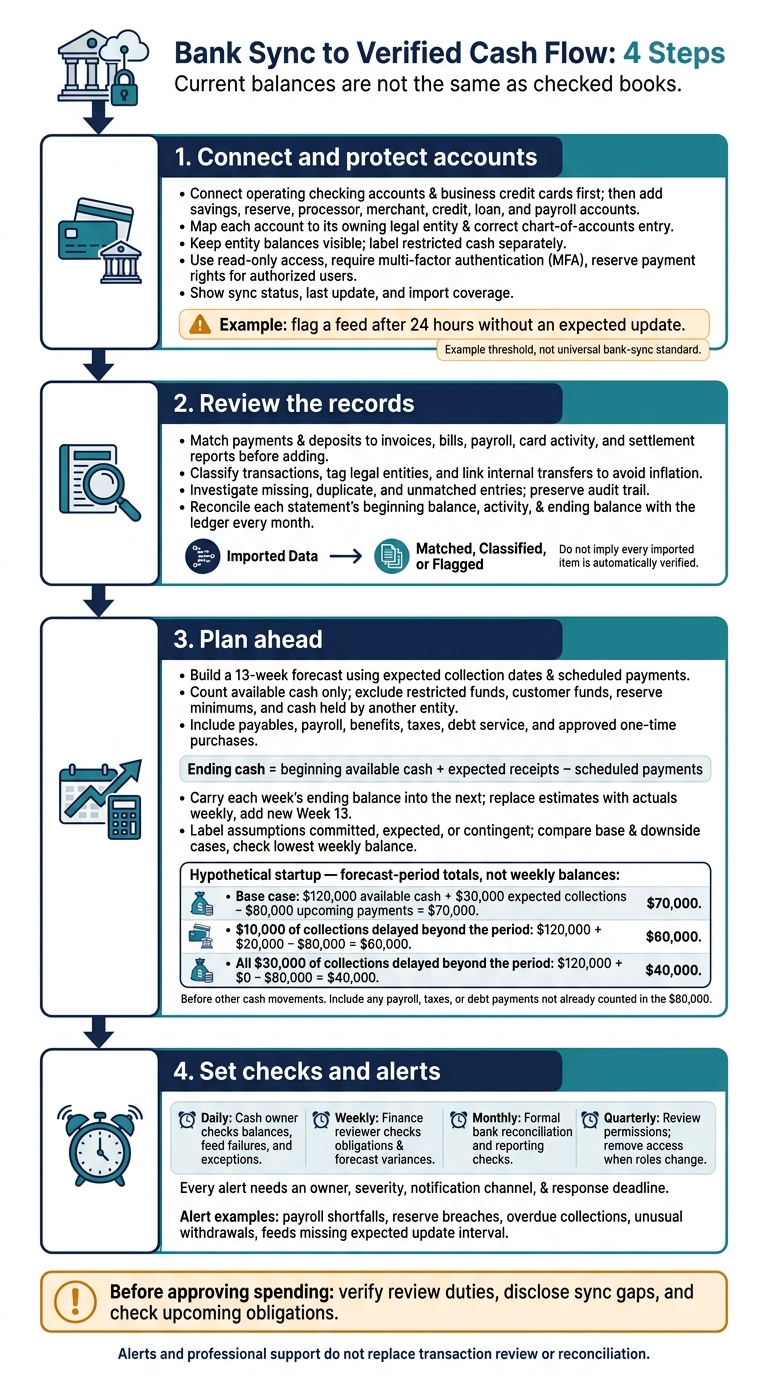
Bank Sync to Verified Cash Flow: 4 Steps
Connect Your Business Accounts
Connect operating checking accounts and business credit cards first. Then add savings, reserve, processor, merchant, credit, loan, and payroll accounts. Missing accounts can skew your runway estimate by hiding debt payments, settlement delays, and transfers.
Check your account list against bank statements, debt schedules, and processor reports so you don’t miss any material cash, credit, or debt balances. Once connected, map each account to the correct legal entity.
Map Accounts to Legal Entities
Before connecting an account, record its institution, last four digits, currency, legal owner, purpose, and account owner. Confirm how far back the sync will pull transactions; the lookback window varies by institution. Get statements or an official export for any missing period, and don’t import overlapping transactions twice.
Map each account to its owning legal entity and the correct chart-of-accounts entry. Add location tags where needed. This keeps consolidated cash reports accurate across entities.
Check imported account details against the bank’s records. Keep each entity’s balance visible in consolidated reports, and label restricted cash separately. Before another entity can use cash held by a subsidiary, it may need approval, documentation, and intercompany entries.
Check Security and Last Update Times
Once accounts are mapped, limit access and check that feeds are syncing. Use read-only access where available, and reserve payment and transfer rights for authorized users. Require multi-factor authentication, and review encryption, token storage, approved users, and retention rules.
Document how to revoke access at both the bank and accounting platform. Review permissions quarterly, and remove access immediately when roles change.
Show sync status and import coverage in the cash dashboard. Set a threshold for reviewing delayed feeds, and escalate payroll or debt-service feed failures immediately.
For example, flag a feed after 24 hours without an expected update.
Track posted and available cash separately in the dashboard. Use pending activity to plan payment timing, not to create book entries.
sbb-itb-17e8ec9
Classify and Reconcile Bank Transactions
Once accounts are connected, clean the transaction data before using it in cash reports. Bank sync imports data - it doesn't replace transaction review.
Set Transaction Categories and Entity Tags
Record each transaction’s date, amount, account, bank description, vendor or payer, category, legal entity, location when relevant, supporting-document link, and review status. Use rules for recurring payments, but check exceptions.
Separate operating, investing, and financing activity. Link internal transfers to keep entity-level records intact without overstating consolidated inflows and outflows. Consistent fields make each transaction easier to trace, classify, and review.
| Data element | Bank feed | Reviewed record |
|---|---|---|
| Description | Bank text | Vendor or payer and category |
| Ownership | Account identifier | Legal entity |
| Transfer treatment | Separate debit and credit | Linked; excluded from consolidated cash flows |
| Review status | Imported | Matched, classified, or flagged |
Match Deposits and Payments to Records
Before adding new records, match bank entries to invoices, bills, payroll, card activity, and settlement reports. For processor deposits, use settlement records to confirm timing and separate gross customer receipts, fees, refunds, and reserves from the net cash deposited. Match credit-card payments to existing card records - not standalone expenses.
Reconcile each statement’s beginning balance, activity, and ending balance with the ledger every month. Record bank fees and charges, and document outstanding payments or deposits rather than forcing matches.
Cash movement doesn't always mean new revenue or expense. Invoice collections settle receivables, while loan payments may include both principal and interest.
Fix Missing, Duplicate, and Unmatched Entries
Check unusual, duplicate, or unmatched items before using the data for forecasts or spending decisions. For suspected duplicates, compare transaction IDs, dates, amounts, accounts, and supporting records. Keep the audit trail intact when correcting entries.
Track unresolved differences with supporting evidence, an owner, investigation status, and an expected resolution date.
| Exception | Review action |
|---|---|
| Stale feed | Check the last successful update and connection status |
| Authentication failure | Ask an authorized user to reauthorize access |
| Duplicate transaction | Verify supporting records before removing the duplicate |
| Missing deposit | Compare settlement records with bank posting dates |
| Balance mismatch | Review pending activity, opening balances, and unmatched entries |
Use the cleaned ledger to track cash risk and update forecasts, with more reliable cash balances and payment timing.
Monitor Cash and Forecast Payments
Once transactions are cleaned, turn synced bank data into a live view of your cash.
Combine Cash Balances With Future Obligations
Count available cash only. Exclude restricted funds, customer funds, reserve minimums, and cash held by another legal entity. Show entity-level and consolidated totals side by side. A healthy group balance can still hide a local cash shortage.
Pair bank balances with expected collections, payables, payroll and benefits, taxes, debt service, and approved one-time purchases. Forecast inflows, outflows, net change, and ending cash. Identify intercompany transfers, but don't count them as group receipts.
For startups that burn cash, estimate runway as operating cash divided by projected monthly net cash outflow. Spell out collection, hiring, and spending assumptions, and state whether taxes and debt payments are included.
Build and Update a 13-Week Cash Forecast
Use the live cash view to project cash week by week across 13 weekly columns. Apply this formula: Ending cash = beginning available cash + expected receipts − scheduled payments. Carry each week's ending balance into the next week.
Assign receipts to collection dates - not invoice dates - and label inputs as committed, expected, or contingent. Each week, replace estimates with actual bank activity, investigate material variances, and add a new Week 13. Separate timing shifts from missing items or incorrect amounts. Then adjust the assumptions rather than overriding totals.
Hypothetical startup: Over the forecast period, $120,000 in available cash plus $30,000 in expected collections minus $80,000 in upcoming payments leaves $70,000 before other cash movements. If $10,000 of collections arrives after that period, ending cash falls to $60,000; if all $30,000 is delayed, it falls to $40,000. Show base and downside cases, document collection confidence, and check the lowest weekly balance - not just the final balance. Include any payroll, taxes, or debt payments not already counted in the $80,000.
Set Alerts for Cash Risks and Feed Failures
Base cash-risk alerts on forecasted cash, not just today's balances. Set alerts for payroll shortfalls, reserve breaches, overdue collections, and unusual withdrawals. Flag bank feeds that miss their expected update interval.
Give every alert an owner, severity, notification channel, and response deadline. Alerts help triage issues; they don't replace review.
Assign Daily, Weekly, and Monthly Checks
Assign a cash owner to check balances, feed failures, and exceptions daily. Have a finance reviewer check obligations and forecast variances weekly. Complete formal bank reconciliation and reporting checks monthly. Update account coverage and permissions after banking or entity changes.
For every manual adjustment, log the amount, reason, evidence, preparer, and reviewer. Retain forecast versions and approvals, and label reports with the review date and open exceptions.
Conclusion: Keep Cash Reports Current and Verified
After forecasting cash, check the data behind the forecast. Confirm that all relevant accounts are connected and feeds are up to date. Make sure transactions are classified and tagged by entity, and reconcile balances to bank statements. Include upcoming obligations in the forecast. Where practical, have different people prepare and approve reports.
Treat “current” as a documented status - not an assumption. Disclose any sync gaps before using a cash report to approve spending.
Get Professional Support for Reviewed Reports
If you want reviewed books, define the controls that keep reports current and auditable. Lucid Financials brings AI-supported bookkeeping, tax services, and CFO support together in one platform.
Before signing, verify CPA oversight, entity-level reporting, who owns the review process, reconciliation deadlines, and escalation paths. Professional support does not guarantee real-time posting or replace reconciliation.
FAQs
How can I verify cash when a bank feed fails?
Check the API connections between your bank and accounting software first. Real-time syncing depends on these secure links. Then compare your bank statements with your accounting records to confirm your cash position and spot any discrepancies.
Lucid Financials continuously monitors your integrations and sends real-time alerts through Slack, so you can address syncing errors or connection failures as they happen.
How much cash buffer should my startup keep?
Your startup’s ideal cash buffer depends on your burn rate, day-to-day needs, and financial stability. There’s no single amount that fits every business. Set thresholds based on recurring bills - for example, an alert when your balance falls below the amount needed to cover payroll.
Real-time monitoring helps you track runway and burn rate. Lucid Financials delivers instant, data-backed answers about your cash position and runway through Slack, helping you decide how much cash to hold in reserve and when to invest in growth.
How should I forecast uncertain customer payments?
Combine real-time bank data with best-case, worst-case, and most-likely projections. Start with opening cash and current inflows and outflows. Then update your forecasts as payments come in or get delayed. Automated alerts or dashboards can flag late or unusual payments, so you don’t have to wait until month-end.
Compare forecasts with actual results and adjust inputs, such as affected accounts or collection patterns, to improve accuracy over time. Sources:.