I start with a pay policy - not a grant percentage. To benchmark startup equity, I compare similar roles and award types, put grants on the same share-count basis, and test what the company can afford.
For example, 12,000 options ÷ 12,000,000 fully diluted shares = 0.10% ownership. That tells me the ownership stake - not what the employee will earn.
My process covers four steps:
- Check the data: Match company stage, role, location, and grant terms. Keep ownership, common-stock value, and potential proceeds separate.
- Set grant ranges: Weigh salary and equity together, with written rules for new hires, promotions, and retention awards.
- Model dilution and get approval: Forecast pool use over 12–18 months, test financing scenarios, and complete legal, tax, and finance reviews.
- Explain and review: Give employees a plain-language grant summary, explain costs and risks, and review hiring results and pool use quarterly.
The rule I keep front and center: <u>equity is uncertain, not guaranteed pay</u>. I document each decision so every offer connects to market data, the hiring budget, and approved grant terms.
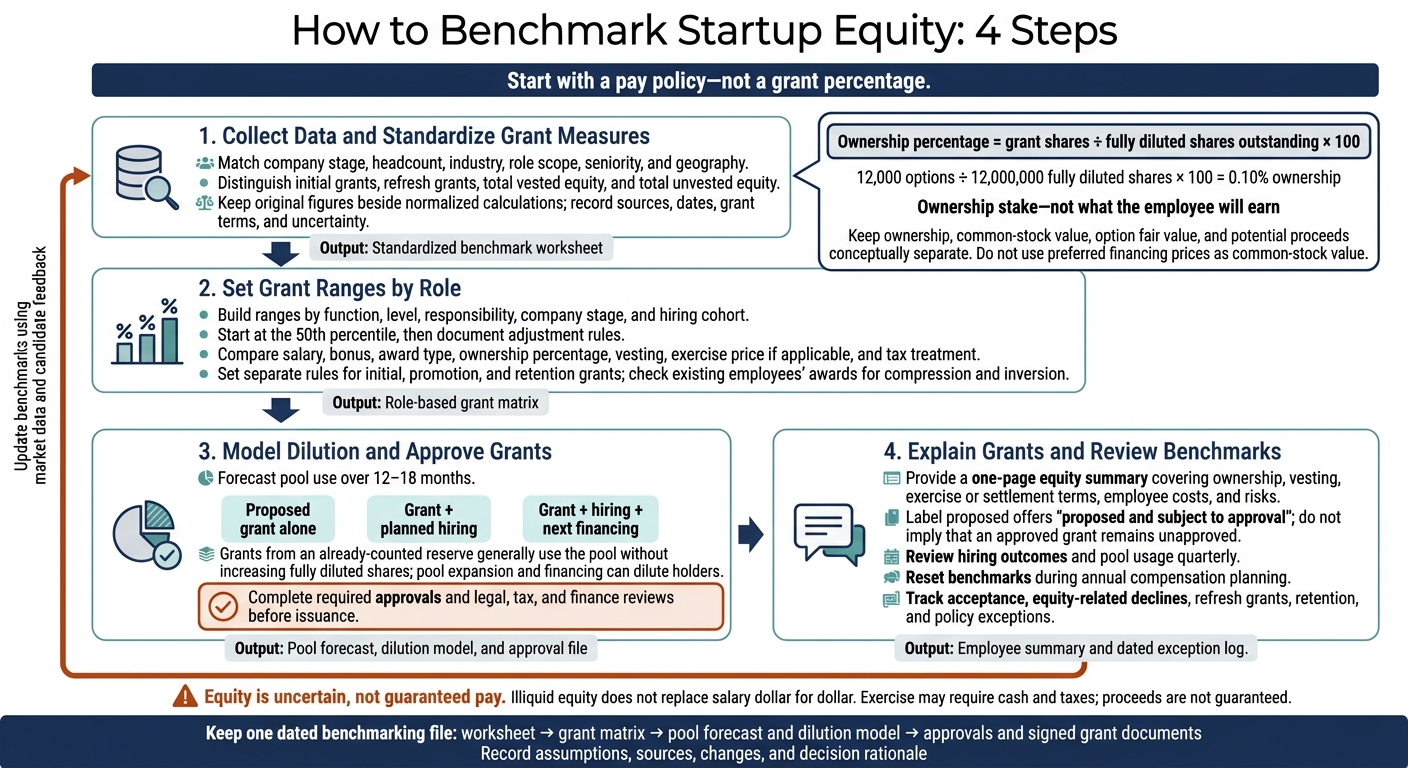
How to Benchmark Startup Equity: 4 Steps
Step 1: Collect Data and Standardize Grant Measures
Choose Sources and Comparable Companies
Start with a version-controlled worksheet, using one row per observation. Match companies by stage, headcount, industry, role scope, seniority, and geography. Combine market data with your own offer and acceptance records, but keep observed data separate from modeled estimates.
| Source | Cohort and geography | Recency | Measure type | Key limitations |
|---|---|---|---|---|
| Carta Total Compensation | Venture-backed startups using Carta; stage, size, and geographic filters | Snapshot and report dates | Percentage of fully diluted shares; available percentiles | Sample bias; older reports are historical |
| Pave | Job, level, location, industry, and stage | Generally monthly; observation dates may differ | New-hire and ongoing equity; selected measure and percentile | Modeled estimates when observations are insufficient |
| Index Ventures’ OptionPlan | Startup planning; company and geographic assumptions | Tool version or access date | Modeled guidance, not observed percentiles | Planning tool, not market data |
Check Data Quality and Dates
For every source, record publication and observation dates, confidence level, collection method, sample size, and exclusion rules. Sample size, participation, and job matching still affect results.
Add an award type field to distinguish initial grants, refresh grants, total vested equity, and total unvested equity. If a cohort is too small, broaden one filter at a time and flag the uncertainty. Keep the original figure beside every normalized calculation.
Convert Grants Into Comparable Measures
Calculate ownership percentage = grant shares ÷ fully diluted shares outstanding × 100. Use the same definition of fully diluted shares in every row.
Keep ownership, underlying-share value, option fair value, and potential proceeds in separate fields. If you annualize a multiyear grant, keep the full-grant measure too, and document the period used.
Example: 12,000 options on 12,000,000 fully diluted shares equals 0.10% ownership.
Do not use preferred financing prices as common-stock value.
Record Valuation and Grant Terms
Record the grant date, issuer, share count, strike price, vesting, expiration, post-termination window, repurchase rights, and ISO/NSO treatment.
To support grant pricing, attach the 409A date, common-stock fair market value (FMV), provider, and report reference. Generally, update the valuation at least every 12 months - and sooner after a financing, acquisition offer, major business change, or material change in financial condition. Confirm requirements with valuation professionals and current IRS guidance.
Use these standardized fields as inputs for role-based grant ranges.
sbb-itb-17e8ec9
Mucker Growth Series: Compensation Benchmarks for Early Stage Startups
Step 2: Set Grant Ranges by Role
Turn the standardized grant data from Step 1 into role-based ranges using market benchmarks. Build a grant matrix by function, level, responsibility, company stage, and hiring cohort. Keep founder ownership, executive awards, early-hire grants, and later-hire grants separate. Carry over the standardized source, date, share count, and vesting fields from Step 1 so each range can be traced to its source.
Choose Target Percentiles and Adjustment Rules
Start at the 50th percentile, then set clear rules for moving up or down. Match responsibilities, not titles. Scarce skills, broader authority, mission-critical roles, or cash pay well below market may warrant more equity. Narrower scope, stronger cash pay, or a lower-cost location may warrant less.
Apply your location policy consistently. Require a written reason for urgency premiums, and have finance review the cost before the CEO or compensation committee approves them.
Compare Cash and Equity Packages
Compare the full package - not equity alone. Show salary, bonus, award type, ownership percentage, vesting, exercise price if applicable, and tax treatment. Illiquid equity does not replace salary dollar for dollar. It may never produce a return.
| Package | Hiring objective | Retention use | Near-term cash cost | Dilution impact |
|---|---|---|---|---|
| Lower cash / higher equity | Early-stage or cash-constrained hiring for candidates willing to take greater risk | Can strengthen long-term alignment, but only if the candidate understands the risk and stays engaged | Lowest | Highest |
| Market cash / market equity | Companies seeking a balanced, repeatable compensation policy | Balances near-term certainty with long-term participation | Moderate | Moderate |
| Higher cash / lower equity | Later-stage hiring, risk-sensitive candidates, or roles with strong cash-market benchmarks | Can improve offer acceptance and reduce reliance on uncertain equity value | Highest | Lowest |
Set Rules for Initial and Follow-On Grants
Define who qualifies for an initial grant based on role level, employment status, and expected contribution. Specify when the grant will be approved and communicated - for example, within 30 days of the start date. Keep the offer date separate from the formal grant date.
Set a review schedule and triggers for follow-on grants. These may include promotion, expanded responsibilities, sustained high performance, material retention risk, or a grant renewal cycle after a specified portion of the original award has vested. Benchmark promotion awards against the new role, but account for existing unvested holdings rather than automatically adding a full new-hire grant.
Before approving a grant, compare it with current employees’ scope, cash pay, original awards, and remaining unvested equity. Flag compression when a new hire receives nearly as much or more equity than a similarly situated employee who joined earlier. Flag inversion when a less senior employee receives more without a defensible reason.
Compare total awards and vesting schedules. Do not treat a multiyear initial grant as a follow-on award. Address gaps through targeted reviews rather than automatic matching, and assess the effect on the equity pool.
Use these ranges as the input for dilution modeling and approval in Step 3.
Step 3: Model Dilution and Approve Grants
Once role-based ranges are set, model how each proposed grant affects the cap table before approving it.
Test each grant against the latest cap table, hiring forecast, and cash budget. Use your cap-table system to track ownership and run scenarios, but check every calculation against source documents. Before using the results for approvals, reconcile them with signed agreements, board consents, financing documents, and the stock ledger.
Model Pool Changes and Future Financing
Use the same fully diluted share count defined above. Run at least three scenarios: the proposed grant alone, the grant plus planned hiring, and the grant plus hiring and the next financing.
A grant from a reserve already included in that count generally reduces the remaining pool without increasing fully diluted shares. Expanding the pool increases the count. Financing can also dilute holders by adding new investor shares.
Follow the term sheet’s order for conversions and pool increases. A pre-money pool increase generally puts more dilution on existing holders; a post-financing increase dilutes investors too.
Forecast initial, promotion, and retention grants over 12–18 months. Factor in expected cancellations and document when the reserve would run out.
Compare Grant Sizes and Confirm Approvals
Larger grants give employees more potential upside and may help retention. But they also use more of the pool, leaving fewer shares for future hires.
If the modeled grant fits the pool and hiring plan, move it into formal approval.
Approval checklist - complete before treating the grant as final:
- [ ] Confirm that the equity incentive plan authorizes the award type, recipient, available shares, and administrator.
- [ ] Obtain board approval for the grant and any pool increase, plus shareholder approval where required by the plan, charter, financing documents, applicable law, or award type.
- [ ] Document fair market value (FMV) and set the exercise price using the latest valuation.
- [ ] Confirm vesting, cliff, acceleration, expiration, post-termination exercise, and repurchase terms.
- [ ] Have counsel confirm federal and state securities compliance, including applicable Rule 701 requirements.
- [ ] Deliver the grant notice, agreement, plan, and tax forms.
- [ ] Retain executed documents and reconcile the cap-table entry with the stock ledger, board minutes, and legal records.
Arrange Financial, Tax, and Legal Review
After sizing the grant, send it through legal, tax, and finance review. Complete all reviews before issuance.
Counsel should review the plan documents, approvals, securities-law compliance, award documents, state requirements, and special terms. A tax adviser should check ISO versus NSO treatment, withholding, early-exercise elections, and recipient-specific issues.
Finance or accounting should review compensation expense, cash requirements, exercise proceeds, payroll treatment, and effects on financial statements. The cap-table administrator should verify share availability, vesting, and records.
Lucid Financials can support this work with bookkeeping, tax, cash forecasting, and investor-ready reporting. It does not provide equity benchmark data, legal advice, cap-table administration, or independent equity valuations.
Step 4: Explain Grants and Review Benchmarks
After approval, give candidates a standard grant summary and explain the tradeoffs in plain language.
Explain Ownership, Costs, and Risks
Use the same one-page equity summary for every candidate. Include the award type, share count, ownership percentage, fully diluted share count and date, vesting, cliff, expiration, and exercise or settlement terms. Add the exercise price when it applies. Label the offer proposed and subject to approval. Show how the grant compares with your role-based range.
Be clear about employee costs and risks. Exercising options requires cash and may also involve taxes and fees. Private shares may not be sellable until a tender offer, acquisition, IPO, or permitted transaction. Keep common-stock fair market value separate from the latest preferred-stock valuation. Neither represents guaranteed proceeds.
Explain what happens when employment ends, including forfeiture and the deadline for exercising vested options. NSO exercise usually creates ordinary income on the spread; ISO exercise can trigger AMT. Direct candidates to a tax adviser, and don't promise after-tax value.
Use candidate questions and acceptance patterns to check whether your benchmark ranges still hold.
Schedule Reviews and Track Policy Exceptions
Use offer results to refine the benchmark - not to override it one offer at a time.
Review hiring outcomes and pool usage quarterly; reset benchmarks during annual compensation planning. Recheck after financing, major valuation changes, acquisition talks, hiring-plan changes, or labor-market shifts. For each source, record its date, filters, role level, geography, award type, unit, percentile, and rationale.
Keep a dated exception log that records the standard range, requested change, approved terms, business reason, approver, and pool impact. Review exceptions to see whether ranges are too high, too low, or applied inconsistently.
Track acceptance, equity-related declines, refresh grants, retention, and exceptions by role and level. Treat these measures as signals, not proof that your offers compete well. Follow up on acceptance and turnover patterns with updated market data and candidate feedback.
Conclusion: Document Your Benchmarking Process
Once you’ve set ranges, modeled dilution, and approved grants, document the process in one dated benchmarking file. Link the worksheet, grant matrix, pool forecast, dilution model, and approval file. Include a definitions sheet covering USD, base salary versus target cash, award type, valuation date, and fully diluted share basis.
Make every grant traceable - from market data and the chosen range to its expected pool impact, approval trail, and the grant terms shown to employees. Keep valuation support, board consents, and signed grant agreements together in the benchmarking file.
Save earlier versions, and record who changed each assumption and why. This audit trail speeds up future benchmarking and makes the decisions easier to support.
FAQs
How do I benchmark equity with limited market data?
Start with an accurate, fully diluted cap table that includes all issued shares, options, warrants, and convertible instruments. Use modeling tools to test funding rounds and option pool sizes, then compare the scenarios with available industry benchmarks. Work backward from target ownership percentages to set acceptable dilution limits.
Keep equity records in sync with payroll and legal systems to reduce errors and give you a sound basis for negotiations.
What if competitive grants exceed my equity pool?
If competitive grants exceed your equity pool, manage your cap table carefully to limit dilution. You can expand your option pool in future funding rounds based on your growth plans and valuations. Use Lucid Financials to model dilution scenarios before committing to new grants.
If issuing shares would cause too much dilution, consider phantom equity. It tracks growth in value without issuing shares or changing your cap table.
How do liquidation preferences affect employee payouts?
Liquidation preferences set the order for dividing proceeds when a company exits. Investors with preferred stock get paid according to their preference terms first. Employees, who typically hold common stock, receive a share of whatever remains. If the exit value is low, employees may receive much less - or nothing at all.
Exit waterfall analyses model these scenarios so stakeholders can see how the terms could affect their final payouts.