A churn model can look strong and still fail for one simple reason: bad scaling. If you scale every numeric field the same way, fit scalers before the train/test split, mix feature types without rules, or keep old scaling settings after your customer base changes, your scores can drift fast.
Here’s the short version:
- Use the right scaler for each feature. Tenure may fit
StandardScaler, while skewed MRR often needs a log step orRobustScaler. - Split first, scale second. If you fit on the full dataset, you leak test data into training.
- Don’t treat all columns alike. Scale continuous fields, leave binary flags alone, encode categories, and handle calendar fields like cycles.
- Recheck scaling as the business changes. A new pricing model or enterprise push can shift feature ranges enough to hurt model quality.
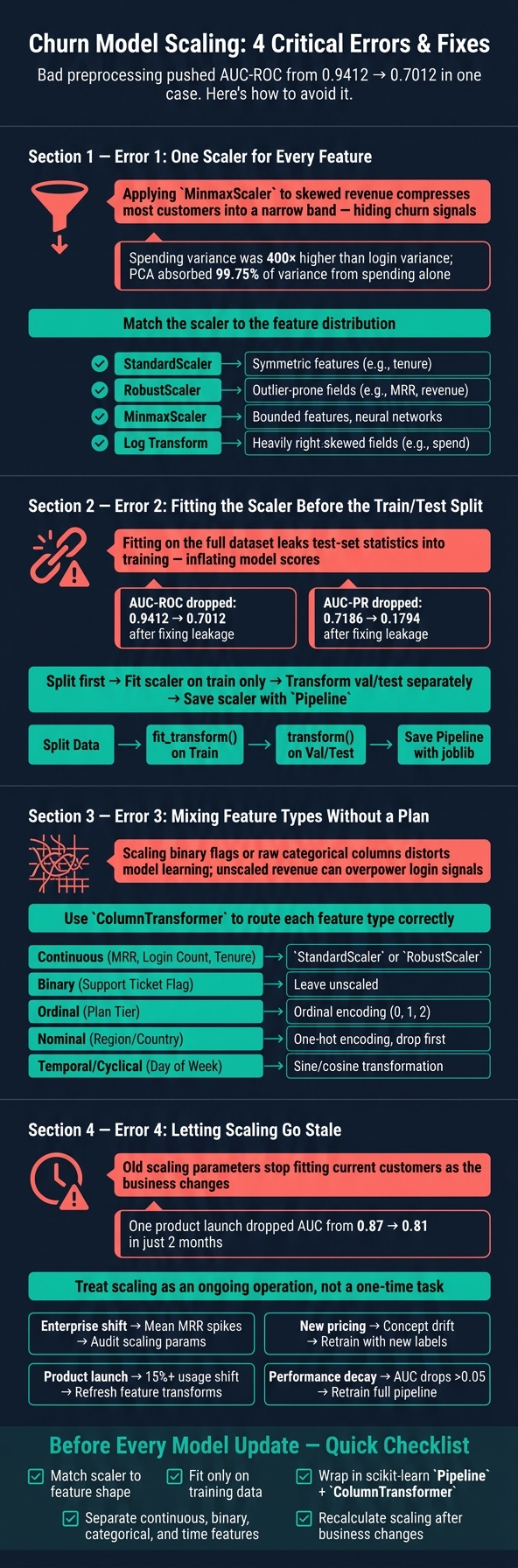
The article’s core point is simple: scaling is not just cleanup. It changes how many churn models learn. In the examples here, bad preprocessing helped push AUC-ROC from 0.9412 down to 0.7012 once leakage was fixed, and one product change cut AUC from 0.87 to 0.81 in two months.
If I had to reduce the whole piece to one checklist, it would be this:
- Match the scaler to the data shape
- Fit only on training data
- Use a
PipelineandColumnTransformer - Separate continuous, binary, categorical, and time fields
- Update scaling when customer behavior shifts
That’s the whole job in plain English: pick the right transform, apply it in the right order, and keep it current.
Churn Model Scaling: 4 Errors and How to Fix Them
Error 1: Applying one scaling method to every numeric feature
Using one scaler for every numeric feature can blur churn signals.
Churn datasets usually mix very different kinds of numbers: revenue, tenure, usage, and count-based fields. And those features don't behave the same way. A single scaling method might look neat on paper, but in practice, it can wash out patterns that matter. The fix is simple: match the scaler to the feature's distribution.
How generic scaling distorts skewed churn features
Revenue is often right-skewed. A small group of high-value accounts can pull the upper tail way out. If you send that through MinMaxScaler, most customers get squeezed into a tight range. That makes it harder to spot early churn risk in the middle of the distribution, where a lot of useful signal lives.
The same problem shows up in models that care about distance or variance. In one churn dataset, spending variance was about 400 times higher than login variance, and PCA took 99.75% of total variance from the spending feature alone, which basically pushed the login signal aside.
Once that distortion shows up, the next move is picking a scaler that fits the feature instead of forcing every column through the same pipe.
How to match the scaler to the feature and model
Start with the shape of the feature, then think about how the model reacts to scale.
If a feature is fairly symmetric, like tenure in months, StandardScaler is often a good fit. For money-related fields like revenue or account balance, where a few large customers create long tails, RobustScaler is usually the safer pick because it uses the median and interquartile range instead of the mean.
If a feature is heavily right-skewed, apply a log transform first to shrink the tail, then scale it. That two-step approach often works better than scaling raw values. Tree-based models usually care less about this because they split on thresholds, not raw magnitudes.
Comparison table: Which scaling method fits which churn feature
Use this as a starting map, not a rulebook.
| Scaling Method | Core Idea | Best For | Risks in Churn Context |
|---|---|---|---|
| StandardScaler | Centers data at mean 0 with standard deviation 1 | Roughly symmetric continuous features, like tenure | Heavy tails and outliers can distort results |
| MinMaxScaler | Scales values to a fixed range | Bounded features, distance-based models, and neural networks | Outliers can compress most customers into a narrow band |
| RobustScaler | Uses the median and interquartile range | Outlier-prone monetary or usage fields, like revenue or balance | Can reduce separation in the midrange |
| Log Transform | Compresses large values logarithmically | Strongly right-skewed features, like spend or usage | Needs log(x + 1) when zero values are present |
sbb-itb-17e8ec9
Error 2: Creating leakage and inconsistency during training and evaluation
Choosing the right scaler matters. When you fit it matters even more. A lot of churn models look better than they should because preprocessing happens in the wrong order.
The biggest mistake is letting the scaler see data it was never supposed to see. If you fit a scaler on the full dataset before the train/test split, you leak test-set stats into training. That means the scaler picks up means, standard deviations, and ranges from rows the model should treat as unseen. At that point, the model is learning from tainted data instead of clean training data.
And that has a cost. Leakage skews both training and evaluation, so performance numbers can look far better than what you’ll get in production. For churn work, that’s a big deal. Retention teams may trust scores that don’t hold up when it counts. In one documented churn case study, fixing the evaluation workflow caused AUC-ROC to drop from 0.9412 to 0.7012 and AUC-PR to fall from 0.7186 to 0.1794. Preprocessing leakage can also push false negatives much higher in production than in testing. In plain English: customers who are about to churn may get marked as safe.
The fix is straightforward. Split first, scale second. Fit the scaler only on training data. Use fit_transform() on the training set, then use transform() only on validation and test data. Don’t refit the scaler on those sets. Once the scaler is fit, save it and reuse it in production.
The safest way to enforce this is with a scikit-learn Pipeline. When the scaler and model are wrapped together, cross-validation handles the order for you. During each fold, the scaler is fit only on that fold’s training slice. That removes the chance of a stray fit() call in the wrong place. Save the full pipeline artifact with joblib so the scaler settings move with the model into production.
Here’s what that looks like in practice:
| Step | Incorrect Practice | Correct Practice | Effect on Churn Metrics |
|---|---|---|---|
| Data splitting | Scale the full dataset, then split into train/test | Split into train/test first; fit scaler only on train | Inflates AUC/Recall by peeking at the test distribution |
| Validation | Refit the scaler on the validation set | Apply the training scaler's mean/SD to validation | Inflates production performance |
| Cross-validation | Scale the whole training set before K-Fold CV | Use a Pipeline to scale inside each CV fold |
Breaks fold isolation |
| Production scoring | Scale live data with its own real-time mean/SD | Apply the saved training scaler | Model sees features on a different scale than it learned |
With scaling under control, the next problem is how mixed feature types get treated from one step to the next.
Error 3: Mixing scaled, unscaled, categorical, and time features without a plan
After you fix the scaling order, the next step is deciding which columns should be scaled. This is where a lot of churn models go off track. If numeric, categorical, binary, and time fields all get lumped together, the model can start paying attention to the wrong things.
When unscaled revenue or usage features overpower the model
Big numeric fields like revenue can swamp smaller usage signals. For example, unscaled revenue may overpower fields like login count or ticket activity, which can make churn patterns harder to detect in distance-based and gradient-based models.
Binary flags are different. A field like “opened a support ticket” is already in a tight range, usually 0 or 1, so it often doesn’t need the same handling as a continuous variable.
How to handle binary, categorical, tenure, and calendar features correctly
The safest approach is to treat features by what they do, not by what their column names look like.
Continuous features such as MRR, login count, and support ticket volume should be scaled. Use StandardScaler when the values are roughly normal. If your customer base has extreme outliers, like whale accounts, switch to RobustScaler.
One-hot encoded categories should stay unscaled. For nominal categories, use one-hot encoding.
Tenure in months acts like a continuous variable, so scaling it with StandardScaler makes sense. Day of week is cyclical, not linear, so raw numbers can be misleading. A sine/cosine transform is a better fit.
Feature-handling table: What to scale and what to leave alone
Use this table as a default map for handling each column type.
| Feature Name | Type | Unit | Scaling Strategy |
|---|---|---|---|
| Monthly Recurring Revenue (MRR) | Continuous | USD ($) | StandardScaler, or RobustScaler if outliers exist |
| Account Tenure | Continuous | Months | StandardScaler |
| Login Count (Last 30 Days) | Continuous | Count | StandardScaler |
| Support Ticket Flag | Binary | 0 or 1 | Leave unscaled |
| Plan Tier | Ordinal | Rank | Ordinal encoding (0, 1, 2) |
| Region / Country | Nominal | String | One-hot encoding, drop first category |
| Day of Week | Temporal | Weekday value | Cyclical encoding (sine/cosine transformation) |
Use a scikit-learn ColumnTransformer to send each feature type down the right path. Stick with one ColumnTransformer so the same rule gets applied every time, instead of relying on manual cleanup that can drift from one run to the next.
Error 4: Letting scaling go stale as the startup grows
A churn model trained on early-stage data gets weaker as your customer base shifts. The scaling parameters - means, standard deviations, and min/max ranges - are just snapshots of your customers at one moment in time. When that base changes, those snapshots start to lie. Scaling is not a one-and-done task. It needs to move with the business.
Why old scaling parameters stop fitting current customers
One of the clearest causes is a shift in customer mix. Say your startup moves from $50/month Pro plans to $5,000/month Enterprise contracts. That change can completely reshape your MRR distribution. A StandardScaler trained on the old data will force enterprise accounts into the wrong range, which can hurt calibration.
Once the mix changes, the scaler’s training stats no longer line up with live data. And this isn’t a small technical footnote. In one production case, a single product launch pushed AUC down from 0.87 to 0.81 in only two months. That’s a sharp drop in predictive accuracy from one business event.
How to audit and refresh scaling on a regular schedule
The fix is pretty simple: treat scaling like a routine part of operations. Put it on a schedule instead of handling it only when something breaks.
Weekly checks on means and standard deviations for key features, such as MRR and login frequency, can spot distribution shifts before they chip away at model performance. Set an automated alert if the mean churn prediction score moves more than 15% from baseline, or if AUC falls more than 0.05 below baseline.
Retrain monthly on recent data. Then compare the new model against the current one on a held-out recent period, and ship the update only if it does better. Before any refreshed model goes live, validate it on a held-out set from the most recent period. The new version should beat the current one before deployment.
Use these signals to decide when to refresh the scaler or retrain the model.
Drift table: Signs that it is time to re-scale
| Trigger for Re-Scaling | Data Signal | Operational Impact | Suggested Action |
|---|---|---|---|
| Enterprise shift | Significant increase in mean MRR or seat counts | Model treats high-value users as outliers, distorting risk scores | Audit and update mean/std dev parameters for scaling |
| New pricing or packaging | Concept drift: relationship between failed payments and churn weakens | Revenue forecasts become unreliable; false positives in risk alerts | Retrain model with new labels; recalibrate probability thresholds |
| Product launch | Usage drift: 15%+ shift in mean session duration or feature adoption | Model misses "silent churn" as usage baselines change | Refresh scaling parameters; update feature transforms |
| Process evolution | Label drift: real churn diverges from predicted churn | Retention teams waste effort on healthy accounts | Perform a full model audit; check for stale churn score definitions |
| Performance decay | AUC drops more than 0.05 below baseline | False positives flood the customer success team | Retrain the full pipeline |
Use the checklist below before the next model update.
Conclusion: A simple checklist for reliable churn scaling
Getting scaling right has less to do with finding the perfect algorithm and more to do with avoiding the same old mistakes that break churn pipelines. Four issues cause most of the trouble: picking the wrong scaler, leaking data, mixing feature types the wrong way, and letting old parameters hang around too long. When scaling gets stale, even a solid model can start to drift. And if production scaling changes, a strong validation score doesn’t mean much. That’s why scaling needs to be a fixed part of every modeling workflow.
Use this checklist before every retrain or scoring update.
Key actions to take before your next model update
- Match the scaler to the feature shape: use
StandardScalerfor roughly normal features,RobustScalerfor outliers, andMinMaxScalerfor bounded inputs. - Fit on training data only, then apply the saved transform to validation, test, and production data.
- Wrap preprocessing in a
scikit-learn Pipelinewith aColumnTransformerso scaling happens inside each cross-validation fold. - Separate feature types. Scale continuous features such as revenue, usage, or tenure. Leave binary features unscaled, and encode categorical features first.
- Recalculate scaling after pricing, customer mix, or usage patterns shift.
Scaling won’t fix weak labels or bad features, but it does remove one quiet source of model error. For startups that depend on churn forecasts, that kind of consistency matters. Use these checks before the next model update.
FAQs
Which churn models need scaling most?
Scaling matters most in churn models that depend on distance, variance, or gradient descent. If one feature has a much larger numeric range than the others, the model can treat it like it matters more than it should.
That’s why you should scale features for KNN, PCA, neural networks, linear regression, and logistic regression.
By contrast, tree-based models like Random Forest and XGBoost are usually scale-invariant, so they generally don’t need scaling.
How often should I refresh my scaler?
There’s no set schedule for refreshing a scaler. How well it works depends on the data distribution and value range underneath it, and those can drift over time.
Update the scaler when your input data shifts in a big way or starts landing outside the range from the original training data. That helps the model keep getting accurate, normalized inputs.
What should I do if new customer data looks very different?
Prioritize data quality from the start. Validate new data, cross-check sources, and clean messy or inconsistent fields before you process anything else.
Then normalize the training set first. After that, use the same scaling parameters for validation, test, and any new data. That helps you avoid data leakage and keeps scaling consistent across the board.
If something looks off, review summary statistics to check whether feature scales line up the way they should.