You can cut the monthly scramble by building one simple system: one dataset, one fixed update format, and one review-and-send process. That means AI drafts the update from locked numbers, a person checks it, and the email goes out on a set date like 07/15/2026.
Here’s the short version:
- Pull essential financial metrics into one source instead of using live numbers from five tools
- Use one fixed template with the same sections and KPI definitions every month
- Have AI write the first draft from your template, KPI table, and past updates
- Require human review for cash, burn, forecasts, risk notes, and final approval
- Send on a fixed schedule and track opens, replies, and follow-up asks
A few details matter more than most teams think. Keep metrics in USD like $125,000.00, use U.S. dates, and lock definitions so “burn” means the same thing every month. The article also points to a clean monthly timeline: books closed by Day 10, dataset locked by Day 12, and update sent by Day 15.
If I had to boil it down even more, I’d say this: AI should write from a trusted reporting file, not guess from scattered apps.
| Part | What happens | Main rule |
|---|---|---|
| Data | Metrics are pulled into one master dataset | One owner per metric |
| Draft | AI writes the first version | No made-up numbers or reasons |
| Distribution | Approved update is sent on schedule | Track engagement after send |
The main point: automate the manual work, keep people in charge of judgment, and make every update easy to compare month over month.
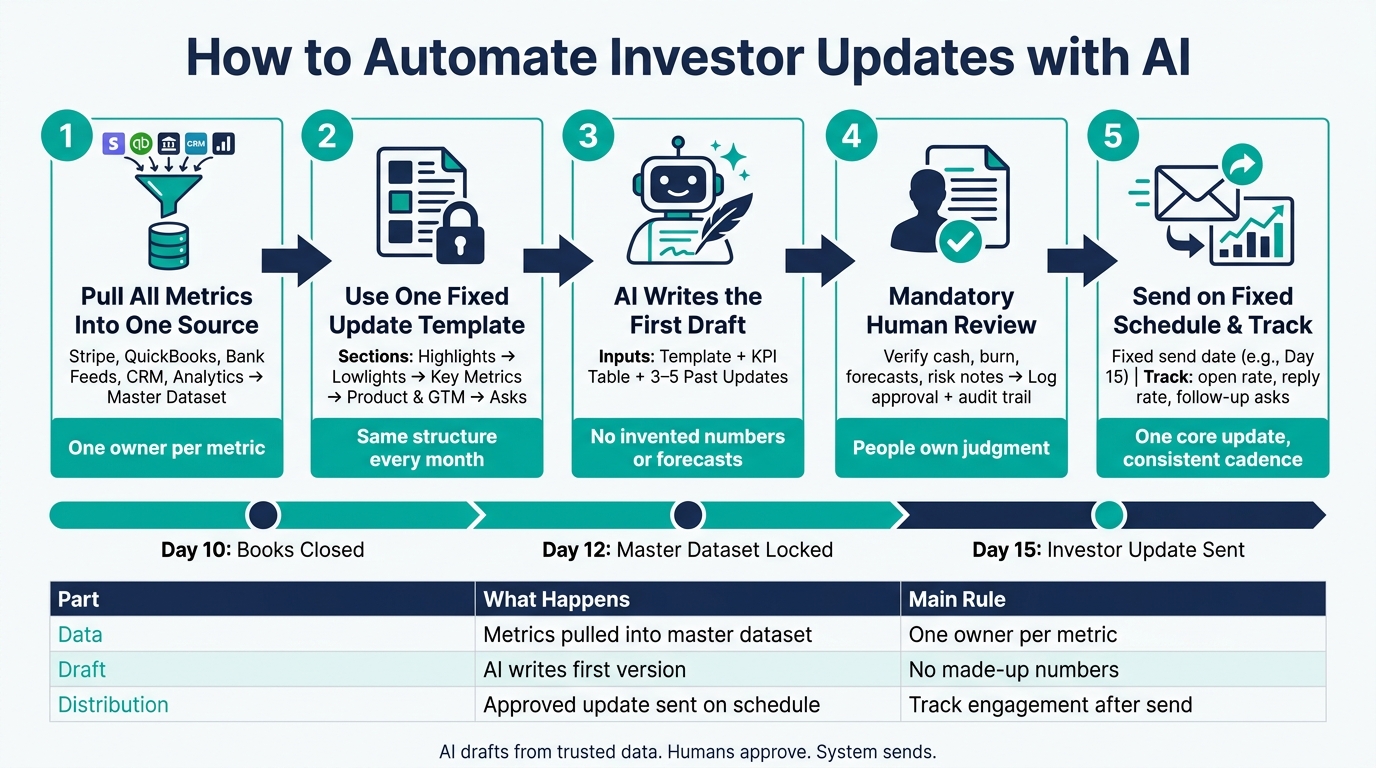
How to Automate Investor Updates with AI: 5-Step Workflow
Automating Investor Communication with AI Agents | Investor Relations Agent
sbb-itb-17e8ec9
2. Build a standard investor update template AI can follow
Use one fixed template before you hook up data sources or write prompts. That gives you the same structure, tone, and metrics every month.
Think of it like setting the mold before you pour the concrete. If the mold changes every time, the update gets messy fast.
Your template should spell out two things:
- The narrative sections
- The exact fields AI should fill in
Choose the sections and subject line format
Start with a subject line that stays the same every month. A format like Investor Update – [Company Name] – July 2026 works well because it's easy to search, thread, and filter in Gmail or Outlook.
For the body of the update, fix the section order and leave it alone. Use this sequence:
- Highlights
- Lowlights
- Key Metrics
- Product & Go-to-Market Updates
- Asks
Make Asks required. That's usually the part where investors can help the most.
Once the section order is set, lock the KPI fields too. That way, AI isn't guessing which numbers to include from one month to the next.
Define the KPI table and stage-specific metrics
Keep the Key Metrics section tied to structured data sources. In plain English: hard-code the KPI list into the template so AI always pulls the same numbers and shows them the same way.
Group metrics into three buckets: Financial, Growth, and Product. Then format them with U.S. conventions:
- Dollars with commas and two decimal places, like $125,000.00
- Percentages with one decimal place, like 14.2%
- Runway in months, like 18 months of runway
| Category | Metric | Example Value | Change vs. Last Month |
|---|---|---|---|
| Financial | MRR | $125,000.00 | +$10,000.00 |
| Financial | ARR | $1,500,000.00 | +$120,000.00 |
| Financial | Burn Rate | $85,000.00 | -$5,000.00 |
| Financial | Cash Balance | $1,750,000.00 | +$90,000.00 |
| Financial | Runway | 18 months | +2 months |
| Growth | User Growth (MoM) | 14.2% | +3.1 percentage points |
| Growth | Pipeline Value | $1,250,000.00 | +$300,000.00 |
| Growth | Net Revenue Retention | 118.4% | +2.4 percentage points |
| Growth | Headcount | 18 | +3 |
| Product | Weekly Active Users | 8,500 | +1,200 |
KPI choice should match company stage. Stage sets the KPI list, so AI uses the same scorecard for the same kind of business.
For Seed updates, use metrics like MRR, net new revenue, burn rate, cash balance, runway, signups, and early NRR.
For Series A/B, add ARR, burn multiple, gross margin, pipeline value, win rate, CAC payback, and NRR trends.
A good rule of thumb: start with 5–8 core metrics. Add more rows only if each extra number changes a decision.
Next, map each KPI to its source system so the template can fill itself.
3. Connect your financial and operating data sources
Once your template is set, the next job is simple: make sure it pulls the right numbers every time. In practice, that means giving each metric one clear source so AI knows exactly where to look.
Map each data source to the metric it owns
Treat each tool in your stack as the owner of a specific group of metrics. Your billing platform owns revenue. Your accounting system owns burn and runway. Your bank owns cash. If two systems can show the same number, choose one and use it every time.
Here’s what that often looks like for a U.S. startup:
| Data Source | Key Metrics Supplied |
|---|---|
| Stripe / Billing | MRR, ARR, gross revenue, churn, refunds |
| QuickBooks / Xero | GAAP revenue, operating expenses, monthly burn, runway |
| Bank feeds (Mercury, Plaid) | Cash on hand, cash movements, available balance |
| Analytics (Mixpanel, Amplitude) | Traffic, activation, retention, conversion rates |
| CRM (HubSpot, Salesforce) | Pipeline value, win rate, deal stages, customer count |
A good rule of thumb: begin with the easy integrations first. Bank feeds and Stripe are usually the fastest to connect, and they give you high-impact metrics right away, especially cash on hand and MRR. Then bring in QuickBooks and your CRM after your data schema settles down.
Create a master dataset and refresh schedule
Don’t have AI pull straight from five different systems. That’s a recipe for messy outputs. Instead, bring everything into one master dataset: a single structured view of the metrics investors care about, with clear sources and timestamps. This can live in a spreadsheet, BI tool, or data warehouse.
Each metric should include:
- A defined source
- A calculation note
- A status flag: pre-close or post-close
That last flag matters more than it seems. AI should draft updates using post-close data only, after the books are fully reconciled.
For most U.S. startups, a monthly cadence works well: close the books by the 10th day after month-end, lock the master dataset by Day 12, and send the investor update by Day 15.
Once that dataset is stable, AI can draft from one trusted source instead of stitching together live data from multiple systems.
Use investor-ready financial reporting as the foundation
Clean books matter. If your accounting records are unreconciled or categorized inconsistently, AI will spread those mistakes through every update it writes. Overstated cash, miscalculated burn, or double-counted revenue can slip into investor messaging and hurt credibility fast.
When your books are clean and your master dataset is in place, drafting gets much easier. Lucid Financials helps startups keep reporting current, Slack-connected, and investor-ready.
4. Set up AI drafting, review, and approval
Once your master dataset is clean, the next step is simple: give AI enough structure to draft the update without filling in gaps on its own.
Train the AI on your template, tone, and drafting rules
Create a master prompt that pulls in the same three inputs each time:
- your standard template
- the latest KPI table
- 3–5 strong reference updates from prior months
That way, the draft starts from a steady format instead of a blank page.
The prompt should also include a few direct writing rules. For example, tell the AI to explain any metric that changes by more than 10% month over month. Tell it to flag material risks in plain bullet points, and only when the data backs them up. And be explicit: it must not invent metrics, forecasts, or causes that do not appear in the dataset or notes.
When the draft is in good shape, pass it to human review.
Add a human review step for accuracy and investor context
Human review matters because numbers alone don't tell the whole story. Board and investor updates often need context that won't show up in the source files.
Before any update goes out, a designated finance reviewer should handle three checks:
- Verify every dollar amount against source reports.
- Edit forward-looking statements, risk language, fundraising status, and personnel notes.
- Record final approval before sending.
For investor-facing updates, AI-assisted drafting should always include mandatory human review.
Handle U.S. reporting and governance carefully
AI should never rename or redefine financial figures. Give it a short glossary with your key metric definitions, and tell it plainly not to create new metrics or claim GAAP compliance unless that status is clearly stated.
You should also keep a versioned audit trail for every update you send. Store:
- the source KPI snapshot
- the prompt text
- the original AI draft
- reviewer notes
- the final approved version
- distribution logs with an approval timestamp
This record helps keep investor communications tied to source data and aligned with internal financial reporting.
Lucid Financials follows this model by pairing AI-generated reporting with experienced finance professionals who review investor-facing figures before the AI turns them into narrative summaries.
After approval, the update is ready for scheduled distribution and engagement tracking.
5. Automate sending, track engagement, and improve the workflow
Schedule distribution and organize investor lists
Once the update is approved, the job shifts from writing to sending. Pick a fixed monthly send time, like the first Tuesday at 9:00 a.m. PT, and make it a recurring calendar event. That simple habit keeps the process steady and takes guesswork off the table.
Keep all investor contacts in one master list, ideally in a CRM or investor spreadsheet. Use clear tags like Board, Lead Investor, Seed, Angel, and Strategic. Also flag anyone who should get the appendix. This makes it easy to send one core update with different attachments while still working from a single source of truth.
Review that list at least once per quarter. Remove bounced addresses, update contacts who changed firms, and check that board members and other governance-sensitive recipients are tagged the right way. Small list mistakes can create a mess fast.
The sending method matters too. For a small group, direct email can work fine. Most teams do better with automated workflows. And if audit trails and engagement data matter most, investor distribution tools usually make more sense.
| Method | Reliability | Tracking | Setup Effort |
|---|---|---|---|
| Direct email | High if sent manually; risk of missed recipients or BCC mistakes | Minimal; basic read receipts or manual link tracking | Low; manual list management |
| Automated workflows | High once configured; consistent monthly sends | Good; open/click rates, reply logging, segmentation reports | Medium; requires mapping lists, tags, and triggers |
| Integrated investor distribution tools | High; purpose-built for updates with compliance-friendly features | Strong; per-investor engagement view, longitudinal tracking | Medium–High; initial integration with financials and contact data |
Track opens, replies, and update quality over time
After sending is automated, use engagement data to make the next update better. Track open rate, reply rate, click-throughs, and the number and type of follow-up asks after each send. Low open rates usually point to deliverability issues or weak subject lines. Low reply rates often mean the update needs sharper takeaways.
If an investor hasn't opened the update within 48 hours, mark them for a personal follow-up. If three updates in a row go unopened, flag that contact again for follow-up.
To improve engagement, test one variable at a time. For example, you might add a key metric to the subject line, like "[Company] – July 2026 Update – 45% QoQ Growth", while leaving the KPI table and section order exactly the same. That way, you can tell what changed and what did not.
If shorter updates in the 500–800-word range keep getting more replies than longer ones, make that your standard. The goal is to adjust presentation and copy while keeping core KPI definitions locked, so investors can compare the same metrics month over month.
That closes the loop from data collection to distribution.
Conclusion: the simplest way to automate investor updates with AI
A dependable investor update workflow comes down to a few moving parts: a fixed template, trusted data sources, AI-assisted drafting, human review, and automated delivery on a steady cadence.
Clean, investor-ready books make the whole process faster and more accurate. Lucid Financials combines bookkeeping, tax services, and CFO support in one platform for startups. It also integrates directly with Slack for real-time answers and always-on investor-ready reporting.
The aim is simple: cut manual work from the process. Automate collection, drafting, and scheduling so people can spend their time on judgment and investor context.
FAQs
What tools do I need to automate investor updates with AI?
You need one central place that links your finance tools and team channels, so data moves on its own instead of getting copied from one system to another. Lucid Financials is built for that. It syncs with accounting software, banking platforms, payroll systems, and Slack.
Core tools include:
- Financial integrations for live data sync
- Communication interfaces for instant metric access
- Reporting engines for investor-ready updates
- AI for anomaly detection, forecasting, and KPI monitoring
How do I keep AI from using the wrong numbers?
Use a single source of truth by pulling data from your CRM, bank accounts, and accounting systems into one place, then reconciling it. That helps everyone work from the same numbers instead of juggling mismatched reports. Standardize formats too, including dates and currency, and make sure key metrics are defined the same way across the company.
Just as important, keep human oversight in the process. Document your workflows, and audit reports for variances before you share them. A clean system matters, but a second set of eyes can catch the stuff software misses.
Who should approve an AI-written investor update before it is sent?
The CEO or CFO should handle the final review and sign-off before an AI-written investor update goes out.
AI can speed up data gathering and put together a first draft of the story. But people still need to check the numbers, spot major swings, and make sure the update reads well. A clear review chain also helps confirm that each figure has been checked and that someone owns it.