Automating investor compliance reporting saves time, reduces errors, and ensures consistent communication with your investors. Instead of spending hours manually gathering data, automation connects directly to your financial tools, cutting reporting time from days to minutes. It also improves accuracy by up to 95%, helping you build trust and secure follow-on funding.
Key Takeaways:
- Why Automate? Manual reporting takes 2–4 hours per cycle for startups and up to 2 weeks per quarter for fund managers. Automation reduces this to ~15 minutes while minimizing errors.
- What to Report? Focus on financial statements (Income Statement, Balance Sheet, Cash Flow) and metrics like burn rate and runway. Reporting frequency varies: quarterly for seed-stage, monthly for Series A+.
- How It Works: Automation connects tools like Stripe, QuickBooks, and banking platforms, ensuring real-time data flow and eliminating manual data collection.
- Best Practices: Use standardized templates, implement approval workflows, and assign clear roles for data validation and reporting.
- Choosing Tools: Look for platforms with API integrations, SOC 2 compliance, audit trails, and role-based access controls. Ensure your data stays secure and private.
Automation shifts your focus from manual tasks to strategic decision-making, allowing your team to prioritize growth while maintaining compliance. Tools like Lucid Financials simplify the process with AI-driven reporting and expert oversight.
Automating Investor Communication with AI Agents | Investor Relations Agent
sbb-itb-17e8ec9
Understanding Investor Compliance Requirements
Before diving into automation, it’s critical to figure out your reporting obligations. These are typically outlined in your financing documents under sections like "Information Rights" or "Covenants" in the Investors' Rights or Stock Purchase Agreement. Getting clarity on these requirements is the first step to building an automated reporting system that’s both accurate and reliable.
Identify Required Reports and Reporting Cadence
For most startups, the standard reporting package includes three key financial statements: the Income Statement, Balance Sheet, and Cash Flow Statement. Additionally, metrics like burn rate and runway are essential. Considering that 29% of startups fail due to running out of cash, keeping a close eye on these numbers is non-negotiable.
The frequency of reporting often depends on your stage of growth. Seed-stage startups typically report quarterly, while Series A and beyond are expected to provide monthly updates. A good benchmark to aim for is the "15-Day Rule": close your books within 10 business days and deliver the final financial package to investors by the 15th day of the following month. Interestingly, startups that can produce board-level financials within 5–7 days of month-end are 73% more likely to secure additional funding.
As Jumpstart Partners puts it:
"Investors fund execution, and financial reporting is your proof of execution competence." - Jumpstart Partners
Another important detail to consider is how your contracts address different types of investors. For instance, "Major Investors" - those who invest above a certain amount, often $250,000 - may have rights to receive detailed monthly or quarterly financial reports. Smaller investors, on the other hand, might only be entitled to annual summaries. Carefully reviewing your agreements will help you understand what level of detail is required for each investor group.
Once you’ve nailed down the reporting requirements and schedule, the next step is establishing strong internal controls to ensure your data is accurate and consistent.
Define Approval and Sign-Off Processes
Knowing what to report is just the beginning - you also need a solid internal process to review and approve the numbers before sharing them. Even the best automated systems require human oversight to ensure compliance and accuracy. Without this layer of review, mistakes can slip through, damaging your credibility.
A well-structured sign-off process assigns ownership of specific data to individual departments. For example, the CFO oversees financial statements, the CTO handles engineering metrics, and the CMO is responsible for marketing KPIs. This approach ensures accountability and keeps the process running smoothly. Here's a practical timeline:
| Step | Responsibility | Timing |
|---|---|---|
| Data Collection | Budget Owners (e.g., CFO, CTO, CMO) | Days 1–4 post-month-end |
| Narrative Drafting | Founder / IR Team | Days 4–5 post-month-end |
| Final Review & Sign-off | CEO / CFO | Days 5–6 post-month-end |
| Distribution | Founder / IR Team | Day 7 post-month-end |
It’s important to document this workflow before implementing automation. While automation can handle tasks like collecting and formatting data, a human touch is still essential. Someone needs to review the narrative, flag any metrics that deviate by more than 10%, and ensure the final package is polished and trustworthy. This attention to detail is what turns a routine report into a tool for building investor confidence.
Mapping and Streamlining Reporting Workflows
Once you've nailed down your reporting requirements and sign-off processes, the next step is to trace how data moves through your organization. This exercise often reveals inefficiencies that might otherwise go unnoticed. For example, startups frequently spend 40 to 80 hours per quarter manually collecting updates and reconciling data across systems - a time sink that can stall growth.
Map the Reporting Workflow
Picture your reporting workflow as a pipeline with six key stages: ingestion, normalization, validation, drafting, review, and distribution. Each of these stages needs to be clearly documented before automation can be introduced.
"The workflow only works when data ingestion, normalization, validation, narrative drafting, review, and distribution are governed as one process." - Tribble
Start by identifying every data source (e.g., Stripe, QuickBooks, CRM) and its owner. Then map out how this data is cleaned and standardized. For instance, one system might categorize a line item as "Consulting Fees", while another calls it "Services Revenue." These inconsistencies must be addressed to make automation reliable. Each metric should be tied to a specific source, owner, and timestamp.
To spot inefficiencies, run a quick audit. Ask yourself:
- Did pulling metrics take more than two hours last quarter?
- Were any reports delayed?
- Did errors crop up in previous updates?
If you answered "yes" to any of these, you've identified bottlenecks to resolve before automating.
Assign Roles and Responsibilities
Once the workflow is mapped, assign a responsible person or team to each stage. This creates a chain of custody that ensures every number has a traceable path before it reaches investors.
| Workflow Stage | Responsible Role | Primary Task |
|---|---|---|
| Data Ingestion | Finance / Accounting | Pull raw data from source systems |
| Normalization | Finance / Accounting | Standardize metric labels and formats |
| Validation | Finance / Asset Management | Flag variances and reconcile discrepancies |
| Narrative Drafting | Founder / IR Team | Add context and commentary to the data |
| Review & Sign-Off | CEO / CFO | Approve final package before distribution |
| Distribution | Founder / IR Team | Deliver to investors and archive for audit |
This approach ensures a documented trail for every data point. Automation can handle repetitive tasks like data assembly, while your team focuses on adding context and making decisions. As Dr. Leigh Coney, Founder of WorkWise Solutions, explains:
"The goal is not to remove humans from the process. It is to ensure that human time is spent on judgment calls rather than data entry."
With a mapped-out workflow and clear responsibilities, you're now ready to explore automation platforms to make investor compliance reporting as efficient as possible.
Choosing the Right Automation Platform
Once you've mapped out your workflow and assigned roles, the next step is selecting the right tool to bring it all together. The wrong platform can create unnecessary headaches, so making the right choice is crucial.
Key Features to Look for in Reporting Automation Tools
Here's the most important thing to know upfront: the best automation platform works with your existing systems, not against them. Look for tools that offer direct API integrations with accounting software like QuickBooks, NetSuite, or Xero. This ensures your data flows smoothly and eliminates the need for time-consuming manual uploads.
Beyond compatibility, these features make a tool stand out:
| Feature | Why It Matters |
|---|---|
| SOC 2 Type II compliance | Ensures the platform meets security standards for handling sensitive financial data. |
| Role-based access controls (RBAC) | Restricts access so only authorized users can view or edit specific reports, safeguarding confidential information. |
| Full audit trails | Logs every data change, providing a clear record for investors and regulators. |
| Human-in-the-loop validation | Flags anomalies before reports are sent, preventing errors from reaching investors. |
| Format flexibility | Handles Excel, PDF, and CSV files without requiring additional reformatting. |
| Financial normalization | Automatically reconciles differences in fiscal years, currencies, and chart-of-accounts labels. |
These features not only streamline reporting but also strengthen data governance, giving you peace of mind.
Before committing to a platform, verify how it handles your financial data. Ensure your confidential information isn't stored externally or used to train public AI models. Opt for private deployments that keep your data within your cloud environment for added security.
Getting this right can lead to major efficiency gains. AI-powered reporting automation can cut manual data assembly by 70% to 85% and reduce error rates to nearly zero, compared to the 2% to 5% error rate typical of manual processes.
"The investor reporting automation approach is not about doing the same work faster. It is about doing fundamentally different, higher-value work." - Dr. Leigh Coney, Founder, WorkWise Solutions
How Lucid Financials Can Help

If you're looking for a platform that checks all the boxes, Lucid Financials offers a powerful solution for automated compliance reporting. It integrates seamlessly with your existing systems, supporting your workflow while speeding up the reporting process. Lucid combines bookkeeping, tax services, tax credits, and CFO-level support into one platform, eliminating the need to juggle multiple tools.
Lucid delivers clean books in just seven days and provides investor-ready reports on demand. Whether you're preparing for a funding round or responding to an investor inquiry, your financials are always up-to-date and ready for review - no last-minute scrambling required.
The platform also connects directly with Slack, allowing founders to ask questions about runway, spending, or performance and receive real-time answers from AI. For more complex issues, Lucid's experienced finance team steps in to provide expert judgment. Every AI-generated output is reviewed by professionals, so you get the speed of automation without compromising accuracy.
Building Reporting Controls and Safeguards
Once you've streamlined your reporting workflows and chosen an automation platform, the next step is ensuring your data is reliable. Fast reporting only matters if the information is accurate and secure. By adding strong reporting controls, you can safeguard data integrity and maintain trust in your reports.
Create Standardized Report Templates
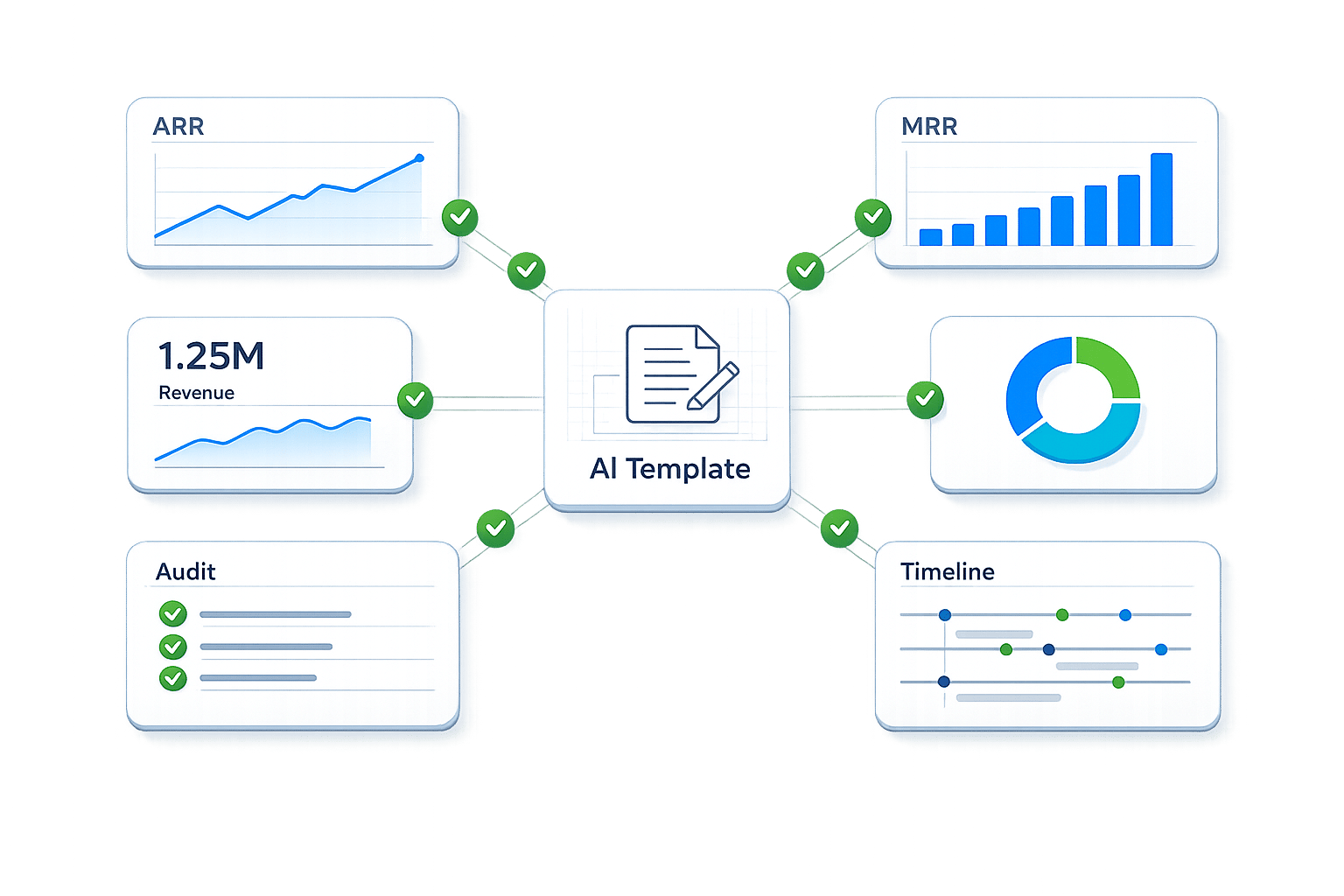
Standardized templates help maintain consistency across reports, making it easier to compare data over time. They also allow data to flow seamlessly from live sources into your reports.
An effective investor compliance report template typically includes:
- Executive summary
- Key performance indicators (KPIs)
- High-level financial overview
- Product and company updates
- Forward-looking forecasts
When these sections are pre-defined and connected to live data, reports can auto-populate effortlessly. This approach can save finance teams 15 to 20 hours per month.
To maintain high-quality data, assign ownership for each section of the report. For instance, the CFO oversees financials, the CTO handles product metrics, and so on. When each leader is responsible for their specific data, the overall report quality improves before final aggregation.
Set Up Data Validation and Security Measures
Standardized templates ensure consistency, but accuracy requires robust validation. Automated systems should run checks to flag discrepancies, catch calculation errors, and highlight anomalies before the report reaches stakeholders. This process can drastically reduce manual error rates from 2% to 5% to nearly zero.
However, automation alone isn’t enough. Pair automated checks with human review to ensure final accuracy. As Dr. Leigh Coney, Founder of WorkWise Solutions, explains:
"LPs receive reports that are more timely, more consistent, and backed by data that has been validated programmatically rather than eyeballed by a tired analyst at 11 PM."
On the security front, aim for SOC 2 Type II compliance as a baseline. Combine this with role-based access controls (RBAC) to ensure team members only access data relevant to their roles. Full audit trails should log every action taken, from access to edits. For AI-driven tools, make sure your financial data is processed in a private environment - keeping it within your cloud and away from external model training.
Monitoring and Improving the Automated Reporting Process
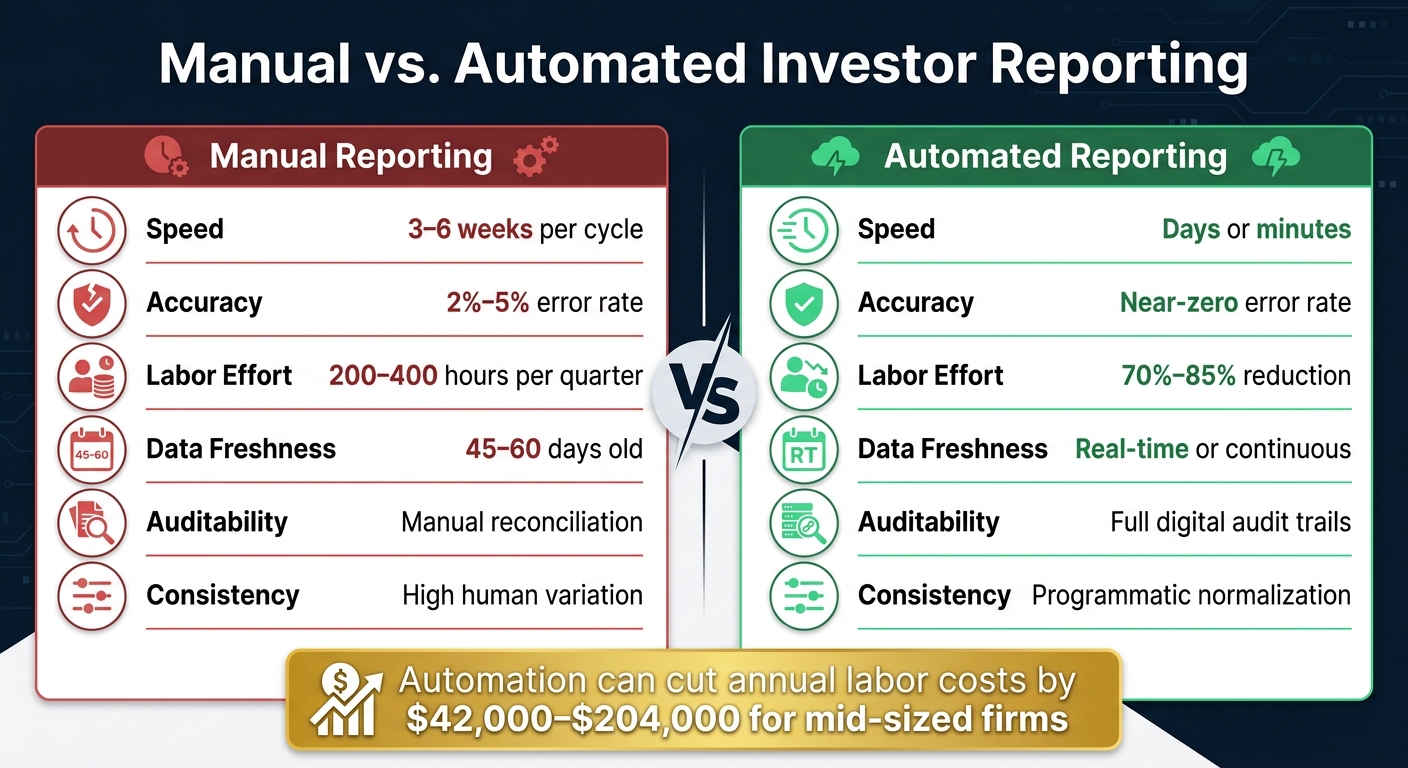
Manual vs. Automated Investor Reporting: Key Stats Compared
Automation is just the start; keeping your system efficient means regularly monitoring and tweaking it as your startup grows and compliance requirements shift.
Track Key Performance Metrics
Keeping tabs on key metrics like cycle time, error rates, and labor hours is essential to ensure your automation is delivering results. For instance, reporting cycle time (how long it takes to go from period-end to delivering reports to investors), error rates, and the division of labor hours between data assembly and analysis are critical indicators. Automation often reduces data assembly work by 70% to 85% and can shrink a full day of manual reporting down to about 15 minutes.
"The investor reporting automation approach is not about doing the same work faster. It is about doing fundamentally different, higher-value work." - Dr. Leigh Coney, Founder, WorkWise Solutions
In the early stages of a startup, tracking investor engagement is another important metric. Monitoring report open rates can help you identify disengaged investors who might need a follow-up conversation. Keeping an eye on these performance indicators allows you to fine-tune your processes and sustain efficiency.
Refine Workflows as Needs Change
As your business evolves and compliance rules shift, your reporting workflows need to adapt. Regularly conduct discovery sprints - structured reviews to map your current workflow and pinpoint emerging bottlenecks before they become major issues. While automation handles repetitive tasks, your team’s expertise is essential to ensure workflows stay accurate and aligned with your company’s changing priorities.
For example, if reviewing AI-generated narrative drafts begins to take hours instead of minutes, it’s a sign you need to refine your data mapping rules or prompts to better reflect your company’s voice and context. Similarly, switching accounting software or adding a new revenue stream means updating your API integrations to prevent outdated data from creeping into your reports.
Manual vs. Automated Reporting: A Side-by-Side Comparison
Here’s a quick comparison to highlight the differences between manual and automated reporting:
| Feature | Manual Reporting | Automated Reporting |
|---|---|---|
| Speed | 3–6 weeks per cycle | Days or minutes |
| Accuracy | 2%–5% error rate | Near zero error rate |
| Labor Effort | 200–400 hours per quarter | 70%–85% reduction |
| Data Freshness | 45–60 days old | Real-time or continuous |
| Auditability | Manual reconciliation | Full digital audit trails |
| Consistency | High human variation | Programmatic normalization |
The financial impact of automation is hard to ignore. For mid-sized firms, it can cut annual labor costs by $42,000 to $204,000. These savings can be redirected toward growth-focused initiatives rather than being tied up in administrative tasks.
Conclusion: Use Automation to Stay Compliant and Focus on Growth
Handling investor reporting manually can be a major drain on your team’s time and energy. Automation completely changes the game. By using live data connections, standardized templates, and strong validation controls, a process that once required hours of work every month can now operate quietly in the background.
Automated reporting tools not only cut down on errors but also free up valuable hours for your team. Here’s some food for thought: startups with real-time KPI dashboards see fundraising cycles that are 40% shorter, and those that communicate consistently with investors are twice as likely to secure follow-on funding. Industry expert Julio Martínez sums it up perfectly:
"Strong investor reporting builds trust, fosters productive investor relations, and supports rapid growth."
The benefits go beyond just making reporting easier. Automation allows your team to shift their focus from crunching numbers to making strategic decisions. Instead of spending hours buried in spreadsheets, your finance team can concentrate on driving growth.
If you’re ready to take this step, Lucid Financials offers a solution tailored to your needs. With AI-powered bookkeeping, real-time financial reporting, and CFO-level support, it ensures your books stay accurate, your investors stay informed, and your team stays focused on what matters most - growth. Automation isn’t just about compliance; it’s about unlocking your potential for strategic success.
FAQs
What’s the simplest way to identify my investor reporting requirements?
To align with investor expectations, start by identifying what they typically require. This often includes GAAP-compliant financial statements, regular operational updates, and projections for future performance.
Next, evaluate your current reporting framework against regulatory standards. Pay close attention to critical metrics such as revenue, burn rate, and operational highlights to ensure you’re meeting compliance and providing valuable insights.
For a smoother process, consider using automated tools like Lucid Financials. These tools offer real-time insights and create investor-ready reports, all while adhering to strict data security measures, such as encryption and role-based access controls. This not only saves time but also ensures your data is secure and meets compliance requirements.
How do I keep automated investor reports accurate before sending them?
To keep automated investor reports accurate, leverage AI-driven validation to spot anomalies, duplicates, and missing data. Automated checks can also help identify variances, ensure mathematical consistency, and flag unverifiable data points. However, automation alone isn’t enough - human review remains critical for verifying figures, reviewing narratives, and addressing flagged issues. By blending AI validation with manual oversight, you can ensure reports are precise, consistent, and ready for distribution.
What security controls should an investor reporting tool have?
To protect sensitive data and ensure compliance, an investor reporting tool needs robust security measures. Here are the key features to look for:
- Multi-factor authentication (MFA): Adds an extra layer of protection by requiring users to verify their identity through multiple methods.
- Industry-standard encryption: Safeguards data both during transmission and while stored, ensuring it remains secure at all times.
- Role-based access controls (RBAC): Limits access to sensitive information based on a user's specific role, reducing the risk of unauthorized access.
- SOC 2 compliance: Demonstrates that the tool meets strict standards for security, availability, processing integrity, confidentiality, and privacy.
Additionally, regular security assessments of third-party vendors and maintaining full audit trails with timestamp verification are critical. These practices help protect data integrity and provide transparency, ensuring sensitive information remains secure.