If your startup closes the books late, your decisions are late too. I’d sum up the article like this: AI helps startups cut close time, reduce coding mistakes, keep records tied to each transaction, and track cash in near real time.
Here’s the short version:
- I see month-end close as the best first place to use AI
- AI can shrink close time from 10–20 days to 3–7 days
- Manual entry still creates 1%–3% transaction error rates
- Low automation can make close cycles up to 70% slower
- AI works well for:
- transaction coding
- reconciliations
- invoice and receipt data extraction
- expense checks
- cash tracking
- forecast updates
- board reporting
- tax document organization
- Human review still matters, especially for low-confidence or unusual entries
- Good results depend on clean data, approval rules, and separation of review and approval
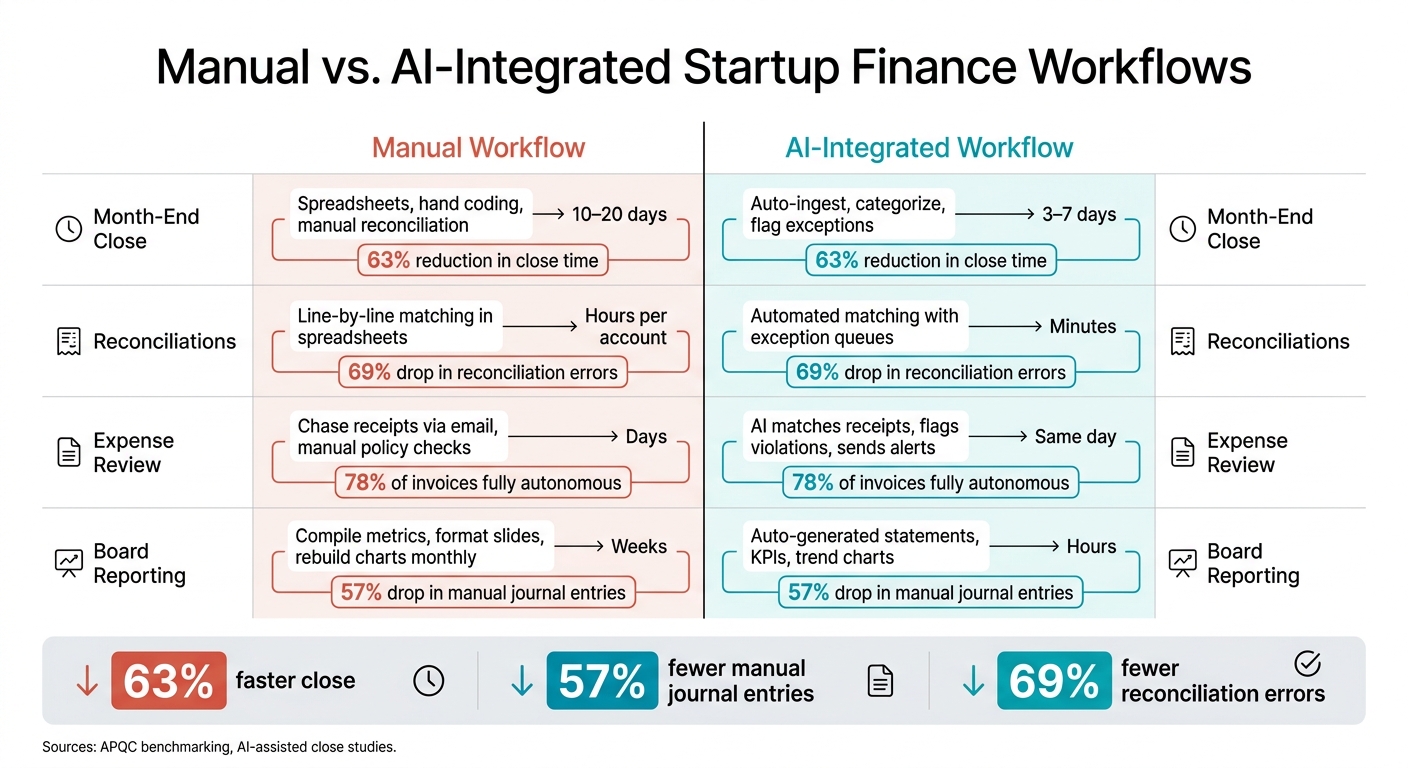
A few numbers stand out. AI-assisted close work has been tied to a 63% drop in close time, a 57% drop in manual journal entries, and a 69% drop in reconciliation errors. That matters when you need clean burn and runway numbers before hiring, fundraising, or a board meeting.
At a basic level, this article says something simple: finance breaks when startups keep adding tools but not systems. AI helps by doing repeat work in the background and sending edge cases to a person. The goal is not to remove finance judgment. The goal is to make sure your team spends time reviewing numbers instead of rebuilding them.
| Area | Manual workflow | AI-supported workflow |
|---|---|---|
| Close | Spreadsheets and hand checks | Auto-import, coding, exception review |
| Reconciliation | Line-by-line matching | Auto-match with flagged issues |
| Expenses | Receipt chasing by email | Receipt matching and policy flags |
| Reporting | Rebuilt each month | Auto-updated dashboards and metrics |
| Tax records | Scattered files | Documents linked to transactions |
If I were reading this to find the main point fast, it would be this: start with close, then move to AP, expenses, and tax records, while keeping a person in the review loop.
Integrating AI Tools Across Financial Workflows
sbb-itb-17e8ec9
The core startup finance problems AI is built to solve
Startup finance usually doesn’t break all at once. It slips through small, repeated mistakes that slow the close, skew reporting, and add tax risk. When data lives in different tools, those mistakes stack up fast.
AI is a good fit for finance work that happens again and again, follows set rules, and depends on speed. That’s often where manual work starts to crack first. And one of the first places you feel that pressure is the close, where delays turn into stale decisions.
How a slow month-end close delays decisions
APQC benchmarking puts the median monthly close at around 6.4 calendar days, with top performers finishing in 4.8 days or less.
For a startup, those extra days create a real delay in decision-making. If burn rate and runway aren’t locked until weeks after month end, hiring plans, marketing spend, and investor talks get pushed back. On top of that, board materials end up built on numbers that are already out of date.
AI helps by handling categorization and reconciliation throughout the month, not just at the end. That shifts the close from a rebuild to a review.
Even if the close finishes on schedule, coding mistakes can still throw off the numbers.
How coding errors distort burn rate and runway
One miscoded transaction can change the story your finance reports tell. If $50,000 in engineering payroll gets booked to "Professional Services" instead of R&D, product development spend looks lower than it is, and gross margin can seem better than it actually is. That kind of mistake affects what leaders see when they make hiring and fundraising calls.
AI helps by learning your usual coding patterns, keeping chart-of-accounts use consistent, and flagging entries that look wrong, like a payroll-sized charge posted to "Office Supplies."
That means burn rate and runway are based on committed spend, not accounting noise.
The same discipline matters during tax season, when missing records can turn into risk fast.
Why clean records matter for tax and compliance
The IRS requires proof that a business expense was paid and was business-related, including receipts, invoices, and proof of payment. For most startups, those records end up spread across inboxes, expense tools, and shared drives. When that happens, missing documentation becomes a filing-time problem, not just an admin headache.
R&D tax credits demand even more. To claim them, startups need records created while the work is happening, not pieced together months later. That means linking engineering payroll, contractor costs, and project-level proof like tickets and code commits to qualifying work under IRS rules.
AI helps by attaching documentation as transactions move through the system, spotting missing vendor tax forms, and organizing R&D payroll data during the year.
The next step is turning those fixes into automated workflows.
How AI improves financial workflows in practice
Now that the weak spots are out in the open, here’s what AI does to fix them in day-to-day finance work. It usually starts with classification, then moves into monitoring and reporting.
Automated categorization, reconciliation, and document capture
AI categorization reads transaction details and matches them against past coding patterns. Over time, it learns repeat behavior, like AWS going under Cloud Infrastructure and Google Ads under Paid Acquisition. When a new vendor shows up, it can suggest a category based on earlier confirmations.
One generative-AI invoice setup cut processing time from 5 days to 2 hours, dropped manual interventions from 30% to 3%, and saved $150,000 per year.
On the document side, AI-based OCR pulls out vendor, date, amount, tax, and line-item data from PDFs, email attachments, and scanned receipts. Then it links each record straight to the matching ledger entry. That means the audit trail gets built during the month, not rushed together at filing time. Human reviewers step in only for flagged exceptions, such as:
- Large one-time charges
- Mismatched amounts
- Unfamiliar vendors
Once transactions are classified, AI can track cash and spend as it happens.
Real-time monitoring for cash flow, spend, and forecast changes
Old-school reporting runs monthly. AI updates cash, spend, and forecasts on a continuous basis by pulling data from banks, cards, payroll, and revenue platforms as transactions clear.
With that live data, the system can flag spend spikes, overdue invoices, and slowing collections. For startups, the big one is runway drift caused by hiring, contract changes, or slower revenue. Lucid Financials surfaces these signals straight in Slack, so founders see them where work is already happening instead of digging through a static monthly PDF.
With live data in place, founders can ask finance questions directly.
Asking financial questions in plain language
Founders can ask, "What was our burn?" or "How does runway change if we add 3 hires in Q1?" The AI reads the question, maps it to the right accounts and time periods, and returns a number with context.
Scenario planning works the same way. Ask what happens if those hires move to Q2, and the system recalculates burn and runway while showing the cost drivers behind the change.
Giorgio Riccio, founder of Lumino Technologies, described what this looked like in a live meeting:
"We pulled up the Lucid platform in a meeting with a VC and they were extremely impressed. His jaw just about dropped when he saw October was even up to date."
Where to apply AI first in a startup finance stack
Manual vs. AI-Integrated Startup Finance Workflows: Time & Accuracy Gains
Not every finance workflow gets the same lift from AI. The best places to start are the ones where messy handoffs between tools create the most manual work.
A simple rule helps here: start where the pain is sharp, the delays are longest, and the exceptions pile up. In most startup finance teams, that means picking the workflow that slows everything else down.
Start with month-end close and automated reporting
For most startups, month-end close is the best first AI use case. That delay can be a big problem when burn rate and runway shift fast.
AI helps trim close time by auto-importing transactions, categorizing routine entries, and sending exceptions to a person for review. It can also draft journal entries for accruals, prepaid expenses, and deferred revenue. A controller or fractional CFO can then approve those entries before posting. The result: a close that can move from two weeks down to 3–7 days, with clean financial statements ready for investors.
Board reporting is usually the next step. Once close data is clean, AI can generate investor-ready dashboards from that same data and keep them updated on a rolling basis instead of rebuilding them from scratch every month.
Add accounts payable, expenses, and tax-ready documentation
After close, the next choke point is document-heavy work that still leans on manual review.
AI can pull invoices from email attachments, PDFs, and vendor portals, then extract the vendor name, date, due date, line items, and amount automatically. It can also suggest account codes - for example, sending a SaaS invoice to Software – Productivity - and route the bill for approval based on your rules, like dual sign-off for anything over $5,000.
A case study with the accounting firm Countsy found that 78% of invoices became fully autonomous after the firm adopted an AI-powered AP platform, which meant no human touch was needed. Another AP automation project reported 70% faster invoice processing by combining OCR, AI classification, and automated routing. It also moved month-end close from two days late to on schedule.
On the expense side, AI matches receipts to card transactions, flags out-of-policy spend, and catches duplicate reimbursements before they reach the books. It also keeps each invoice, receipt, and journal entry attached to its transaction, so tax filings and R&D credit documentation are ready when needed.
Manual vs. AI-integrated workflows: a side-by-side comparison
The gap stands out when you look at manual and AI-integrated workflows side by side:
| Workflow Area | Manual Process | AI-Integrated Process | Time to Complete |
|---|---|---|---|
| Month-end close | Download statements, code line by line, reconcile manually | Auto-ingest, categorize, flag exceptions for review | 10–20 days → 3–7 days |
| Reconciliations | Match transactions account by account in spreadsheets | Automated matching with exception queues | Hours per account → much less time |
| Expense review | Chase receipts via email, check policy manually | AI matches receipts, flags violations, sends alerts | Days → same day |
| Board reporting | Compile metrics, format slides, rebuild charts monthly | Auto-generated statements, KPIs, and trend charts | Weeks → hours |
The pattern is hard to miss: the work shrinks, and the numbers stay ready to share. That matters when a VC asks for financials with little warning or due diligence starts out of the blue.
How to implement AI-driven finance operations with the right controls
Set up clean data, approval rules, and human review
Speed helps only when your controls keep up.
AI is only as good as the data feeding it. If your data is messy, the output will be messy too. That’s why the first step is simple: clean up your chart of accounts and make sure your core systems are in sync. If your historical data has errors, AI won’t fix them for you. It will scale those errors.
After that, turn your finance policies into clear approval rules. For example:
- Auto-approve small expenses that are coded correctly
- Require manager sign-off for travel
- Flag any expense above $5,000
You still need segregation of duties. The person who prepares a journal entry or reconciliation should not be the one approving it. Companies with stronger AI-enabled accounting controls report fewer material weaknesses, with IT controls standing out in particular.
Human review matters too. Low-confidence or unusual entries should go straight to a person for review. A common threshold is anything below 85% to 90% confidence before the books close. Review exceptions every week. As people correct those items, that feedback can go back into the model and help cut down the exception queue over time.
When full-stack startup finance support makes sense
There comes a point when finance work stops being “just bookkeeping.”
Tool-based AI workflows can handle a lot. But once tax, reporting, and CFO-level work start piling up, the job can get too big for a founder or a small team to manage well on their own. You’ll usually see this shift when a startup hits mid-five-figure to six-figure monthly recurring revenue, has several investor stakeholders asking for regular reporting, is adding headcount, and is dealing with tax items like R&D tax credits and multi-state sales tax.
At that stage, a full-stack finance partner can cut down handoffs by handling bookkeeping, tax, tax credits, and CFO support inside one system. Lucid Financials is built for startups and connects directly with Slack, so founders can ask plain-English questions about runway or burn and get real-time answers. It provides clean books within seven days and investor-ready reporting. Every AI-generated output is reviewed by an experienced finance team, so automation doesn’t trade accuracy or compliance for speed.
Conclusion: Key gains startups should expect from AI
Once the controls are set, track the rollout with a few hard numbers: close speed, automation rate, and forecast accuracy.
AI-assisted close processes have cut month-end timelines from an average of 8.7 days to 3.2 days. That’s a 63% reduction. They’ve also led to a 57% drop in manual journal entries and a 69% drop in reconciliation errors.
After rollout, keep an eye on four core metrics:
- Days to close
- Auto-categorization rate
- Hours saved per month
- Forecast accuracy - the variance between projected and actual cash
The result is straightforward: fewer errors, better cash visibility, and faster decisions.
FAQs
How do I know if my startup is ready for AI in finance?
You’re ready for AI in finance when day-to-day admin work starts eating too much time. If your team is stuck chasing receipts, reconciling bank accounts, or keying in invoices by hand, that’s a clear sign the current setup is slowing you down. The same goes if incomplete records or miscoded transactions are starting to create more risk.
You also need clean, connected inputs before AI can do useful work. That means reconciled bank, credit card, and payroll accounts, a standardized chart of accounts, and 12–24 months of historical data in USD. Your records should also clearly separate revenue, COGS, and expenses.
What finance workflow should we automate first?
Start with bookkeeping and reconciliation. These are high-volume, rule-based tasks that sit underneath every other finance process. If you automate transaction matching and categorization first, your data stays clean and accurate from the start.
That gives you a solid financial base before you move into more complex work like forecasting, scenario modeling, or real-time reporting.
How much human review should stay in the process?
Human oversight still needs to be part of the process. AI is good at repetitive work, but strategic calls and accuracy still depend on human judgment.
About 5% to 10% of financial transactions include exceptions that need a person to step in. That’s why AI-generated transactions should be reviewed before they’re posted to the general ledger. At the same time, finance leaders should stay in charge of assumptions, anomaly checks, and final report sign-offs.