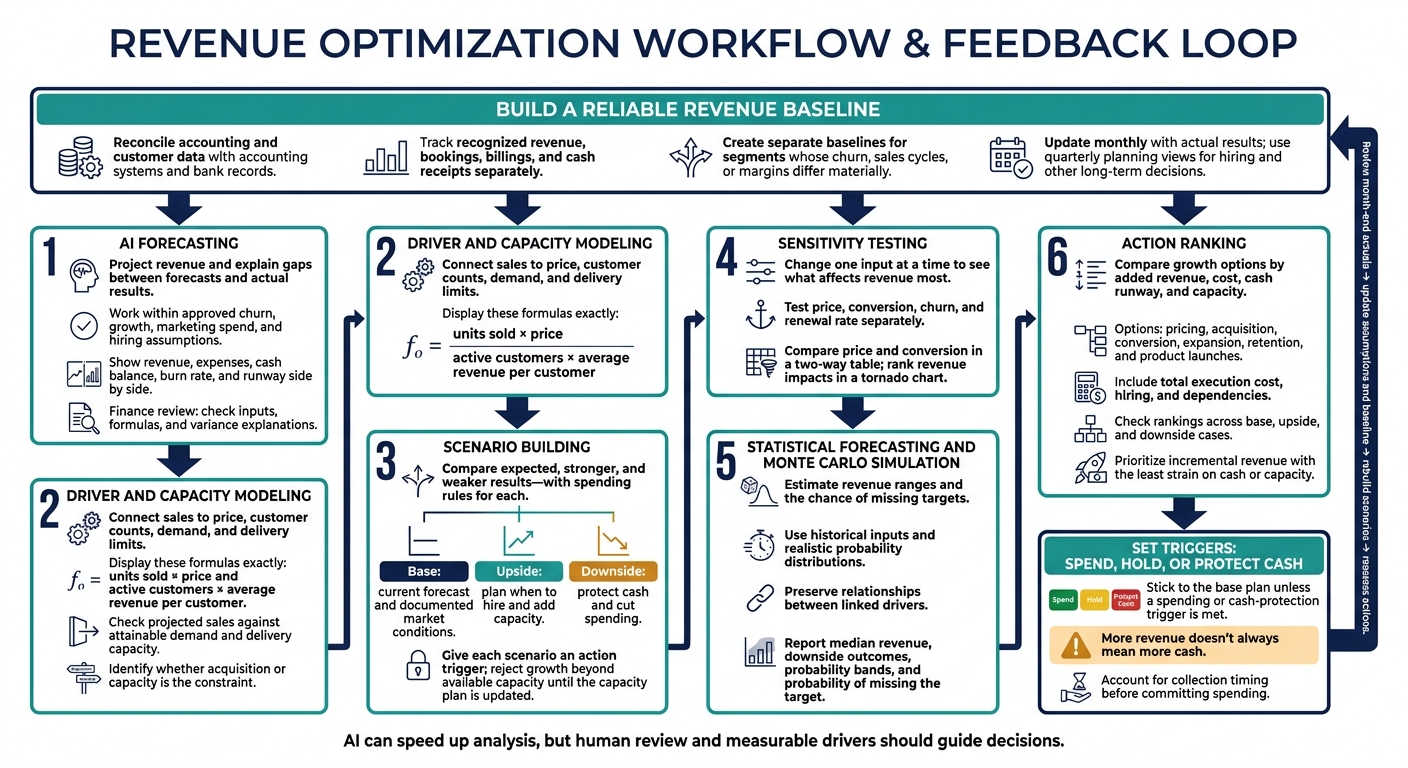
I start revenue scenario planning with one question: Which growth actions can the business afford if sales fall short? I build a baseline from actual results, then test base, upside, and downside cases before committing cash.
Here are the six techniques I use:
- AI forecasting: Project revenue and explain gaps between forecasts and actual results.
- Driver and capacity modeling: Connect sales to price, customer counts, demand, and delivery limits.
- Scenario building: Compare expected, stronger, and weaker results - with spending rules for each.
- Sensitivity testing: Change one input at a time to see what affects revenue most.
- Statistical forecasting and Monte Carlo simulation: Estimate revenue ranges and the chance of missing targets.
- Action ranking: Compare growth options by added revenue, cost, cash runway, and capacity.
For example, I wouldn’t approve a 10% marketing spend increase without checking when sales - and cash receipts - might follow. More revenue doesn’t always mean more cash. I update the model monthly and use <u>clear action triggers</u>, with a finance review, to decide when to spend, hold, or cut.
Revenue Scenario Optimization: From Forecasts to Action
Scenario Analysis in Excel - Adjust Price, Cost & Quantity | Excel for Business Finance
sbb-itb-17e8ec9
Build a Reliable Revenue Baseline
Use a base scenario as your working baseline. Update it monthly with actual results, and use quarterly planning views for hiring and other long-term decisions.
Connect directly to accounting systems and bank records to reconcile accounting and customer data. This keeps scenario inputs consistent. Track recognized revenue, bookings, billings, and cash receipts separately - they aren’t interchangeable.
Once the data is clean, create separate baselines for segments whose churn, sales cycles, or margins differ materially.
After any material change to the baseline, rebuild secondary scenarios using the revised assumptions. Keep every scenario tied to the current baseline.
1. Use AI to Forecast Revenue and Explain Variances
Data Needed
Give AI revenue projections, expense forecasts, and month-end actual results. Start with current baseline assumptions, then use AI to model variations. Test how each driver changes revenue to guide scenario decisions.
Revenue Drivers
Keep AI within approved assumptions: churn rate, growth rate, marketing spend, and hiring plans. Use these limits to build upside and downside cases.
If marketing spend rises 10%, define the expected sales lift and the timing of that lift.
Decision Outputs
Show revenue, expenses, cash balance, burn rate, and runway side by side. Ask AI to flag anomalies and compare forecasts with actual results so you can see which assumptions drive the biggest revenue changes.
Validation Checks
Review forecasts at month-end and whenever key drivers change. Before approving each revised forecast, have a finance lead check inputs, formulas, and variance explanations. Pay particular attention to assumptions that affect revenue, burn, and runway.
2. Model Revenue Drivers and Check Demand and Capacity
Data Needed
Gather monthly actuals, sales volumes, prices, active customers, and average revenue per customer. Include growth and churn metrics, marketing spend, sales pipeline data, and hiring plans or workforce allocation. Your model should account for both customer demand and your ability to deliver.
Revenue Drivers
Start with units sold × price or active customers × average revenue per customer. Link acquisition and conversion assumptions to new customers, then factor in churn and expansion. Set timing assumptions so projected revenue falls in the right month.
Decision Outputs
Build near-term projections using expected pipeline conversions and available delivery capacity. Compare the forecast with addressable demand and attainable market share over the same period. Show the gap between potential sales and revenue you can deliver so it’s clear what limits the forecast.
Validation Checks
When pipeline and demand estimates disagree, use the realistic scenario as your baseline. If pipeline exceeds capacity, review hiring plans and workforce allocation before accepting the forecast. If projected sales exceed attainable demand, revisit conversion and market-share assumptions. Use the constraint you identify to decide whether to prioritize acquisition or capacity expansion.
3. Build Base, Upside, and Downside Scenarios
Data Needed
Build the base case around your current revenue forecast, expense forecasts, and documented market conditions.
Revenue Drivers
Adjust only the key revenue drivers: demand, pricing, conversion, retention, timing, and capacity. Check each change against external market conditions before combining assumptions.
Decision Outputs
Compare the three scenarios to guide business decisions. Use the downside case to protect cash and cut spending. Use the upside case to plan when to hire and add capacity. Give each scenario an action trigger so the next review makes clear when to shift from the base case to upside or downside.
Validation Checks
Check that each scenario’s assumptions support its projected results. Reject upside growth that exceeds available capacity until you update the capacity plan. Use AI vs. traditional scenario planning tools to check formulas and flag assumptions that don’t line up. Compare the gaps between cases to decide which drivers need sensitivity testing next.
4. Measure Revenue Sensitivity to Key Drivers
Once scenario gaps show where uncertainty matters most, test which drivers change revenue the most.
Data Needed
Use the base scenario as the control. Change one driver at a time to isolate its impact.
Revenue Drivers
Test price, conversion, churn, and renewal rate separately. Keep churn and renewal rate distinct: churn measures losses, while renewal rate measures contract renewals.
Decision Outputs
Use a two-way table to compare price and conversion trade-offs. Rank drivers by revenue impact in a tornado chart, with the largest impact first.
Validation Checks
Base test ranges on actual performance, and update the model with month-end results. When setting priorities, compare each driver’s revenue impact with its effects on cash flow and runway.
Check linked drivers first: changing one input can break downstream links in the model. Use the largest sensitivities to choose which inputs need statistical testing next.
5. Apply Statistical Forecasts and Monte Carlo Simulation
Once you’ve identified the most sensitive drivers, use statistical simulations to measure revenue risk. Feed your baseline and sensitivity results into the simulation model.
Data Needed
Use historical revenue drivers, expense assumptions, and demand data to set input ranges and fit probability distributions. Run many Monte Carlo simulations, sampling from those distributions to build a probability distribution for revenue.
Revenue Drivers
Simulate price, conversion, churn, renewals, and sales capacity across realistic ranges. Keep relationships between linked drivers intact.
Decision Outputs
Report median revenue, downside outcomes, and probability bands, including the probability of missing your target. Use these results to set triggers for pricing, hiring, capacity, or spending.
Validation Checks
Compare management’s forecast with the simulated outcomes. Revise assumptions that produce ranges that are too narrow to justify, excessive downside risk, or targets that depend on best-case inputs. Use the simulation results to decide which revenue actions deserve funding and which assumptions need revision.
6. Rank Revenue Actions by Impact and Feasibility
Data Needed
Compare pricing, acquisition, conversion, expansion, retention, and product launch actions using revenue projections, expense forecasts, historical actuals, and current market conditions. Include hiring plans and execution dependencies so each action reflects its total execution cost.
Revenue Drivers
Tie each action to the variable it changes: price, marketing spend, conversion, customer expansion, churn, or new-product sales. Model the action against that driver, then calculate its revenue and expense impact. For expansion or product launches, include the hiring plan and its effect on burn rate and cash flow before committing.
Decision Outputs
After sensitivity testing, rank actions that affect the most important drivers by incremental revenue. Then check those rankings against cash runway and capacity limits in the base, upside, and downside cases. Prioritize the action that delivers the highest incremental revenue with the least strain on cash or capacity. Spell out dependencies, including any hiring or added capacity, and include their effects in the forecast.
Validation Checks
Compare the action list across all three scenarios to see whether each action still ranks well. Update rankings with month-end actuals, and rerun sensitivity tests when core assumptions change. If an upside or downside case becomes the new baseline, use it to update the ranking and check the action list again. Use the ranked list to select the few actions that move into execution.
Use Scenario Results to Choose Actions
Turn ranked actions and scenario results into real-time financial insights that serve as clear rules for running the business. After sensitivity analysis and simulation, set triggers for each scenario: when to increase spending, hold steady, or protect cash. Include collection timing in the results, since late payments can change which action makes sense.
Example thresholds below are illustrative. Use this structure to set your own spending, hold, and cut thresholds.
Scenario Key assumptions Quarterly revenue range (USD) Cash impact Action trigger Management response Base Current spending; stable demand $900K–$1.1M Neutral or positive cash flow Revenue stays within 5% of forecast Hold spending; follow the current plan. Upside Marketing spending up 10%; high demand $1.2M–$1.5M Higher cash burn, offset by higher revenue Revenue exceeds $1.1M in Month 1 Increase growth spending; start hiring. Downside Lower demand; higher churn $600K–$850K Negative cash flow; pressure on cash runway Revenue drops below $800K for two consecutive months Protect cash; freeze hiring; cut spending that isn't needed.
Stick to the base plan unless a spending or cash-protection trigger is met.
Conclusion: Review and Update Your Scenarios
After testing scenarios and ranking actions, make review a routine. Document assumptions and use sensitivity results to keep forecasts focused on the drivers that matter most.
Feed actual results back into the model to keep it useful. Watch for manual overrides: they can block automated updates and leave outdated inputs in place. When a scenario matches actual revenue more closely, make it the base scenario. Then reassess which actions need funding, hiring, or a pullback.
Revisit the model whenever market conditions or planned spending change. AI can speed up analysis, but human review and measurable drivers should guide decisions.
FAQs
How can I model revenue with limited historical data?
Turn founder intuition into revenue projections with the triangular distribution method: set minimum, maximum, and most likely values for each assumption. Keep the model focused on 2–4 key assumptions, such as churn rate or sales cycle length.
Support your data with industry benchmarks and market research [3]. Lucid Financials provides real-time, data-backed insights to help ground your assumptions [3][4].
How do I account for seasonality in revenue scenarios?
Review 12 to 24 months of historical data for each revenue stream to spot seasonal patterns. Use those patterns to shape your financial model’s assumptions rather than relying on flat growth rates. Account for seasonal changes in customer acquisition costs and conversion rates across your base, best-case, and worst-case scenarios.
Lucid Financials makes this process easier with real-time reporting and automated insights.
How can I tell if my revenue model is overfitting?
Overfitting happens when your model fits historical data too closely and struggles with new data. Track Mean Absolute Percentage Error (MAPE) and Root Mean Square Error (RMSE). Strong accuracy on historical data paired with poor accuracy on new data can point to overfitting.
Lucid Financials uses real-time data and industry benchmarks to keep revenue projections grounded in reality - not stale or cherry-picked information.