Payroll tax errors get expensive fast. If I had to sum this up in one line, it’s this: AI helps me catch payroll tax problems before payroll is final, cut manual review time, and keep cleaner records for filings and audits.
Here’s the short version:
-
AI checks inputs before payroll runs
It can spot missing worker data, tax setting mismatches, and pay issues early. -
AI flags odd payroll changes
That includes unusual withholdings, bonus amounts, or classification problems. -
AI helps with filings and records
It can track deadlines, log reviews, and keep support files in one place. -
People still make the final call
AI can flag issues, but a person still needs to review tax decisions and approvals.
A few numbers stand out:
- AI-powered payroll tools are tied to a 60%–80% drop in processing errors
- Manual payroll work can drop by up to 70%
- Finance teams report saving about 5.4 hours per week
If I’m running a startup, the main lesson is simple: start where payroll mistakes hurt most - multi-state taxes, worker classification, and payroll changes. Then add AI checks, approval rules, and a monthly review habit.
Quick comparison
| Area | Manual payroll tax work | AI-assisted payroll tax work |
|---|---|---|
| Error checks | Problems often show up after payroll | Issues can be flagged before payroll closes |
| Multi-state tracking | Easy to miss rate or location changes | Tax and jurisdiction mismatches are easier to catch |
| Review time | More hand-checking | Less manual review |
| Audit records | Files may be scattered | Review logs and source records are easier to track |
| Team role | Staff does all checking | AI handles repeat checks; staff handles judgment |
One more point matters here: late 1099 filings can cost $340 per form after August 1, and threshold rules can change. That’s why input checks and deadline tracking matter so much as headcount grows.
If I strip the article down to its core message, it’s this: AI does the repeat checking, and my team handles the exceptions. That mix can help me stay on time, cut filing risk, and keep payroll records ready when questions come up.
sbb-itb-17e8ec9
How AI reduces payroll tax compliance work
AI takes a lot of the repeat checking out of payroll tax compliance. For small teams, that means fewer manual reviews and a better shot at catching mistakes before payroll is locked in.
Organizations using AI-powered payroll systems report a 60–80% drop in processing errors, and AI-driven validation can reduce manual payroll intervention by up to 70%. That matters most when payroll gets messy - think multiple states, different pay types, and a pile of filing deadlines.
AI tends to help in three parts of the process: before payroll runs, during exception checks, and after filings.
How AI reviews tax settings, jurisdictions, and worker data before payroll runs
Before payroll is finalized, AI can scan employee records and flag missing fields, worker classification issues, or mismatches in tax settings. It can also help calculate gross pay, deductions, and tax rates with more consistency across multi-state payroll setups.
AI document extraction can pull data straight from timesheets, tax forms, and payroll registers, which cuts down on manual entry mistakes. In plain English, it helps catch setup problems before they turn into payroll problems.
How AI flags problems in withholdings, bonuses, and payroll changes
Real-time anomaly detection can flag missing entries, classification errors, and unusual pay patterns for review before payroll is finalized. That includes things like odd withholding amounts, bonus payments that look off, or payroll changes that don’t match past records.
AI can point out the exception, but a person still makes the final compliance call before deposits or filings go out. That’s an important line. The system does the heavy lifting on review, while the team handles judgment.
How AI supports filings, deadline tracking, and audit-ready records
Tracking payroll compliance is one of the biggest time drains in the process. AI can help flag discrepancies before filings are submitted and keep organized logs of reviews, approvals, and exceptions for audits.
Finance professionals using AI tools report saving an average of 5.4 hours per week on tasks like these. That gives the team more time to deal with exceptions, approvals, and other work that still needs a human eye.
How to set up AI for payroll tax compliance, step by step
Use a phased rollout. First, check inputs. Then compare outputs. Add controls before go-live. That approach tends to work best because it starts with the payroll tax steps where mistakes can hurt the most.
Map your payroll process and find the high-risk steps
Start by mapping where payroll data comes from: general ledger, timesheets, payroll registers, W-2s, and 1099s. Then look at each step that still depends on manual entry or hand-done calculations, like gross pay, deductions, and tax rate applications. Those are usually the best places to bring in AI support.
Pay close attention to multi-state operations. That’s where tax rate accuracy and jurisdiction mappings matter most, and where small errors can snowball fast. Before rollout, clean up the source data so AI can flag payroll errors instead of getting tripped up by messy inputs.
After you’ve mapped the highest-risk steps, run AI in parallel with your current process to see whether it matches manual results.
Set compliance KPIs and run AI in parallel before going live
Set baseline targets for accuracy, exceptions, and review time. Then run AI and manual payroll side by side before go-live and compare the results.
This side-by-side test gives you a clear read on whether the system is doing the job or missing the mark. If outputs line up and stay steady, you’re in a much better spot to move forward.
After the outputs are stable, lock down changes with approvals and scheduled reviews.
Add approvals, access controls, and monthly review routines
Once AI is live, keep people involved where judgment calls are needed. Limit who can change tax settings or jurisdiction mappings, and require review before any change moves into production.
It also helps to set a monthly review routine. Check that tax rates and jurisdiction mappings still match current work locations. Payroll data shifts over time, and if nobody looks, bad settings can sit there longer than you’d think.
Human review still handles judgment calls, context, and compliance decisions.
Manual vs. AI-assisted payroll tax compliance: a side-by-side look
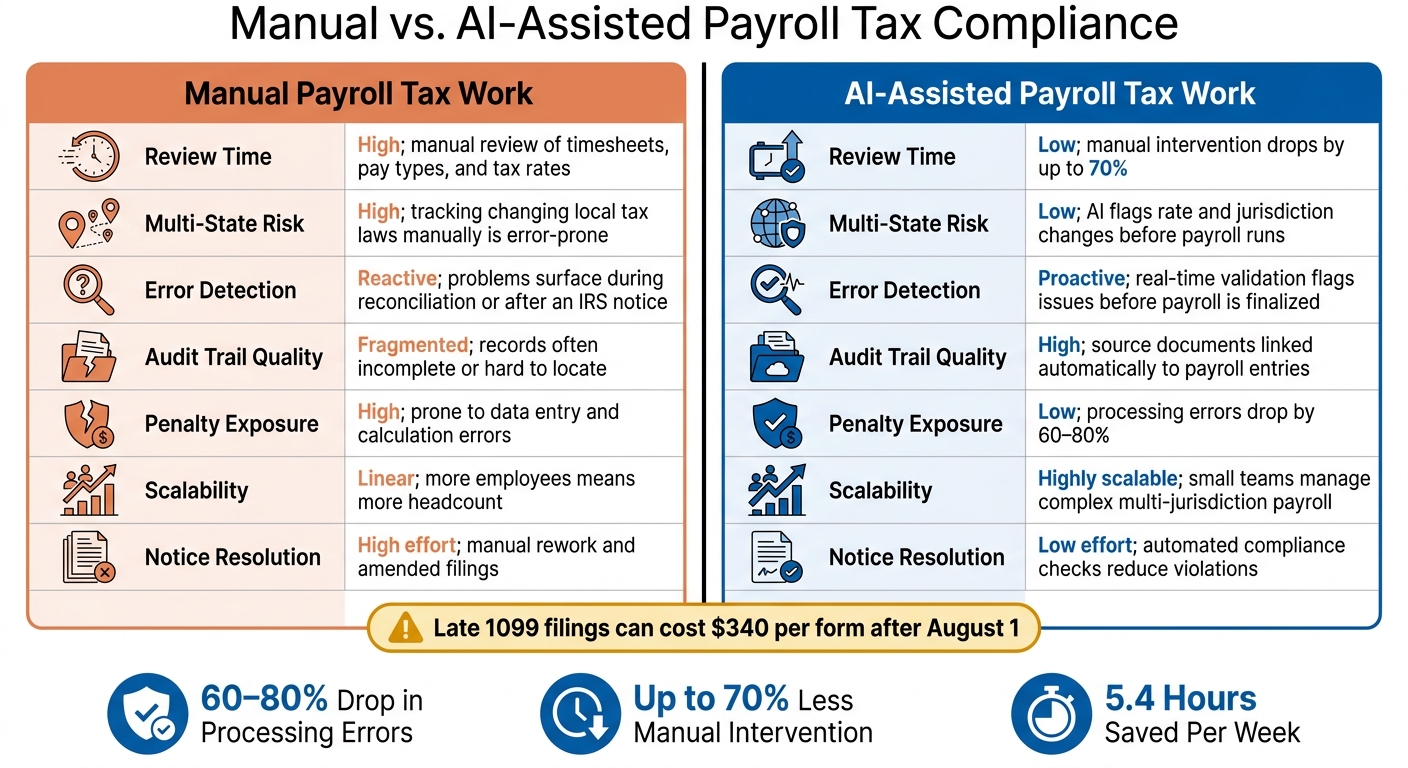
Manual vs. AI-Assisted Payroll Tax Compliance: Key Differences
Once AI is up and running and your review checks are set, it helps to compare manual and AI-assisted payroll tax compliance side by side. The gap shows up fast in error rates, audit prep, and how much rework your team has to do. The table below shows where AI changes the workflow the most.
Here’s the manual vs. AI-assisted breakdown.
| Factor | Manual | AI-Assisted |
|---|---|---|
| Review Time | High; manual review of timesheets, pay types, and tax rates | Low; manual intervention can drop by up to 70% |
| Multi-State Risk | High; tracking changing local tax laws manually is error-prone | Low; AI flags rate and jurisdiction changes before payroll runs |
| Error Detection | Reactive; problems surface during reconciliation or after an IRS notice | Proactive; real-time validation and anomaly detection flag issues before payroll is finalized |
| Audit Trail Quality | Fragmented; records often incomplete or hard to locate at year-end | High; source documents are linked automatically to payroll entries |
| Notice Resolution Effort | High; requires manual rework, amended filings, and back-and-forth | Low; automated compliance checks reduce violations and rework |
| Scalability | Linear; more employees or states means more headcount | Highly scalable; small teams can manage complex, multi-jurisdiction payroll |
| Penalty Exposure | High; prone to data entry and calculation errors | Low; processing errors can drop by 60–80% |
Late 1099 filings can cost $340 per form after August 1.
Where AI saves time and cuts filing risk
The biggest shift comes down to timing. Manual payroll tax workflows usually catch problems after the damage is already done - a misclassified worker, the wrong withholding rate, or a missed threshold. AI moves that check earlier. It flags issues before payroll runs, not after a notice lands in your inbox.
For startup operators, that means fewer last-minute fixes before payroll closes, less cleanup after amended filings, and cleaner records if an audit comes up. Late contractor filings can still create costly compliance work, which is why threshold tracking matters. A good example is the 2026 increase in the Form 1099-NEC reporting threshold from $600 to $2,000 under the One Big Beautiful Bill Act. That change can help your team avoid filing forms you don’t need - or missing ones you do.
When payroll rules, worker locations, and filing thresholds keep shifting, those workflow differences aren’t small. They shape how much risk your team carries from one payroll run to the next.
Conclusion: Keeping payroll tax compliance under control as your startup grows
As your startup grows, payroll tax compliance gets harder. And when mistakes happen, they cost more.
The upside is pretty straightforward: AI can handle repeat compliance checks, while your team steps in for the exceptions. That means fewer errors and less manual review. But people still need to make the tough calls, especially around worker classification edge cases, multi-entity setups, and other high-impact cases.
For founders and operators, the next move is simple: start with the payroll tasks that carry the most risk. Look at where your current process is most likely to break down - multi-state filings, worker classification issues, and payroll changes - then use AI to validate inputs and monitor for problems. Pair that with clear approval workflows and a monthly review routine so nothing falls through the cracks.
Key takeaways for founders and operators
Focus on your highest-risk payroll steps. Use AI for validation and monitoring. Keep human approvals and monthly reviews in place. That helps payroll tax compliance stay accurate, on time, and audit-ready as headcount grows and your setup gets more complex.
FAQs
How does AI catch payroll tax errors before payroll closes?
AI-powered payroll systems catch errors before payroll closes with continuous, real-time monitoring. Instead of waiting for a manual end-of-month review, they check data as it comes in and compare records across accounting, HR, and banking systems.
They also use anomaly detection to spot problems early. That can include unusual overtime, duplicate bank accounts, or figures that don’t match. On top of that, automated checks against current tax tables and rules help catch discrepancies before they turn into costly compliance problems.
What payroll tax tasks still need human review?
AI can take care of routine payroll work. It’s good at repetitive tasks, and that can save a lot of time.
But human review still matters when the situation gets messy or the stakes are high. That includes R&D tax credit eligibility, cross-border transfer pricing, tricky tax interpretations, and sensitive employee payroll exceptions.
People should also step in when:
- AI confidence drops below 90%
- Outputs need regular audit checks
- Final tax returns must be matched against source documents like W-2s and 1099s
That last part is a big one. Even if the system looks right at a glance, the final return should still be checked against the actual paperwork. In payroll and tax, small mistakes can snowball fast.
What should I automate first in payroll tax compliance?
Start with accurate employee records. That means keeping federal and state tax details, wage rates, and work classifications up to date.
From there, pull financial data from bank feeds, payment platforms, and accounting software into one standardized format. With everything lined up the same way, it becomes much easier to automate tax calculations and filings, cut manual errors, and stay compliant as your team grows.