

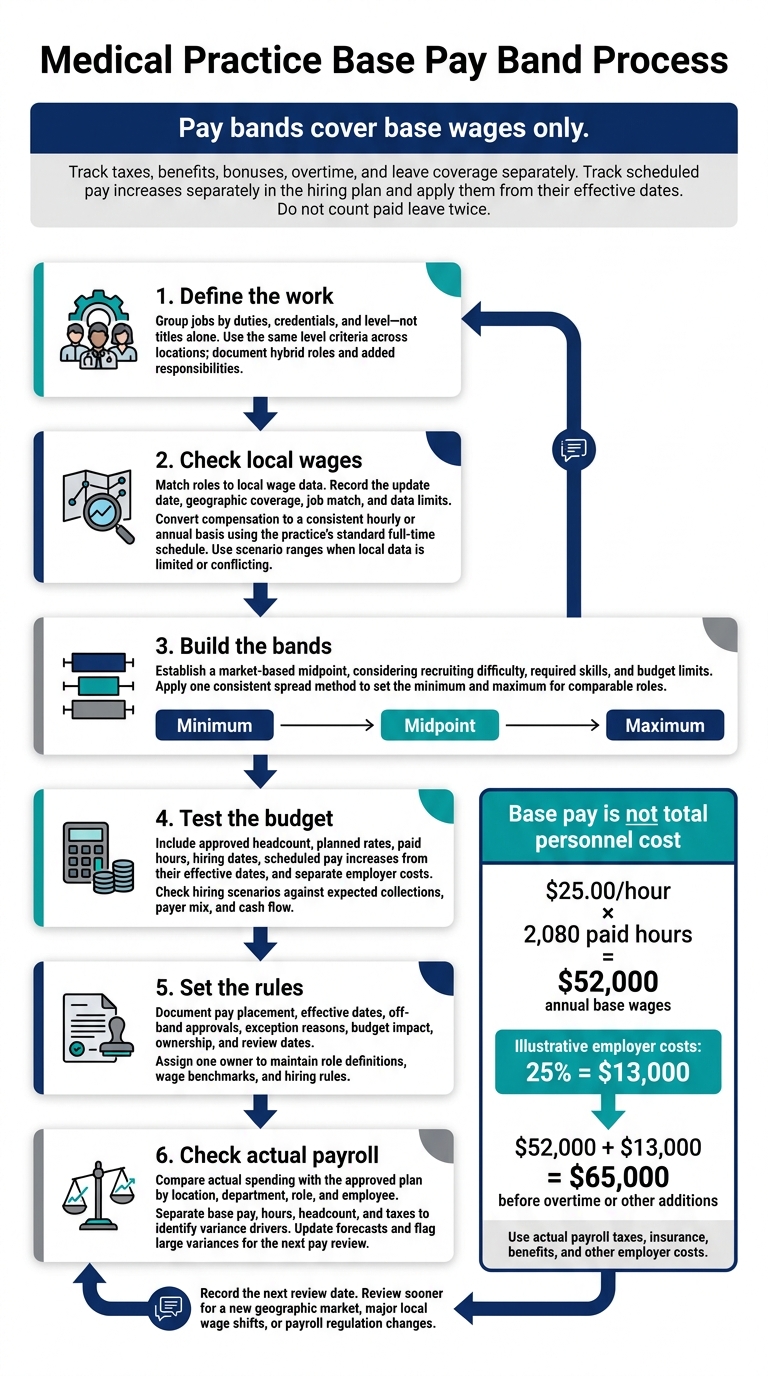
I set staff pay bands by matching job duties to local wages, defining minimum, midpoint, and maximum base rates, and checking those rates against the staffing budget.
The hourly rate is only part of the cost. At $25 per hour for 2,080 paid hours, annual base wages total $52,000. Adding an illustrative 25% in employer costs brings the budget to $65,000, before overtime or other additions.
Here’s the process I use:
- Define the work: Group jobs by duties, credentials, and level - not titles alone.
- Check local wages: Compare matching roles and convert pay data to the same hourly or annual basis.
- Build the bands: Use a market-based midpoint and one consistent method for setting minimums and maximums.
- Test the budget: Include headcount, hours, hiring dates, scheduled pay increases, and separate employer costs.
- Set the rules: Document pay placement, off-band approvals, ownership, and review dates.
- Check actual payroll: Compare spending with the approved plan and update forecasts.
My rule: <u>pay bands cover base wages only</u>. I track taxes, benefits, bonuses, overtime, and leave coverage separately so you can see what each hiring decision will cost.
How to Set Medical Practice Staff Pay Bands
Define Job Families and Levels
Group Jobs by Duties and Qualifications
Use a job-family template to group roles with similar duties, credentials, and pay logic. Update each description to reflect the work people actually do, not just their payroll title.
For hybrid positions that mix clinical, administrative, or lead duties, create a custom role entry. These definitions provide the basis for comparing pay across locations and assigning pay bands.
Use the Same Level Criteria Across Locations
Apply the same criteria at every location so the same job maps to the same pay level. Keep role definitions consistent, and adjust pay only for differences in location, budget, or growth.
Document any added responsibilities so managers across sites can assign the role to the same band and make accurate local wage comparisons.
sbb-itb-17e8ec9
Research Local Wages and Make Data Comparable
Match Jobs to Local Wage Data
Use the role definitions from the previous section to compare each job family and level with local wage data. Start with industry templates for standard roles, then adjust for local pay rules and complex hiring structures.
Keep a benchmark record for each role. Include the last update date, geographic coverage, job match, and data limits. When local data is limited or conflicting, use scenario ranges rather than treating broad medians as exact local rates.
Separate Base Pay and Standardize Rates
Track base pay separately from employer taxes, benefits, planned pay increases, bonuses, and effective dates. This makes hiring plans easier to update and keeps pay-band data clean.
If a source reports monthly compensation, convert it to hourly or annual rates using the practice’s standard full-time schedule. Use these standardized rates to set the minimum, midpoint, and maximum for each pay band.
How to Calculate Pay Rates in Healthcare Staffing - Tips and Mistakes to Avoid
Set Base Pay Minimums, Midpoints, and Maximums
Use the standardized local wage rate from the prior section as your midpoint anchor. Then adjust for recruiting difficulty, required skills, and budget limits.
Calculate the 3 Band Points
Set the midpoint using the market rate. Apply one consistent spread method to calculate the minimum and maximum for every comparable role.
Document Pay Placement and Exceptions
Record each role’s base rate and effective dates. If you approve an exception for a specific hiring case, document the reason and budget impact in the hiring plan. This keeps payroll costs visible by department.
Use the approved band points in the next budget review.
Check Pay Bands Against Staffing Budgets
Once you’ve set the band points, check each role against the staffing budget.
Calculate Annual Wages and Employer Costs
Budget each approved position at its planned rate within the approved pay band.
For full-time planning, $25.00 × 2,080 paid hours = $52,000 in annual base wages. Illustrative employer costs of 25% add $13,000, bringing the total to $65,000 before overtime or other additions.
Authorized Position Budgeted Hourly Rate Expected Annual Paid Hours Annual Base Wages Employer Costs (25%) Total Personnel Cost Medical Assistant $25.00 2,080 $52,000 $13,000 $65,000 Front Desk Lead $28.00 2,080 $58,240 $14,560 $72,800 Registered Nurse $45.00 2,080 $93,600 $23,400 $117,000
Use your actual payroll taxes, insurance, benefits, and other employer costs - not the example’s 25%. Don’t count paid leave twice. Budget leave coverage, overtime, and temporary labor separately. Include scheduled pay increases starting on their effective dates.
Budget for Hiring and New Locations
Compare scenarios by start date, not just annual cost. Use payroll dates to plan cash flow, and treat monthly figures as averages.
Scenario Assumptions Start Date Added Personnel Cost Cash-Flow Effect Current staffing 10 FTEs; no vacancies N/A $0 Baseline Planned hires Two medical assistants at $25.00/hour; 25% employer costs January 2027 $130,000 annually About $10,833/month outflow Wage adjustments Approved increases for existing staff Increase effective date Rate increase × remaining paid hours, plus employer costs Higher payroll from effective date New location Four FTEs plus a manager June 2027 $315,000 annualized; $183,750 for June–December $26,250/month outflow
Tie each position to its approved headcount, pay band, and start date, allowing for phased starts. Before recruiting, set approval thresholds for off-band offers, retention increases, and temporary labor that exceeds its budget.
Before approving hires or new locations, stress-test their costs against expected collections, payer mix, and cash flow. Use the approved cost plan as the baseline for hiring and pay reviews.
Put Pay Bands Into Practice
Once a pay band is approved, add its base rate, role, and tax assumptions to the hiring plan. Use it to guide hiring decisions and pay reviews.
Use Pay Bands in Hiring and Pay Reviews
Start with standard role templates and approved market rates. This ensures your workforce cost benchmarking aligns with local economic data. Then set starting pay within the approved local band. During scheduled pay reviews, track approved pay increases separately from starting base pay and taxes.
Compare Actual Payroll With Approved Budgets
After payroll closes, compare actual base wages with approved staffing budgets by location, department, role, and employee. Separate base pay, hours, headcount, and taxes to see what caused each variance. Use those findings to update the next forecast, and flag large variances for the next pay review cycle.
Conclusion: Approve Pay Bands and Set Review Dates
Before approving pay bands, check job families and levels, local wage data, band calculations, budget fit, and exception rules.
Assign one owner to maintain role definitions, wage benchmarks, and hiring rules. Record the next review date in the pay-band documentation. Review sooner when entering a new geographic market, after major local wage shifts, or when payroll regulations change. These checks keep pay bands aligned with wages, budgets, and hiring plans.
Make clear that pay bands cover base wages only. Track payroll tax compliance and planned increases separately in the hiring plan.
FAQs
How wide should our staff pay bands be?
Set pay band widths using your practice’s payroll history, comparable local wage data, and total employment costs: wages, employer payroll taxes, and benefits. Don’t rely on one-size-fits-all industry rules.
Group providers, clinical support, and administrative staff separately. For each group, set a minimum, midpoint, and maximum based on internal pay comparisons and verified external wage data. Use those bands to keep hiring plans within your practice’s budget.
Where should new hires fall within a pay band?
Start new hires at the position’s planned base pay, typically the midpoint target for market-aligned offers. Keep pay within the band: no lower than the minimum and no higher than the maximum.
Before finalizing the hire, check that the role, start date, and total recurring employer costs - wages, employer payroll costs, and benefits - fit the practice’s funding plan. Account for any separate cash needed for onboarding or the transition, too.
What if an employee earns above the band maximum?
Review why the employee’s pay exceeds the band maximum instead of treating it as an automatic budget failure. Performance, specialized skills, or market adjustments may justify the exception.
Check that recurring costs - including base wages, employer payroll taxes, and benefits - fit within your practice’s cash forecast. If pay remains above the band, document the reason so compensation stays consistent, transparent, supported by clear reasoning, and within your practice’s financial limits.