I’d start AI demand forecasting with one decision: how many clinical hours to schedule over the next eight weeks. Then I’d test whether it helps you match staffing and supplies to patient needs - without treating booked appointments as visits, revenue, or cash.
Here’s the approach I’d use:
- Get the data ready. Connect scheduling, billing, and capacity records across locations. Track unmet demand separately from blocked slots, and protect patient data.
- Test before spending. Compare a simple baseline with other models using past forecast dates and only information available at the time. Check errors, bias, and prediction ranges.
- Connect visits to dollars. Build separate revenue and cash plans using payer mix, reimbursement, collection timing, payroll, and other costs. Test downside, expected, and upside cases.
- Keep people in charge. Choose tools with clear records of changes and approvals. Assign owners, review staffing weekly and finances monthly, and expand only after a pilot improves the chosen outcome.
My rule: a more complex model has to earn its place. <u>Better forecasts matter only when they lead to better decisions.</u>
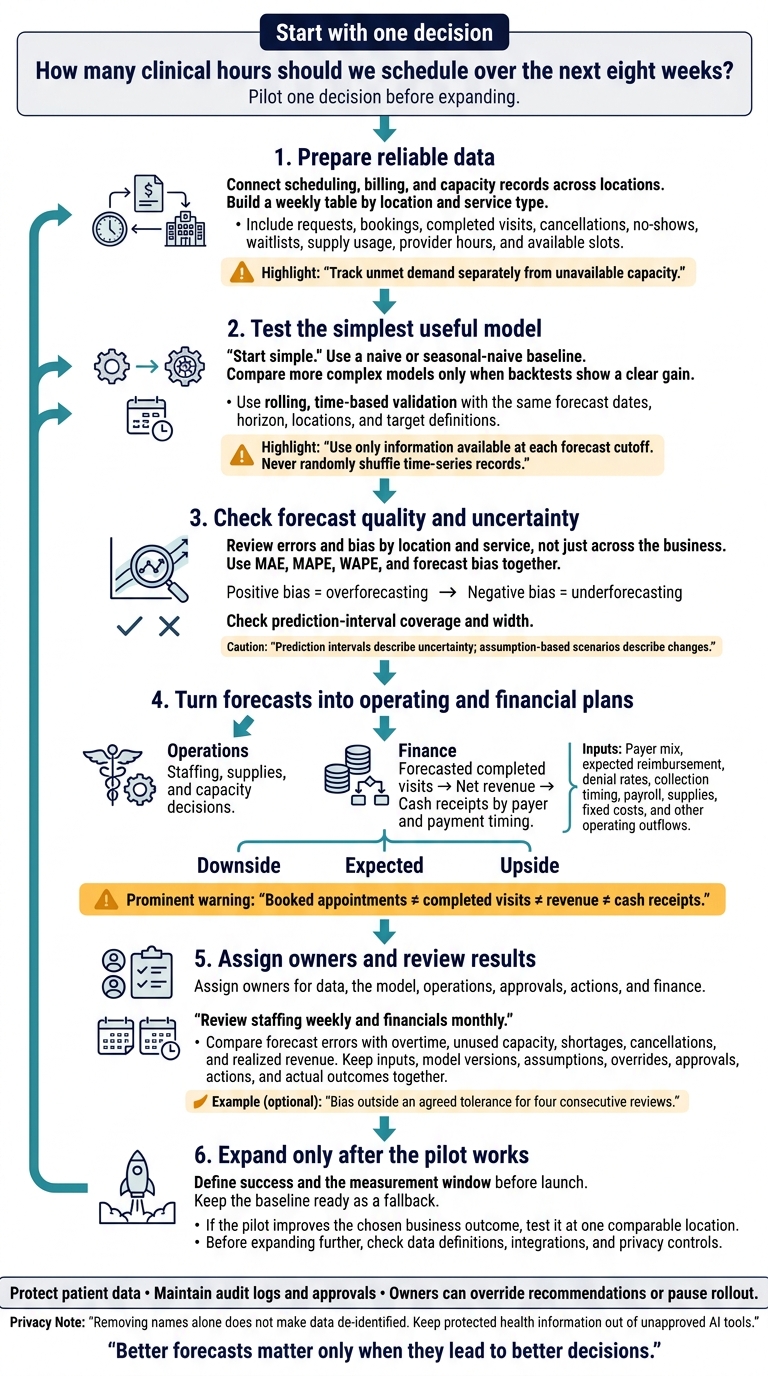
AI Demand Forecasting: From Clinic Data to Decisions
Prepare Reliable Data Across Locations and Entities
Once you’ve set the decision and forecast horizon, build the dataset to support them.
Combine Scheduling, Billing, and Capacity Data
Clean data matters more than model complexity. Create a weekly table by location and service type for your chosen decision. Include requests, bookings, completed visits, cancellations, no-shows, waitlists, supply usage, provider hours, and available slots.
Standardize location, legal-entity, provider, and payer identifiers so each activity is assigned correctly. Keep payer mix, allowed amounts, denial rates, and collection timing in separate fields.
Save every appointment status change and timestamp - not just the final status. Use a shared data dictionary to define fields, allowed values, source systems, and owners. Reconcile visits with billing records, and investigate gaps rather than forcing totals to match.
Fix Data Gaps and Account for Capacity Limits
With the core table standardized, check for missing data and capacity limits.
Before each forecast run, look for missing identifiers, duplicate appointments, inconsistent time zones, impossible event sequences, and unexplained changes in volume. Document corrections and transformations, including how daily records roll up into weekly totals.
Track unmet demand separately from unavailable capacity. Record turned-away requests and waitlist additions alongside slots blocked by staffing, room limits, or supply shortages. A blocked slot reflects a capacity limit, not lost demand.
For new locations, use only comparable internal sites as proxies. Compare specialty, payer mix, operating hours, local population, referral relationships, and launch stage. Label proxy assumptions, use broader prediction ranges, and update those assumptions as local requests and bookings arrive.
Test Demand Signals and Protect Patient Data
Test holidays, seasonal illness, marketing plans, referrals, and population trends using only data available at forecast time. Keep only signals that improve performance on held-out data.
Use aggregated counts when possible. Removing names alone does not make data de-identified. Restrict access, encrypt data, and log usage. Keep protected health information out of unapproved AI tools, and require a business associate agreement for vendors that handle it.
sbb-itb-17e8ec9
Choose and Test a Forecasting Method
Once your data is clean, choose the simplest model that supports your decision and forecast horizon.
Compare Baselines, Statistical Models, and Machine Learning
Start simple. Use machine learning only when backtests show a clear gain over simpler models. Use predictive models to produce forecasts. Keep generative AI focused on summarizing results unless it has been validated on historical data.
| Method | Data needs | Strengths | Limits and interpretability | Startup fit |
|---|---|---|---|---|
| Naive or seasonal-naive | Latest observation or matching prior seasonal period | Transparent benchmark | Misses changing trends and external drivers | First benchmark for any startup |
| Exponential smoothing | Short-to-medium history; seasonal history if needed | Models level, trend, and seasonality | Limited handling of complex drivers | Recurring forecasts |
| Regression | Demand history and known future driver values | Links demand to measurable drivers | Relationships can shift; correlation does not prove causation | Known drivers and explainability needs |
| Tree-based models | Structured observations across locations and drivers | Models nonlinear relationships | Can overfit historical noise | Enough consistent data across related locations |
| Neural networks | Large amounts of data and engineering support | Learns complex patterns over time | Less transparent | Measurable gains justify engineering effort |
Let the decision guide the model choice - not the other way around.
Backtest Forecasts and Check Uncertainty
Use rolling, time-based validation: move a historical forecast cutoff forward in repeated steps, then test predictions against what happened afterward. Compare every method using the same forecast dates, horizon, locations, and target definitions. Never randomly shuffle time-series records.
At each cutoff, use only the information available then to fit missing-value rules, scaling, and feature selection. Any future driver values must also have been known at that point. Check errors by location and service, not just across the business.
A prediction interval gives a range intended to contain future demand at a stated probability. During backtesting, check how often actual demand fell inside that range. Review its width, too: a range can cover most outcomes yet be too broad to help with staffing.
Assumption-based scenarios serve a different purpose. They describe changes, such as a launch or provider departure, rather than calibrated probabilities. For every override, log the date, location, evidence, original forecast, revised forecast, and approver. Later, check whether the override improved the decision.
Choose Tools That Support Integration and Review
Once you've chosen a method, look for tools that run it reliably and show how each forecast was produced.
Require scheduling and billing integrations, location-level forecasts, exports, and uncertainty ranges that help with staffing, inventory, revenue, and cash decisions. Audit logs should track data updates, model versions, overrides, and approvals.
Before sending sensitive information to a vendor, confirm role-based access, encryption, retention policies, breach procedures, and data-handling agreements. Assess setup effort, subscription fees, usage charges, maintenance costs, retraining needs, and support quality.
During a demo, staff should be able to explain the forecast, spot stale inputs, and trace an override. They should also recognize results outside the model's tested range. If they can't, the tool isn't ready for routine use.
A spreadsheet is enough for one location, a few services, stable weekly demand, and forecasts updated weekly or monthly. Consider automation when manual consolidation delays staffing, inventory, revenue, or cash decisions - or when errors have material financial consequences.
Keep review and approval controls in place, and run automated results alongside the baseline. Automate only when gains in accuracy, speed, traceability, or decision quality justify the recurring cost.
Measure Results and Build Financial Plans
After backtesting the model, check how forecast errors affected staffing, revenue, and cash.
Track Accuracy, Bias, and Business Results
Judge statistical accuracy and business impact over the same forecast horizon. Compare forecasted visits with actual visits by location, service line, and time frame: next week, next month, and next quarter. A network average can hide chronic understaffing at one clinic.
Use these metrics together to decide whether staffing, supply, or capacity plans need to change:
| Metric | Meaning | Best use | Main limit |
|---|---|---|---|
| Mean absolute error (MAE) | Average absolute difference between forecast and actual visits | Expressing staffing or supply errors in visits | Not directly comparable across locations with different visit volumes |
| Mean absolute percentage error (MAPE) | Average absolute percentage error when actual demand is above zero | Comparing relative errors across services | Undefined at zero and unstable near zero; excluding zero-demand periods can distort results |
| Weighted absolute percentage error (WAPE) | Sum of absolute errors ÷ total actual visits × 100 | Summarizing performance across periods or locations | High-volume segments can hide smaller ones; undefined when total actual demand is zero |
| Forecast bias | (Total forecast − total actual) ÷ total actual × 100 | Detecting repeated overforecasting or underforecasting | Opposing errors can cancel out; undefined when total actual demand is zero |
Positive bias means overforecasting; negative bias means underforecasting. When total actual demand is zero, report WAPE as not meaningful, not 0% or 100%. Use MAE and counts of zero-demand periods instead.
Set tolerances based on business costs rather than a universal accuracy target. Review errors alongside overtime, unused capacity, shortages, cancellations, and realized revenue. Underforecasting drives overtime, shortages, and missed visits. Overforecasting drives idle capacity and excess cost.
Once you understand demand accuracy, translate visit forecasts into financial plans.
Turn Visit Forecasts Into Revenue and Cash Scenarios
Build revenue, cash, and working-capital scenarios from forecasted completed visits by location and service line. Add payer mix, pricing, collections, and cost timing. Apply expected reimbursement, denial rates, variable labor, supplies, and other costs tied directly to visits. Then subtract fixed costs, including rent, software, insurance, and salaried management.
Translate visits into net revenue, then map that revenue to cash receipts by payer and payment timing. Revenue and cash receipts follow different timelines. Cash-flow forecasts should include payer receipts, payroll, supplier payments, rent, and other operating outflows. Working-capital plans should also account for the timing gap between current assets and current liabilities.
Assign Owners and Set Review Schedules
Make ownership and review schedules part of forecast governance from the start. Assign owners for data, the model, operations, approvals, actions, and finance. Review staffing weekly and financials monthly, with reviews timed to purchasing and scheduling deadlines.
Define retraining triggers in advance - for example, bias outside an agreed tolerance for four consecutive reviews. Retrain when bias persists or when cancellations, payer mix, service mix, provider staffing, pricing, or seasonality shift.
Keep inputs, model versions, assumptions, overrides, approvals, actions, and actual outcomes together. Each review should make clear what changed - and why.
Conclusion: Test One Decision Before Expanding
Start with one pilot decision. Before rollout, check that the data, validated baseline, and time-ordered backtests support the staffing, supply, revenue, or cash plan. Define success and set the measurement window before launch. Keep the baseline ready as a fallback if data feeds fail or recommendations don’t pass validation.
If the pilot improves the chosen business outcome, test it at one comparable location. Before expanding further, check that data definitions, integrations, and privacy controls transfer correctly.
AI supports decisions; owners remain accountable for staffing, spending, patient-data protection, and financial commitments. Owners must retain the authority to override recommendations or pause the rollout.
FAQs
How much data do I need to start forecasting?
For AI revenue forecasting, start with at least 12 months of clean, consistent historical data. Some platforms can work with less, but 12–18 months helps models spot seasonal patterns and trends.
Data quality matters more than volume. Standardize currencies to U.S. dollars ($), format dates as MM/DD/YYYY, remove duplicates, and fill in missing values. Lucid Financials can help connect your systems to provide clean, investor-ready financial data.
How can I forecast demand my clinic can't serve?
Use predictive models to analyze past patient volume and seasonal trends, then forecast when demand could exceed your clinic’s capacity. Keep appointment history and day-to-day clinic data clean and standardized to support accurate AI projections.
Spot busy periods early so you can adjust staffing and resources before bottlenecks form. Use scenario planning to test how hiring or investments in clinic operations could help you meet that demand.
How do I calculate my forecasting pilot's ROI?
Measure time saved on manual data processing and gains in forecast accuracy. Successful implementation often means spending 16% more time on strategy work.
Track Mean Absolute Percentage Error (MAPE) and the variance between forecasts and actual results. Top performers keep variance below 5%, while most startups should target 10%–15%. If errors exceed 20%, check data inputs and assumptions for structural issues.