I’d start AI pricing with one offering, firm price limits, and a test against current prices - not a company-wide rollout. The goal is to improve profit without hurting retention or letting costs erase the gain.
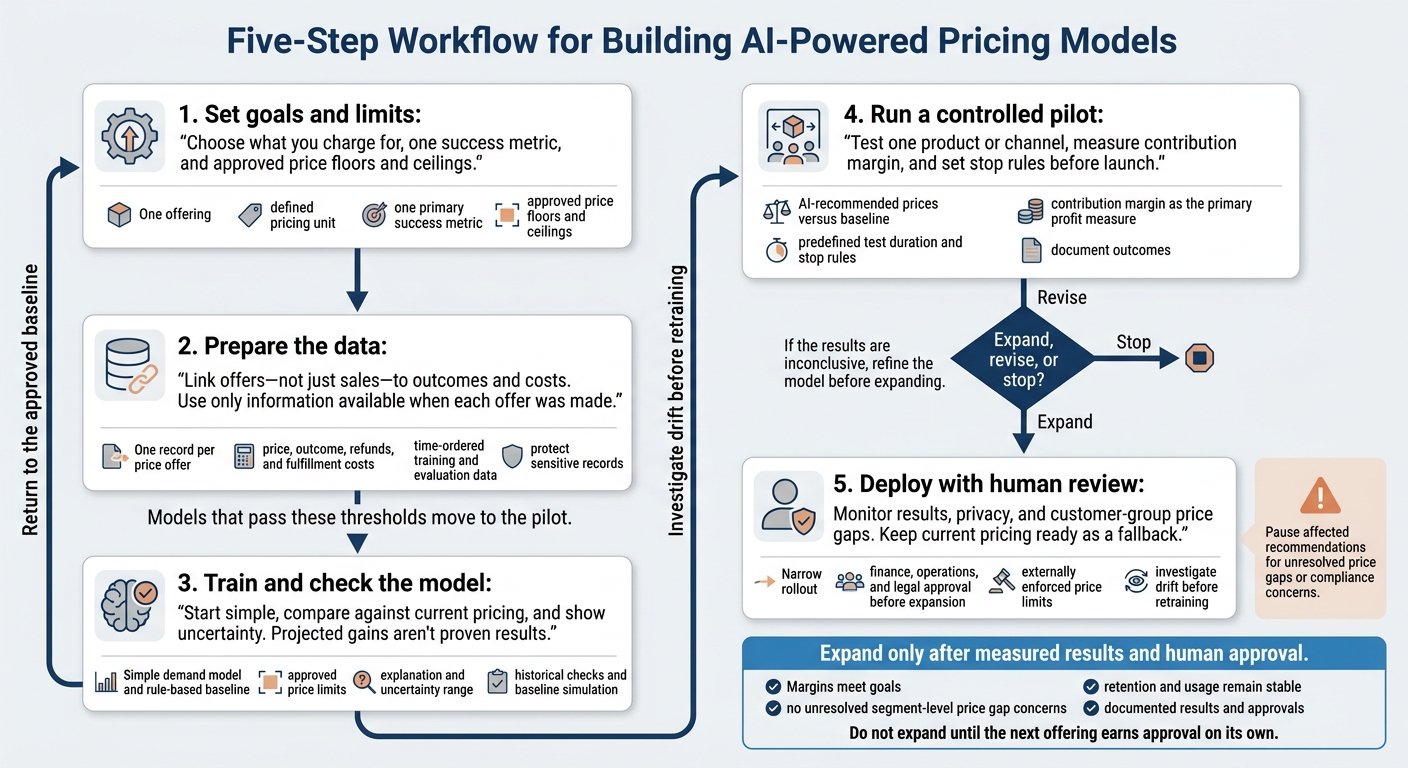
Here’s the five-step approach I’d use:
- Set goals and limits: Choose what you charge for, one success metric, and approved price floors and ceilings.
- Prepare the data: Link offers - not just sales - to outcomes and costs. Use only information available when each offer was made.
- Train and check the model: Start simple, compare against current pricing, and show uncertainty. Projected gains aren’t proven results.
- Run a controlled pilot: Test one product or channel, measure contribution margin, and set stop rules before launch.
- Deploy with human review: Monitor results, privacy, and customer-group price gaps. Keep current pricing ready as a fallback.
My rule: <u>expand only after measured results and human approval</u> - not just because the model predicts more revenue.
5 Steps to Build AI-Powered Pricing Models
Full Tutorial: Price Elasticity and Optimization with Machine Learning in R (feat. XGBoost)
sbb-itb-17e8ec9
1. Set Pricing Goals and Limits
Before defining the model, audit reliable sales, catalog, and cost data. Review your current pricing process and its pain points, too. Assign one owner to approve recommendations and settle tradeoffs between growth and profitability. The goal: define the price range the model can recommend.
Choose a Pricing Unit and Success Metric
Define exactly what customers pay for: a feature set, seat, API call, compute hour, or credits per task. Match that unit to how customers already buy and use your product - and make sure you can track it accurately.
Choose one primary success metric, such as contribution margin or retention. Keep the objective simple enough for the model to optimize.
Set guardrails before training. If you have limited data, start with margin floors before moving to predictive pricing.
Compare Pricing Structures
Use the simplest structure your records can support. Each model comes with different levels of revenue predictability and measurement difficulty.
| Pricing Structure | Unit | Revenue Predictability | Measurement Difficulty | Use Case |
|---|---|---|---|---|
| Standard Tiered (Subscription) | Feature set or service level | High | Low | Predictable SaaS packages; good-better-best models |
| Usage-Based | Tokens, API calls, or compute hours | Low | High | AI services; consumption-based scaling |
| Outcome-Based | Revenue generated or costs saved | Low | Very High | High-alignment partnerships with hard-to-measure outcomes |
| Hybrid | Subscription + usage components | Medium | Medium | Scaling AI products with base recurring fees |
Start with the simplest structure that fits the value customers receive. If you can’t measure usage or outcomes reliably, don’t use them as the basis for billing. Your choice determines which data you’ll need next.
2. Prepare Financial, Customer, and Market Data
Link Price Offers to Demand and Costs
Build a dataset with one record per price offer - not just per sale. Connect CRM, billing, analytics, and accounting records to create offer-level pricing signals. Link each offer to its price, outcome, refunds, and fulfillment costs. Keep pending offers separate from confirmed losses so unfinished deals don’t skew demand estimates.
Track usage, available capacity, and costs tied to your pricing unit. Include customer behavior and market signals, such as seasonality, but use only information available when the offer was made.
Clean Data and Protect Sensitive Records
Standardize dollar amounts, timestamps, time zones, and account IDs. Resolve duplicate transactions. Flag missing prices, costs, or outcomes instead of quietly treating them as zero.
Split training and evaluation data by time, setting aside later offers for evaluation. Exclude any features that became available only after the pricing decision.
Limit personal data and check the dataset for bias before training so the model doesn’t learn those patterns. Use this time-ordered dataset to train the first model within your price limits in Step 3.
3. Train a Model Within Price Limits
Use the cleaned, time-ordered dataset from Step 2 to train your first model within the price range set in Step 1. Start with a simple demand model and rule-based baseline. Choose the price that best supports your financial metric while staying within approved floors, ceilings, and margin rules. Include a plain-language explanation and an uncertainty range with every recommendation.
Choose Features and Estimate Price Response
Estimate demand using the cleaned offer-level dataset from Step 2, competitor prices, and macro signals. Build pricing guardrails into calibration so the model cannot recommend prices outside approved limits.
Correlation does not establish elasticity. Calibrate the model against known outcomes before the pilot.
Compare the Model With Current Pricing
Check demand forecasts against actual historical outcomes. Separately, simulate the model’s recommendations against the current pricing baseline. Set acceptance thresholds for forecast error and elasticity fit before testing. Results at untried prices are projections, not measured gains.
Review uncertainty alongside projected improvements, and show the inputs, guardrails, and reasoning behind each recommendation. Use simulation to screen models, then validate pricing changes in the pilot. Models that pass these thresholds move to the pilot in the next step.
4. Run a Controlled Pricing Pilot
Test the trained model from Step 3 on one product or channel with reliable transaction and cost data. Keep the pilot small so you can spot implementation issues before expanding.
Set Test Groups, Metrics, and Stop Rules
Compare AI-recommended prices directly against the baseline. Keep recommendations within predefined price guardrails and business rules so prices stay within approved limits.
Before launch, document the test duration, success metrics, and stop rules. Track unit sales, revenue, and contribution margin, with contribution margin as the primary profit measure. Define when to stop the test because of demand drops, competitor moves, or cost changes.
Review Results and Document Decisions
After the test period, compare results against the baseline. Check whether seasonality or market changes explain the outcome. If the results are inconclusive, refine the model before expanding.
Document the setup, guardrails, metrics, and outcomes. Use that record to decide whether to expand, revise, or stop the pilot.
5. Deploy With Monitoring and Human Review
Once the pilot is stable, move to a controlled deployment using the same product or channel tested in Step 4. Get approval from finance, operations, and legal before expanding. Keep the initial rollout narrow so you can roll back easily if performance slips. Expand gradually, and only while results stay consistent. Show the price, rationale, and uncertainty band for every recommendation.
Enforce Price Limits and Plan Rollbacks
Set price floors and ceilings outside the model so it cannot bypass them. If recommendations fall outside the approved range or behave unexpectedly, require human review and return to the approved baseline. Keep that baseline in place until the issue is resolved.
Track Results, Privacy, and Segment-Level Price Gaps
Use one dashboard to monitor profit, revenue, margin, retention, lifetime value, forecast accuracy, and shifts in demand or costs. Track each customer segment’s response as market conditions change, and review segment-level results for unexplained price gaps. Investigate drift before retraining - first, make sure you understand its cause. Track market shifts and competitor moves in real time.
Review performance and compliance together. Have legal check privacy, consumer protection, antitrust, discrimination, contract, and disclosure requirements. Watch for unexpected use of personal data or features that act as proxies for sensitive traits. Do not use nonpublic competitor data to coordinate prices. If unexplained segment-level price gaps or compliance concerns arise, pause the affected recommendations until the issue is resolved.
Conclusion: Validate One Offering Before Expanding
After the pilot and monitored rollout, validate one offering through all five steps before moving to the next. Document results and approvals before expanding.
Use the pilot’s results to decide whether the offering is ready for a broader rollout. Expand only when margins meet goals, retention and usage remain stable, and segment-level price gap checks show no unresolved concerns. More revenue isn’t enough if costs wipe out the gain.
Tie sales and cost records to each approved price. Require human approval before expansion, and keep the baseline ready for rollback.
Do not expand until the next offering earns approval on its own.
FAQs
How much data do I need to start AI pricing?
To get started with AI-powered pricing, you need at least 12 months of clean, consistent sales data to identify seasonal patterns. Gradient boosting typically needs at least 18 months of transaction history, while neural networks often require 24 months or more of detailed records.
Your data must be accurate, complete, and standardized. That includes billing history, unit costs, and customer behavior metrics [2][3]. Lucid Financials helps maintain reliable, real-time, investor-ready financial records [2][4][5].
How can I measure price sensitivity reliably?
Start with clean, consistent data: use USD for currency, MM/DD/YYYY for dates, and at least 12 months of records to account for seasonality. Calculate price elasticity by dividing the percentage change in demand by the percentage change in price.
Use the Van Westendorp Price Sensitivity Meter to find the price range customers consider acceptable [2]. Then check your findings through historical testing, segment analysis, and 4–8 weeks of A/B testing [3].
How long should my pricing pilot run?
Most pricing pilots need 4 to 8 weeks to test results and collect data you can act on. Track revenue growth, gross margin, customer acquisition cost, lifetime value, and churn.
When testing with a small group or enterprise clients, this window helps limit risk and shows what’s working before you scale. Account for seasonality and outside market conditions that could affect the results.