Accounting automation works best when tailored to the specific needs of an industry. Generic tools can handle repetitive tasks but often fail with tasks requiring context, like revenue recognition for SaaS or job costing in construction. This article explores how niche-specific automation can save time, improve accuracy, and enhance financial oversight.
Key Takeaways:
- What is Niche Automation? Tools designed for industry-specific tasks, such as deferred revenue in SaaS or POS mapping in restaurants.
- Why Industry Matters: Every business type has unique financial challenges - automation must reflect these differences to avoid errors.
- AI's Role: AI-driven tools improve efficiency, cutting close cycles from 10–15 days to 3–5 days and increasing revenue per employee by 39%.
- Steps to Automate:
- Identify pain points (e.g., manual billing).
- Document workflows before automating.
- Prioritize tasks based on complexity (e.g., fully automate repetitive tasks, keep judgment-heavy tasks manual).
- Standardize data (e.g., consistent Chart of Accounts).
- Connect systems and embed industry-specific rules.
- Governance: Automation needs oversight - set controls, test in phases, and monitor KPIs like close cycle time and error rates.
- Advanced Tools: AI can predict cash flow, detect anomalies, and generate niche-specific dashboards for real-time insights.
For businesses looking to simplify financial operations, platforms like Lucid Financials consolidate bookkeeping, tax, and forecasting into one system, combining automation with expert review for reliable results.
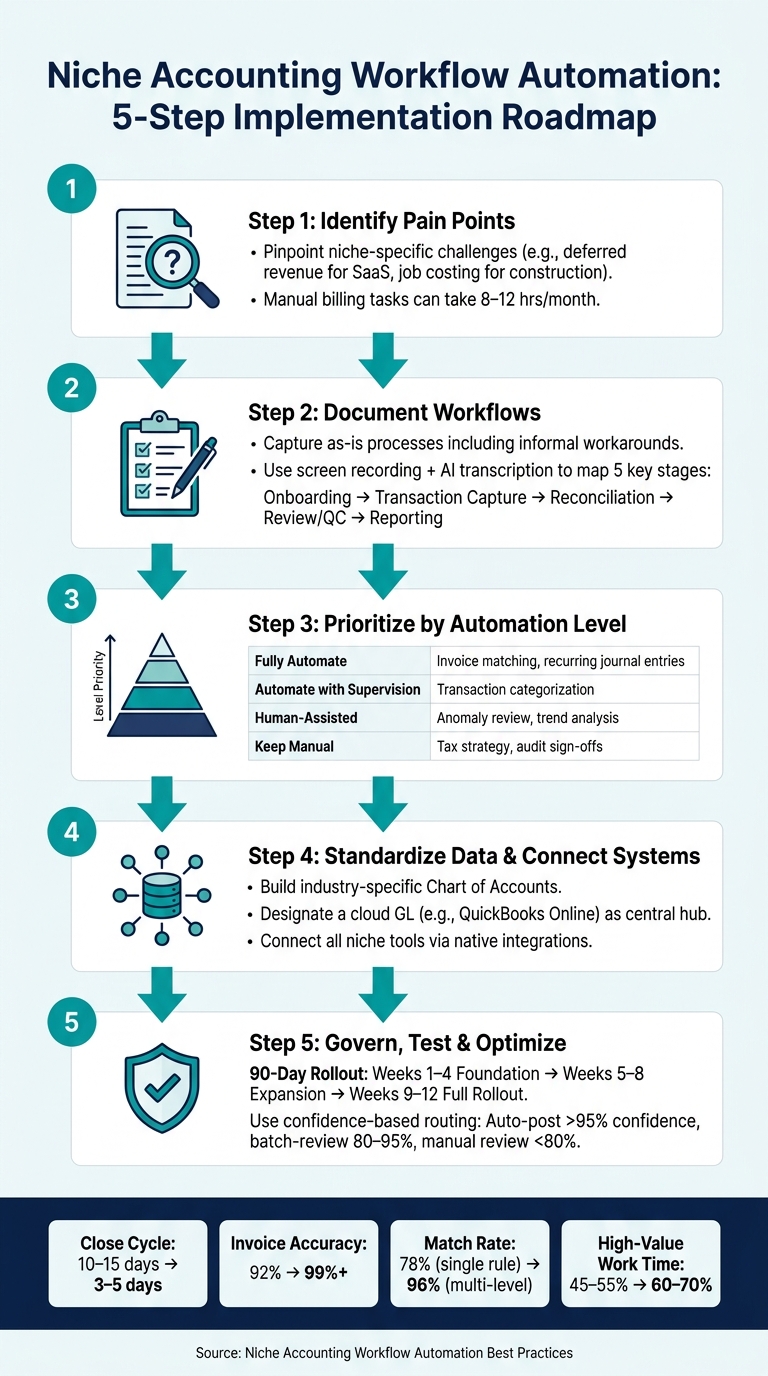
Niche Accounting Workflow Automation: 5-Step Implementation Roadmap
Understanding and Mapping Niche Accounting Processes
Identifying Niche-Specific Accounting Needs
Before diving into automation, it’s critical to pinpoint the specific accounting challenges unique to your niche. These pain points aren’t always obvious.
Take SaaS companies, for instance. Tasks like managing deferred revenue and adhering to ASC 606 compliance can be incredibly time-consuming - up to 8–12 hours per month if handled manually. Here’s an example to illustrate the impact of automation: A DevOps SaaS company with an $8M ARR reduced its billing calculations from 30 hours to just 1 hour per month. At the same time, they improved invoice accuracy from 92% to over 99%. This kind of transformation doesn’t just save time; it lets teams focus on higher-value tasks.
Once you’ve identified these pain points, the next step is to document both your current processes and your desired workflows. This is the foundation for successful automation planning.
Documenting Current and Target Workflows
Thorough documentation is the key to ensuring you don’t miss any critical steps during automation. Start by documenting your current workflows - this helps you avoid automating processes that are already flawed.
The process should follow this sequence: document, standardize, then automate. Begin with your "as-is" state, including any informal workarounds your team has developed over time. These shortcuts often hold valuable institutional knowledge that can be lost if overlooked.
Roman Villard, CPA and Founder of Full Send, offers a simple yet effective tip for this step:
"A really easy way to document your workflow process is to use a screen recorder tool to capture your screen as you do the work. Just talk about the process and use a tool like ChatGPT to summarize and distill the transcript in process form."
Using screen recording tools to capture workflows makes it easier to break down and analyze processes. Once you’ve documented your current state, map out your target workflow across five key stages: onboarding, transaction capture, reconciliation, review/quality control, and reporting. Adding fixed review checkpoints - particularly between reconciliation and reporting - can help catch errors before they escalate to clients or stakeholders.
Prioritizing Tasks for Automation
With workflows documented, the next step is to evaluate which tasks are ripe for automation. Not everything should be automated, and attempting to automate too much at once can lead to chaos. A smart approach is to categorize tasks based on the level of judgment they require:
| Automation Category | Task Type | Examples |
|---|---|---|
| Fully Automate | Purely mechanical, clear rules | Matching invoices to POs, recurring journal entries |
| Automate with Supervision | Mostly mechanical, occasional judgment | Categorizing transactions, handling reconciliation exceptions |
| Human-Assisted Automation | AI assists, human decides | Reviewing financials for anomalies, trend analysis |
| Keep Manual | Professional judgment, high sensitivity | Tax strategy, audit sign-offs, materiality judgments |
If a task is performed consistently for three or more clients every month, it’s a strong candidate for automation. Start by tackling the top three most manual or error-prone processes, such as bank reconciliation, invoice matching, and recurring journal entries. To ensure a smooth transition, run the automation in parallel with your manual process for 2–4 weeks. This trial period helps identify any edge cases before fully committing to the new system.
"The judgment-heavy steps take the same amount of time - you're just not spending time on data pulling and formatting anymore." - Ledger Brief Team
Ultimately, automation should free up your team to focus on tasks that require expertise and strategic thinking.
sbb-itb-17e8ec9
AI In Practice | Stop Finding Errors in Month-End. Catch Them at Entry
Designing and Building Niche-Specific Automation
Once you've mapped and prioritized niche accounting processes, the next step is creating an automation system tailored to your industry. This involves setting clear data standards, connecting essential systems, and embedding rules that reflect the specific needs of your niche.
Standardizing Data and Chart of Accounts
After identifying workflows suitable for automation, the first priority is organizing your data. Why? Because automation is only as effective as the quality of the data it processes. If your Chart of Accounts (COA) is inconsistent - think varying naming conventions, vague account descriptions, or mismatched vendor details - your automation will stumble right from the start.
To avoid this, create industry-specific COA templates before diving into automation rules. For example:
- A restaurant client will need accounts for POS sales categories, sales tax payables, and tip liabilities.
- A construction client will require job-costing buckets and retainage receivable accounts.
These aren't just "nice-to-haves." They're essential to ensure automation rules can correctly route transactions. Additionally, ensure all automated outputs are standardized in native formats to prevent import errors.
Once your data is standardized, the next step is integrating it across your key systems for seamless functionality.
Connecting Core Systems for End-to-End Automation
Start by designating a cloud-based general ledger, such as QuickBooks Online, as your central hub. Then, connect all niche-specific tools to this hub using native integrations.
The tools you'll need depend on the industry. For instance:
- Restaurants require their POS systems to map directly to the COA.
- E-commerce businesses need tools to reconcile platform payouts with bank deposits while accounting for processor fees.
- Agencies benefit from project time-tracking tools that feed directly into billing.
Every relevant data source should have an automated pathway into the general ledger - eliminating manual exports or copy-pasting entirely.
For more complex setups, integration orchestrators can act as intermediaries. These tools monitor data sources, process them through AI, and send the results to your accounting software as draft transactions for review. As Andy Pfertner, Controller at JustAnswer, explains:
"As good as AI is, it's not perfect all the time. We need to keep the human element in there to make sure the output is validated."
With systems connected, the final step is embedding industry-specific logic into your automation rules.
Encoding Niche Logic into Automation Rules
This is where automation becomes truly effective. Generic setups often fall short because they lack the specific logic required for different industries. A rule that works flawlessly for a retail client might completely miscategorize transactions for a construction client. To prevent this, niche-specific logic must be built into the rules from the start.
Here’s a quick look at how industry-specific logic can make or break your automation:
| Industry | Key Logic to Encode | Common Close Risk |
|---|---|---|
| Construction | Job costing, progress billing, retainage tracking | Job costs misclassified as overhead |
| SaaS | Deferred revenue schedules, MRR/ARR alignment | Revenue timing errors after upgrades |
| E-commerce | Processor fee mapping, clearing account netting | Undeposited funds buildup; revenue overstated |
| Law Firms | Trust account tracking, matter-level cost categories | Retainers treated as earned revenue |
| Restaurants | POS mapping, tip reporting tie-outs, sales tax payables | Sales tax drift; gift card liabilities ignored |
For transaction matching, relying on single-criteria rules like "amount only" yields an auto-match rate of around 78%. However, using a multi-level matching hierarchy - starting with exact matches for amount, date, and reference number, and then relaxing to fuzzy payee matching and date proximity - can boost that rate to 96%. Training these rules with 3–6 months of historical transaction data before going live further improves accuracy. Automated reconciliation can reach a 99.6% first-pass match rate, compared to 94.2% for manual processes.
Governance and Optimization of Automated Workflows
Once automation rules are in place and systems are connected, the next step is ensuring they remain accurate, compliant, and effective over time. Regular monitoring and testing are essential to maintain the integrity of automation, especially when tailored to specific industries. Here's how you can validate and refine your automation strategy.
Setting Up Controls and Audit Trails
A common misstep is assuming automation can run entirely on its own. In reality, every automated transaction needs human oversight before it reaches the General Ledger:
"Ensure all AI-generated transactions are reviewed by a human before posting to the General Ledger."
Controls should function across three levels: preventative, detective, and corrective. Here's what that looks like:
- Preventative controls: Stop errors before they occur, such as validating transactions against an approved vendor list.
- Detective controls: Identify errors after processing, like using automated tools to scan for duplicate invoices.
- Corrective controls: Address issues through workflows designed to handle exceptions.
Role-based permissions are essential for separating tasks like initiating transactions from approving them. For example, invoices over $1,000 should automatically be routed to senior reviewers. Every action - who initiated, edited, or approved a transaction - should be time-stamped in a digital audit trail. As Ben Olsen from Nimbl puts it:
"Controls are not optional, they're the point."
Testing and Rolling Out Automation in Phases
Rolling out automation in phases reduces risk and builds trust in the system. A 90-day roadmap might look like this:
| Phase | Timeline | Focus |
|---|---|---|
| Foundation | Weeks 1–4 | Standardize Chart of Accounts; pilot with 3–5 clients; run AI in "suggestion mode." |
| Expansion | Weeks 5–8 | Implement AP/AR automation; expand to 10–15 clients; automate document workflows. |
| Full Rollout | Weeks 9–12 | Automate month-end close and reporting; finalize governance policies for AI. |
Confidence-based routing is a practical strategy during this process. For example:
- Automatically post transactions with over 95% confidence.
- Batch-review those with 80–95% confidence.
- Manually review anything below 80%.
Always test new rules in a sandbox environment using historical data before connecting them to live systems. Document manual processes as a backup - occasional "fire drills" can prepare your team to handle tasks manually if a tool fails. Once the system is live, monitor performance metrics to ensure the automation is delivering consistent results.
Tracking Workflow Performance with KPIs
Before launching automation, establish benchmarks like how long it takes to close the books, current invoice error rates, and the number of manual hours spent per workflow. These provide a baseline for measuring improvements.
Post-automation, monitor KPIs such as:
- Close cycle time: Automating repetitive tasks can reduce this by 20–40%.
- Auto-coding rate: The percentage of transactions categorized without human input.
- Error rate: Track the accuracy of journal entries and invoices.
- Errors caught vs. errors introduced: This helps verify that the automation logic is functioning as expected.
For a broader view, measure time-to-insight - how quickly leadership can access reliable financial data after the period ends. As Numeric aptly puts it:
"Technology is the engine and the human is the steering wheel."
Using AI and Advanced Techniques for Niche Accounting Optimization
AI for Forecasting and Advanced Automation
Once workflows are running smoothly, AI steps in to offer more advanced capabilities that go beyond simple categorization. These include predictive forecasting, anomaly detection, and revenue recognition automation.
One standout application is predictive cash flow forecasting, where AI can provide clear, actionable insights. For example, a SaaS company might use AI to model its cash runway by analyzing metrics like monthly recurring revenue (MRR), churn rates, and hiring projections. Meanwhile, an e-commerce business might focus on forecasting cash flow around inventory needs, advertising budgets, and seasonal demand. A good starting point is a 13-week cash flow model, which can then incorporate additional factors like headcount, sales pipelines, and marketing spend. According to Deloitte, companies using AI for financial forecasting report 20–30% faster forecast cycles and see accuracy improvements of 10–20 percentage points compared to traditional spreadsheet-based methods.
Anomaly detection is another high-impact use case. AI can continuously monitor data streams such as bank transactions, accounts payable, payroll, and expenses to flag irregularities. For instance, it can catch duplicate payments, unexpected vendor charges, or mismatches between order volumes and payment settlements. The Association of Certified Fraud Examiners (ACFE) found that organizations using proactive data monitoring and anomaly detection experienced 52% lower fraud losses and identified fraud in half the time compared to those that didn’t. Combining fixed rules (like requiring secondary approval for payments over $10,000) with AI’s ability to score anomalies can highlight subtler issues, such as an unusual $3,000 expense when typical charges are under $500.
Once these AI-driven insights are in place, the next step is to present them in dashboards that enable clear and decisive action.
Building Niche-Specific Dashboards and Reports
To make the most of AI insights, tailored dashboards help translate raw data into actionable metrics. Generic reports often fail to address the unique questions each niche demands. For instance, a SaaS founder needs data on net revenue retention and customer acquisition cost (CAC) payback periods, not just a simple revenue total. Similarly, an agency owner might prioritize metrics like billable utilization and effective hourly rates per client. The key to building a useful dashboard is starting with the specific decisions it needs to support, rather than focusing on flashy visualizations.
Once the key decision questions are clear, it’s essential to centralize the formulas behind your metrics to maintain consistent reporting. For SaaS businesses, this might mean focusing on MRR, ARR, Net Dollar Retention, Gross Margin, and the Magic Number. For e-commerce, important KPIs include contribution margin per order, return on ad spend (ROAS) by channel, refund rates, and inventory turnover. Standardizing these niche-specific KPIs ensures everyone is working from the same set of numbers, avoiding discrepancies between teams.
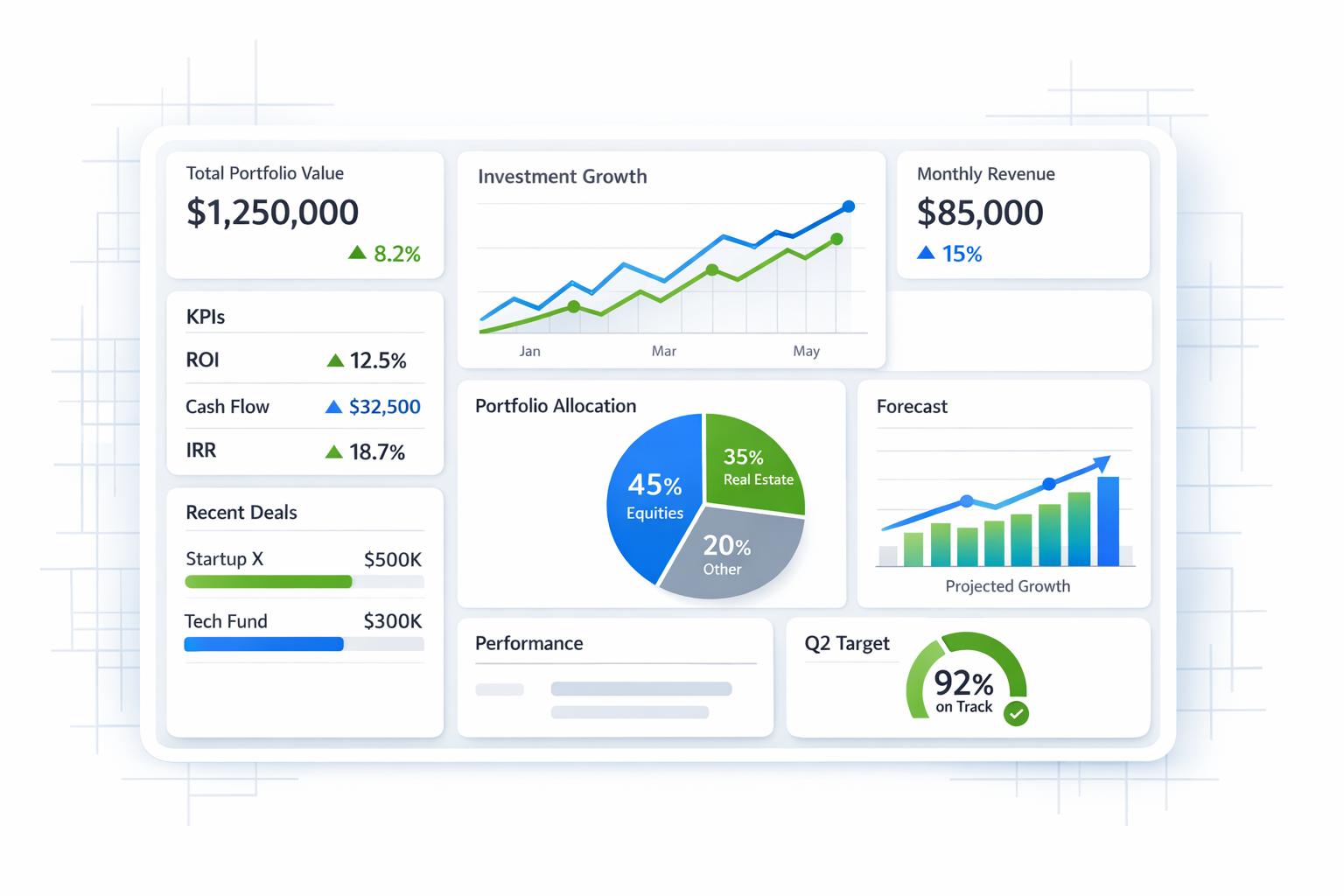
Next, connect your data sources - such as your general ledger, billing system, payroll provider, and bank feeds - so dashboards automatically refresh without manual input. The ultimate goal is a self-updating reporting system that highlights key anomalies using AI, ensuring executives have accurate, up-to-date insights for their reviews.
Using Lucid Financials as a Centralized Accounting Solution

For startups and growing businesses, juggling bookkeeping, tax preparation, forecasting, anomaly detection, and investor reporting across multiple tools can create inefficiencies and gaps. Lucid Financials simplifies this by consolidating everything into one AI-powered platform. This integrated solution builds on automation and custom dashboards to deliver real-time insights that are ready for decision-making.
Lucid combines bookkeeping, tax services, tax credit management, and CFO-level support in a single system. Its AI tools generate forecasts, financial reports, and alerts from live data streams, while an experienced finance team reviews every output before it reaches you. This “human-in-the-loop” approach ensures that automation remains effective and reliable. For founders who need instant financial insights without building a full internal finance team, Lucid offers seamless integration with Slack. This means you can quickly access information about cash runway, burn rates, or spending patterns whenever you need it. Plus, Lucid guarantees clean, accurate books within just seven days of onboarding, with investor-ready reports always up to date - eliminating last-minute stress before fundraising rounds or board meetings.
Conclusion: Key Practices for Long-Term Automation Success
Niche accounting automation requires consistent effort. The most successful firms start small, test their systems, and adapt their automation strategies as their business evolves.
While automation excels at managing repetitive tasks, the 5–10% of exceptions still demand human oversight to ensure accuracy and reliability. As one practitioner puts it:
"Automation handles the standard cases efficiently. The exceptions - the 5-10% of transactions, entries, or documents that don't fit the pattern - still need human attention."
Failing to address these exceptions can harm trust in your system. Just one misclassified entry in a client deliverable can undo months of positive results.
Research indicates that effective automation can boost high-value work by 15–25 percentage points. Firms that integrate both mechanical and AI-assisted automation spend 60–70% of their time on high-value tasks, compared to the industry norm of 45–55%. This shift from routine data processing to advisory work adds significant value. For example, a firm billing $150/hour could recover 25 hours a week during a 14-week season, resulting in $52,500 in additional billable capacity. Redirecting resources in this way highlights the long-term benefits of streamlined financial operations.
For startups and growing businesses that want results without building an internal finance team, Lucid Financials offers a comprehensive solution. Their AI-driven platform covers everything - bookkeeping, tax, forecasting, and CFO support - while human experts review every output. With clean books in seven days, investor-ready reports on demand, and real-time answers via Slack, Lucid Financials ensures your financial operations stay efficient and effective at every growth stage. This integrated approach lets your business thrive while they handle the numbers.
FAQs
What should I automate first in my accounting workflow?
Start by focusing on repetitive, low-risk tasks that follow clear rules and produce outputs that are easy to verify. Examples include tasks like matching invoices to purchase orders, reconciling transactions, or creating recurring journal entries. To get started, map out your current workflow to identify these tasks. Then, automate them step by step. This approach helps maintain accuracy, avoids major disruptions, and gives you the chance to review and confirm results before moving on to more complicated processes.
How do I keep AI-driven accounting automation accurate and compliant?
To keep AI-driven accounting automation accurate and compliant, focus on tools that emphasize security, transparency, and detailed documentation. Make sure to maintain clear audit trails, monitor performance consistently, and perform regular data quality checks. Establish governance frameworks that include human oversight for critical outputs to ensure accountability. Choosing AI solutions specifically tailored for accounting tasks can also improve reliability. These steps help reduce risks and ensure workflows stay on track and compliant with regulations.
What data do I need to build niche-specific automation rules?
To design automation rules tailored to accounting workflows, start by gathering data that highlights repetitive and rule-driven tasks. This includes details like transaction records, invoice data, bank feeds, and categorization guidelines. Prioritize information that can streamline activities such as reconciling transactions, matching invoices with purchase orders, and spotting irregularities. By focusing on these areas, you can build automation that handles routine tasks efficiently while still allowing for manual review when exceptions arise.