Accounting workflows can be a source of inefficiency, errors, and burnout for finance teams. But by automating repetitive tasks, standardizing processes, and leveraging AI tools, businesses can save time, reduce mistakes, and refocus on higher-value work.
Key takeaways from the article:
- Automation is a game-changer: Automating invoice processing, bank reconciliation, and month-end close activities can cut costs by over 80% and reduce close times by 20–40%.
- AI improves accuracy and efficiency: AI tools can process unstructured data, match transactions with 85–95% accuracy, and flag exceptions for human review.
- Standardized processes matter: Documenting workflows and creating templates ensure consistency, reduce errors, and make automation more effective.
- Workflow software is essential: Tools that enforce task order, provide real-time dashboards, and integrate with existing systems help maintain control and visibility.
- Approval workflows need optimization: Automating invoice approvals can save thousands annually and cut processing time significantly.
- Balance workloads intelligently: Automation redistributes tasks, allowing teams to focus on strategic work while reducing burnout.
- Centralized document management saves time: AI-powered tools streamline data extraction, reduce errors, and eliminate the chaos of scattered files.
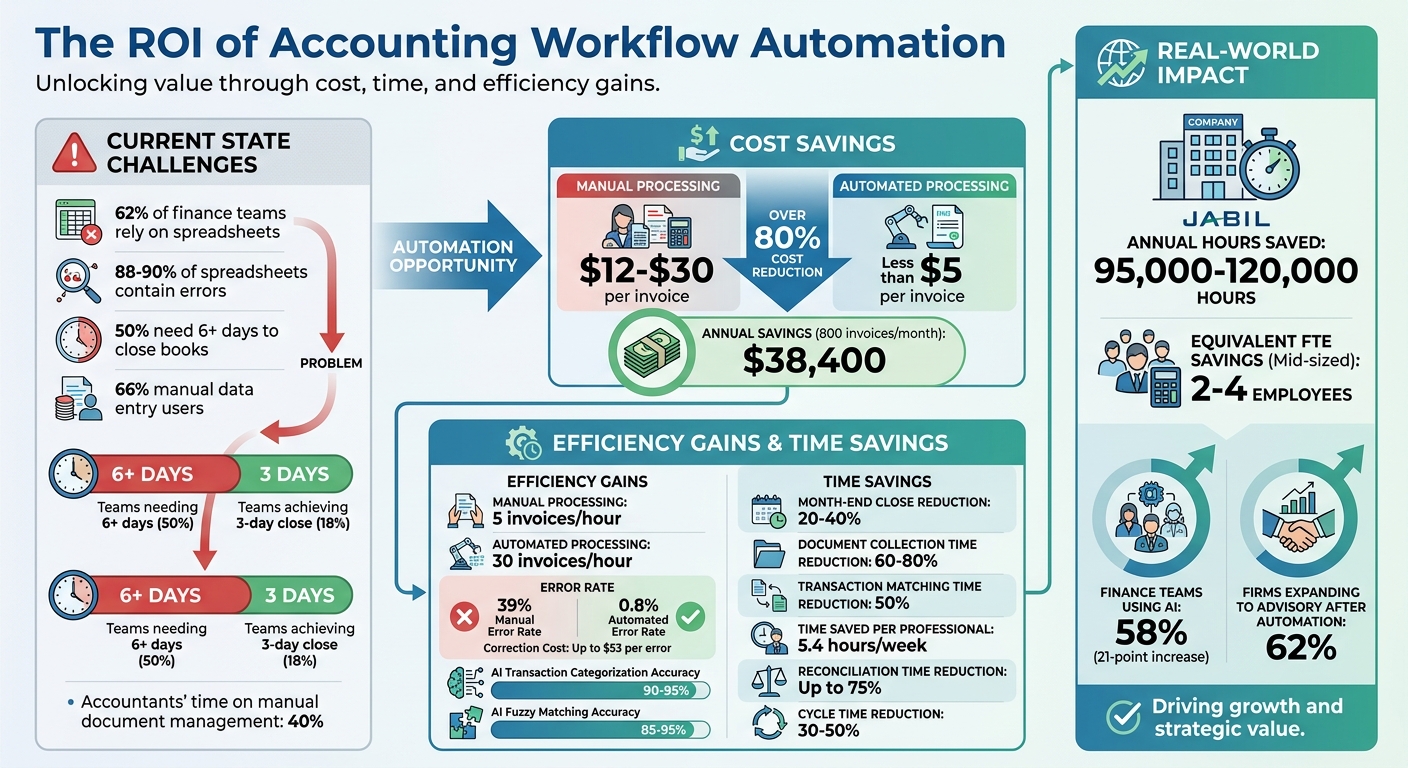
Accounting Workflow Automation ROI and Efficiency Statistics
5 Ways AI Can Transform Accounting Workflows | ClickUp
sbb-itb-17e8ec9
1. Automate Repetitive and High-Volume Tasks
One of the quickest ways to save time in your accounting workflows is by automating tasks your team handles repeatedly. Think of processes like invoice processing, bank reconciliation, expense reporting, and month-end close activities (e.g., pulling trial balances or generating recurring journal entries). These tasks tend to take up significant time but require little professional judgment. By combining automation with standardized processes, you can see even greater efficiency.
Automation Opportunities and ROI
Did you know that manual invoice processing costs between $12 and $30 per invoice? Automating this process can bring that cost down to less than $5, cutting expenses by over 80%. While manual data entry processes about 5 invoices per hour, automation can handle up to 30 invoices in the same time frame. Plus, manual methods often lead to errors - 39% of manually processed invoices contain mistakes, with each correction costing as much as $53. When the fully loaded cost of manual invoice processing is between $15 and $40 per invoice, the financial benefits of automation are hard to ignore.
Real-world examples show the impact automation can have. Jabil saved between 95,000 and 120,000 hours annually by automating its month-end close processes. Similarly, Brex cut transaction matching time by 50% using automated accounting platforms. These time savings allow teams to focus on more strategic, value-driven work.
Efficiency Gains Through AI and Technology
Modern AI tools can handle tasks like extracting header and line-item data from invoices (e.g., vendor name, date, amount), matching bank transactions to the general ledger, and performing three-way matching between purchase orders, receiving reports, and invoices. AI-powered fuzzy matching for bank reconciliation achieves an accuracy rate of 85% to 95%.
However, a significant challenge lies in converting unstructured documents (like PDFs and scans) into structured data before applying workflow logic. As Lido explains, "The biggest bottleneck in most finance workflows isn't the routing or approval logic. It's getting clean, structured data out of documents in the first place".
Standardization and Process Consistency
Before diving into automation, it's essential to map out your workflows in detail. Document every step and separate tasks into those that are purely mechanical (rule-based) and those requiring human judgment. You might group tasks into three categories:
- Automate confidently: Tasks like exact invoice-to-PO matching or recurring journal entries.
- Automate with supervision: Tasks such as categorizing unusual transactions.
- Keep manual: Tasks that require professional judgment, like tax strategy or materiality assessments.
This clear structure makes it easier to integrate tools and scale your automation efforts.
Scalability and Integration with Existing Systems
When choosing automation tools, look for ones that integrate seamlessly with your current systems, whether it’s QuickBooks, Xero, or NetSuite. Tools with robust APIs allow real-time data flow and bidirectional synchronization, meaning they can both pull data from your ERP system and update it in real time. Start by automating your most time-consuming mechanical task to test the results. Initially, you can run the automated process alongside your manual workflow to ensure accuracy. Always keep documented manual processes as a backup, especially during critical times like year-end close.
2. Use AI-Powered Processing
Building on automation strategies, AI-powered processing takes on tasks that require more nuanced interpretation. Unlike traditional robotic process automation (RPA), which follows strict rules, AI can handle unstructured documents like invoices and receipts, interpret accounting policies, and adjust to real-world variations. This shift allows finance teams to move away from tedious manual data entry and focus on becoming strategic advisors.
Efficiency Gains Through AI and Technology
AI models trained on clean historical data can deliver 90–95% accuracy in categorizing recurring transactions. By using confidence-based routing - where transactions with 95% or higher confidence are automatically posted while lower-confidence ones are flagged for human review - companies can process large volumes of data with minimal oversight. Today, 58% of finance functions leverage AI, a 21-point jump from the previous year. Yet, many firms still spend 40–70% of their billable hours on manual tasks, as they rely on "shallow" AI like basic document scanning.
For example, in early 2026, Brex implemented automated reconciliation tools with AI-driven exception handling, cutting total matching time by 50%. Similarly, Awardco introduced continuous transaction monitoring in April 2026, reducing their month-end close process by four days by identifying data issues throughout the month instead of at the end. These benefits, however, depend on maintaining consistent data quality, which is where standardization plays a key role.
Standardization and Process Consistency
AI enhances consistency by applying the same logic to every transaction, removing the inconsistencies that can arise from human judgment. However, the effectiveness of AI depends heavily on the quality of the data it learns from. To optimize performance, standardize your Chart of Accounts and clean 12–24 months of historical data, which can improve categorization accuracy by 15–20 percentage points. Without this groundwork, AI may replicate past classification errors.
A good starting point is to automate a single mechanical task, such as exact-match bank reconciliation, and run it alongside your manual process for 2–4 weeks to confirm accuracy. This step-by-step approach helps build trust in AI before rolling it out to more complex workflows.
3. Create Standard Processes Across Your Firm
Once you've embraced AI-powered processing, the next step is to establish standardized procedures across your firm. Why? Because standardization is the foundation of effective automation. Without it, automation can quickly turn into chaos. Nigel Sapp from Numeric puts it best:
"Automating a broken workflow just produces broken outputs faster".
Standardization and Process Consistency
The first step is to centralize your standard operating procedures (SOPs). If processes are stored in team members' heads instead of being documented, you risk inconsistent work, irregular reviews, and delayed responses to clients. Kellie Parks, Founder of Calmwaters Cloud Accounting, highlights the importance of this:
"You can't scale if you're not doing good work. You can't do good work if you don't make your way through the process, and you can't efficiently make your way through a project if you're going to do the tasks out of order".
To address this, document the key stages of your workflow: Client Onboarding, Transaction Capture & Categorization, Reconciliation, Review & Quality Control, and Reporting. For each stage, create checklist templates to ensure tasks - like bank reconciliations - are completed in the same order and to the same standard across all clients. You can even record a team member performing a task and use AI to create a clear, written process. These standardized workflows not only promote consistency but also make it easier to integrate automation tools, setting your firm up for scalable success.
Scalability and Integration with Existing Systems
Before applying technology, take the time to map and refine your workflows. Automating poorly designed manual processes only amplifies inefficiencies. Standardized processes, on the other hand, can significantly improve efficiency - reducing cycle times by 30–50% and cutting reconciliation time by up to 75%. For mid-sized companies, this can save the equivalent of 2–4 full-time employees annually, allowing firms to grow without adding more staff.
Successful integration starts with clean master data. Spend 2–4 weeks on data cleanup to standardize naming conventions and remove duplicate records for vendors or customers. This effort ensures smooth data flow between systems and improves AI accuracy. It’s worth noting that 62% of finance organizations still rely on spreadsheets for financial close tasks, despite 88–90% of spreadsheets containing at least one error. Replacing outdated Excel checklists with workflow software offers benefits spreadsheets can't match, like real-time updates, timestamps, and audit trails. By standardizing processes and cleaning up your data, you’ll not only enhance integration with existing tools but also prepare your firm for scalable, efficient automation.
4. Use Workflow Management Software
To take your standardized processes to the next level, consider implementing workflow management software. This type of software ensures tasks follow a structured path, enforces checkpoints, and flags potential issues before they escalate. By combining automation with process standardization, workflow tools help maintain consistency while integrating critical controls. As Hardik Mehta, Co-founder of Xenett, puts it:
"Automation means the system takes action based on rules. Task tracking means you still manage everything manually".
Standardization and Process Consistency
Workflow management tools are designed to keep tasks in order. For instance, a review cannot proceed until reconciliations are fully completed. These systems also enforce evidence-based task completion. That means tasks can’t be marked as done unless they include necessary attachments, reconciliation links, or client responses. This approach not only ensures tasks are completed in the proper sequence but also verifies that they meet predefined standards before moving forward.
Efficiency Gains Through AI and Technology
While strict controls ensure consistency, AI-driven tools enhance efficiency. For example, AI can detect anomalies and automatically flag exceptions for review. Instead of combing through every transaction manually, your team can focus on the 5–10% of cases that fall outside the standard rules. Additionally, centralized client portals simplify processes like document collection, e-signatures, and follow-ups through automated reminders. Real-time dashboards further streamline operations by offering a complete view of "close readiness" and risk levels across all clients, rather than simply listing completed tasks.
Scalability and Integration with Existing Systems
Workflow software is most effective when it integrates smoothly with your current systems. Look for tools that connect directly to platforms like QuickBooks Online, Xero, banking systems, and document storage solutions. This eliminates the need for manual data entry. Native APIs are particularly advantageous, as they reduce the hassle of exporting and re-keying CSV files compared to third-party middleware.
Before rolling out the software across your entire firm, start with a pilot program involving 5–10 clients. Include a mix of simple and complex accounts and run it for a full close cycle. This helps verify performance, refine configurations, and build confidence in the system. Additionally, set up approval hierarchies within the software to avoid bottlenecks. For example, expenses under $500 could auto-approve, while those over $5,000 are sent to a VP for review. These configurations ensure the system scales effectively as transaction volumes grow.
5. Improve Approval Workflows and Controls
Refining approval workflows can make a huge difference in accounting efficiency. These workflows are often where accounting teams lose valuable time and resources. In fact, 49% of accounts payable teams report that invoice approvals take too long. Delays happen because files get misplaced, approvers lack necessary context, or manual routing creates bottlenecks. Streamlining these processes can lead to immediate and measurable savings.
Automation Opportunities and ROI
The cost gap between manual and automated invoice approvals is hard to ignore. Processing invoices manually costs $9–$15 or more per invoice, while automation cuts that down to just $3–$5. For a company handling 800 invoices monthly, this could mean saving about $38,400 each year. Beyond cost, automation also reduces error rates from approximately 2% to just 0.8%.
Rules-based routing is key to efficient approvals. For instance, invoices under $500 might be automatically approved if they match a purchase order, while higher amounts can be escalated for additional review - perhaps to a CFO. A great example is Microsoft, which cut its invoice approval time from seven days to just two by using automated routing and mobile approvals for its management team.
Efficiency Gains Through AI and Technology
AI tools take approvals a step further by offering approvers all the context they need - like purchase orders, GL codes, vendor history, and contract details - at their fingertips. This context speeds up decision-making, with responses typically taking 2–4 hours instead of the usual 5+ days.
For invoices with issues, like mismatched prices or missing purchase orders, automated routing can flag these as exceptions and send them to separate queues with service-level timers. This allows teams to focus on resolving problem invoices while clean ones move through the system seamlessly. Siemens, for example, used AI-powered document processing to handle over 500,000 invoices annually, achieving a 98% straight-through processing rate - meaning most invoices went from receipt to payment without human intervention.
Standardization and Process Consistency
Consistent controls are essential for reducing fraud, and automation plays a big role here. Fraud attempts are a real problem - 79% of organizations faced attempted or actual payments fraud in 2024, with 63% identifying business email compromise (BEC) as a major avenue for these attacks. Automated workflows help enforce controls like requiring two-person approval for high-risk actions, such as changes to vendor bank details. They also create a centralized audit trail, recording who approved what and when, which is invaluable for audits and accountability.
A critical control to implement is three-way matching - comparing the invoice, purchase order, and receiving report. This ensures you only pay for what was ordered and received. Setting small tolerance levels, such as allowing a 1% quantity variance or rounding differences, can prevent teams from wasting time on minor discrepancies.
Scalability and Integration with Existing Systems
Building on earlier discussions about system integration, mobile-friendly solutions can significantly reduce delays in approval workflows. Everything starts with clean, structured data. AI tools can extract structured data from unstructured sources like PDFs and receipts, enabling accurate routing logic. Without this, many teams still rely on manual data entry - something 66% of finance professionals admit to doing. Look for systems that integrate directly with your ERP, pulling vendor master data and chart of accounts in real time to maintain GL accuracy without manual intervention.
Mobile integration makes a big difference too. Approvals through mobile devices can cut cycle times by up to 50%, provided the interface is user-friendly. Notifications should display key details - like vendor name, amount, and purpose - for quick, one-tap approvals, avoiding the need to open bulky attachments. Tools like Lucid Financials even integrate with platforms like Slack, letting teams handle approvals and get real-time answers without switching systems. Escalation rules, such as sending reminders after 24 hours of inaction or routing to a backup approver after 48 hours, ensure invoices don’t pile up. These improvements align perfectly with broader automation strategies, enhancing approval workflows as part of an overall push for better processes.
6. Balance Workload Distribution and Capacity
Uneven workloads can seriously impact an accounting team's productivity. During peak seasons, 48% of accounting professionals clock 51–60 hours weekly, while 19% push through 61–70 hours. In contrast, slower periods often leave staff underutilized. The solution isn't just about hiring more people - it's about smarter task allocation through automation. By redistributing tasks intelligently, automation can help balance workloads, improve efficiency, and reduce burnout.
Automation Opportunities and ROI
Automation offers a clear path to efficiency. For example, automating document collection can slash client follow-up time by 60–80% and reduce month-end close processes by 20–40%, turning weeks of work into days. If a firm processes 800 invoices monthly, these time savings can free up resources for more strategic, higher-value services. It's no surprise that 62% of firms expand into advisory services after adopting compliance automation.
Efficiency Gains Through AI and Technology
AI isn't just about speed - it’s about smarter work allocation. With AI managing 90–95% of routine transactions, teams can focus on the 5–10% of flagged exceptions. This shift saves an average of 5.4 hours per week per professional, allowing senior staff to dedicate their time to complex decision-making and quality control.
"Firms leaning into automation are moving up the value chain faster than those who are not. It's never been easier to be busy, but this can be a trap."
– Jason Staats, CPA, Founder, Realize
This approach aligns tasks with skill levels. Junior staff can oversee AI-assisted processes like transaction capture and onboarding, while senior staff handle high-stakes reviews and judgment-driven tasks. This balance is crucial, especially when 57% of bookkeeping teams reported poor work-life balance in 2024 due to inefficient workflows.
Standardization and Process Consistency
Standardizing workflows is key to balancing workloads effectively. Using templates for recurring tasks - whether weekly, monthly, or quarterly - ensures that any team member can step in without delay. Batching similar tasks also reduces the productivity drain caused by frequent context switching. When combined with AI-driven processes, these standardized workflows make task handoffs seamless.
Modern workflow management tools offer real-time dashboards and color-coded progress indicators, helping managers quickly spot at-risk projects and reassign tasks as needed. Automated task dependencies ensure that as one task is completed, the next is triggered automatically, keeping work moving smoothly even when team capacities vary.
Scalability and Integration with Existing Systems
To scale workload management successfully, it's essential to select tools that integrate seamlessly with your existing accounting software. Poor integration can create new bottlenecks, undermining the benefits of automation. Whether you're using QuickBooks, Xero, or an ERP system, smooth integration is critical.
Start small by automating a single, time-intensive process - like bank reconciliation - and run it alongside manual methods for 2–4 weeks to ensure accuracy before rolling it out fully. This phased approach minimizes risks associated with abrupt system changes.
Platforms such as Lucid Financials take integration a step further by connecting with tools like Slack, offering real-time workload visibility and enabling managers to adjust tasks without juggling multiple systems. By automating repetitive tasks and maintaining seamless integrations, firms can potentially double their client capacity without adding administrative staff.
7. Centralize Document Management and Collaboration
When documents are scattered across emails, Slack messages, and shared drives, it creates unnecessary delays and frustration. Teams can spend hours searching for files instead of focusing on their core tasks. In fact, manual document management can take up to 40% of an accountant's time. By centralizing all documents into a single platform, you eliminate this time drain. Controllers gain real-time insights into task statuses - what’s done, what’s overdue, and who’s responsible - across multiple entities. Beyond improving efficiency, this setup also supports seamless integration with automated workflows, as discussed earlier.
Efficiency Gains Through AI and Technology
Centralized document management ties directly into automation efforts, cutting down manual tasks and reducing errors. Modern platforms act as a central hub for managing tasks, reconciliations, and variance analysis - replacing the chaos of spreadsheets and email chains. However, automation often faces a hurdle: many documents arrive in unstructured formats like PDFs or photos. This is where AI extraction tools shine, transforming unstructured data into structured, actionable entries that can feed into automated workflows.
As Lido explains:
"The biggest bottleneck in most finance workflows isn't the routing or approval logic. It's getting clean, structured data out of documents in the first place".
The benefits are clear. AI-driven extraction can reduce manual data entry errors by 85%, and manual invoice processing costs anywhere from $15 to $40 per invoice. For firms managing around 50 clients, automating document collection and data entry can save over 120 hours each month. Awardco’s adoption of a centralized platform in 2026 is a great example - they shaved four days off their month-end close process using continuous transaction monitoring.
Scalability and Integration with Existing Systems
One of the biggest challenges in automation projects is integration. To overcome this, a two-step approach works best: first, use a document extraction tool, such as Lido (starting at $29/month for 100 pages), to process unstructured files. Then, connect this tool to your routing and execution system, like your ERP. A centralized orchestrator can also link dedicated email inboxes (e.g., invoices@firm.com) and bank feeds directly to your accounting ledger.
Start small by automating a single high-volume task, like invoice extraction. Test the process for 2–4 weeks to ensure accuracy, and always have AI push data as "draft" transactions for human review. This maintains an audit trail and ensures professional oversight. Avoid letting AI post directly to the General Ledger. Platforms like Lucid Financials can take this further by integrating with tools like Slack, creating a centralized workspace where teams can access documents, track progress, and get real-time updates - all without switching between systems. This approach transforms fragmented workflows into a streamlined operation, aligning with the broader goal of automation-driven optimization.
Conclusion
Streamlining accounting workflows allows teams to shift their focus from repetitive tasks to more strategic initiatives. Automation and AI take care of the routine steps - like data entry, invoice matching, and reconciliation - while human expertise remains critical for handling exceptions, making strategic decisions, and nurturing client relationships. As Jason Staats, CPA and Founder of Realize, explains:
"Firms leaning into automation are moving up the value chain faster than those who are not. It's never been easier to be busy, but this can be a trap. A culture of continuous improvement ensures the team is engaged in meaningful work".
The secret lies in viewing workflow optimization as an ongoing journey, not a one-time fix. As businesses grow and expand into multiple currencies or jurisdictions, processes that once worked smoothly can become bottlenecks. Consider this: nearly 50% of finance teams need six or more business days to close their books, while only 18% hit the "gold standard" of a three-day close. Companies that automate repetitive tasks often achieve a 20% to 40% reduction in total close time. Start small - automate one high-volume task, test it for 2–4 weeks, and conduct post-close reviews to refine the process. This steady, iterative approach helps transform disjointed workflows into efficient, scalable systems.
These continuous improvements pave the way for a seamless blend of technology and expertise. Lucid Financials offers this balance for startups and growing businesses. By combining AI-powered bookkeeping, tax services, and CFO support on a single platform, Lucid handles the routine tasks while seasoned professionals ensure every output is accurate and compliant. Founders can enjoy clean books in just seven days, real-time insights via Slack, and investor-ready reports - all starting at $150/month. Whether you're pre-seed or Series C, Lucid evolves with your business, turning fragmented processes into a streamlined operation that keeps up with your growth.
FAQs
Which accounting tasks should we automate first?
When diving into automation, it’s smart to begin with tasks that are repetitive, high-volume, and follow clear rules. Think invoice processing, bank reconciliation, expense reporting, and month-end closing. A great starting point is automating document handling - extracting data from PDFs, receipts, and invoices. This cuts down on manual data entry significantly. Once unstructured data is under control, you can focus on optimizing downstream processes like approval routing and journal entries, ensuring workflows are quicker and more precise.
How do we prepare our data before using AI in accounting?
To get your data ready for AI in accounting, focus on making it clean, well-organized, and consistent. This means eliminating duplicates, updating old records, and standardizing formats across the board. Disorganized data can disrupt AI performance, leading to inaccurate analysis and unreliable financial insights. By ensuring your data is properly prepared, you enable AI tools to operate efficiently, providing timely and actionable results to improve your accounting processes.
What controls keep automated approvals secure and audit-ready?
To ensure automated approvals remain secure and ready for audits, it's crucial to implement strict access controls, maintain comprehensive audit trails, and utilize compliance tools to meet regulations such as U.S. GAAP. These steps not only protect your workflows but also support precise and regulation-compliant reporting.