

Track the vendor’s notice deadline - not just the contract end date. Start renewal reviews 90–120 days before that deadline so the practice has time to review costs, approve a decision, and meet the contract’s delivery rules.
Keep one register with one row per agreement to connect:
- Contract terms: Signed documents, amendments, practice location, notice dates, and delivery requirements.
- Staff responsibilities: An owner, backup, approver, and escalation dates.
- Costs and decisions: Renewal pricing, budget and cash forecast changes, written approvals, and proof of notice delivery.
The signed agreement controls the deadline. Negotiations do not automatically pause it, and sending notice is not enough if the contract requires receipt. Keep records current, check later invoices against approved pricing, and refer unclear terms to legal counsel.
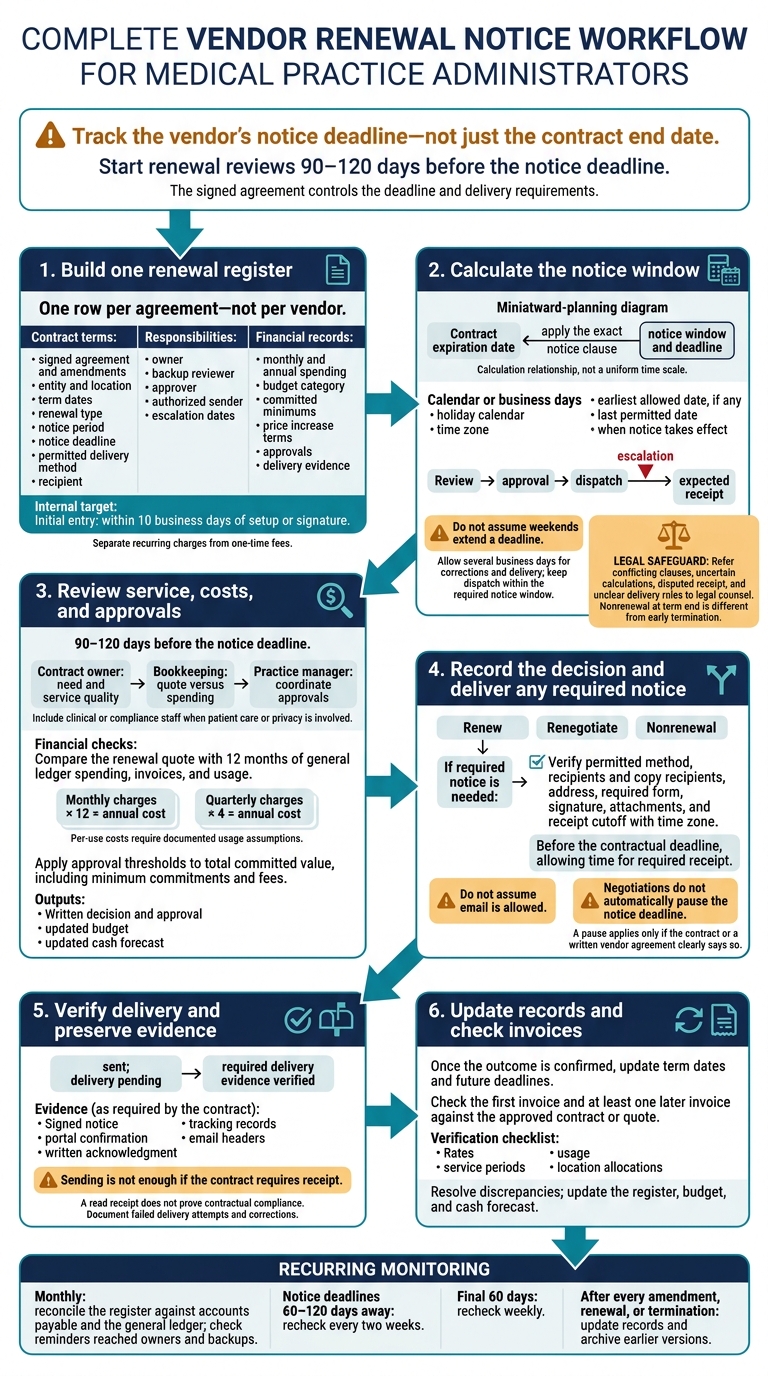
Vendor Renewal Notice Tracking Workflow
Contract Renewal Tracker | Never Miss a Vendor Contract Renewal (Google Sheets)
sbb-itb-17e8ec9
Step 1: Create a Vendor Renewal Register
Add every signed agreement, including contracts already in effect. Use one row per agreement - not per vendor. Check the register against AP records, bank and card transactions, recurring purchase orders, and vendor invoices. Assign one owner to resolve unmatched payments, duplicate vendor names, and expired contracts that are still being paid.
Record Contract Terms, Staff, and Spending
Group the fields by purpose. Start with the vendor’s legal name, service category, location, contracting entity, and department. Then record start and end dates, the renewal term, auto-renewal terms - including automatic renewal with no fixed end date - the notice period, and the calculated notice deadline.
Add the notice method and recipient, primary owner, backup reviewer, and current action status.
Use clear statuses: “review pending,” “renegotiate,” “renew,” “terminate,” and “legal review.”
Connect these terms to their budget impact. For bookkeeping, record monthly and annual spending, billing frequency, budget category, committed minimums, and price increase terms. Separate recurring charges from one-time fees, and note whether pricing applies per provider, user, location, or transaction. Link approvals and notice evidence so each expense can be traced to an authorized decision.
Link Signed Contracts and Amendments
Link each row to the signed agreement and every amendment. Record the source document, signed date or version date, clause reference, and amendment effective date. Keep prior versions, and update the affected terms whenever a clause changes.
Limit document access by role. Store contract data only - not patient information - and link any applicable Business Associate Agreement for review.
Follow a Register Setup Checklist
Treat the deadlines below as internal workflow targets. The signed agreement controls the actual notice requirements.
| Contract data | Financial data | Assigned owner | Deadline | Required action |
|---|---|---|---|---|
| Initial entry: vendor, entity, location, term dates, renewal type, notice period, and contract link | Monthly and annual spending, budget category, and price increase terms | Practice administrator; backup reviewer assigned | Within 10 business days of setup or signature | Enter contract data and verify the signed agreement |
| Renewal review: scope, expiration, notice deadline, and amendment history | Expected renewal cost, budget, and recent invoices | Department or location owner; bookkeeping reviewer | 90–120 days before the notice deadline | Record the recommendation and get approval |
| Notice delivery: clause, recipient, delivery method, and evidence location | Renewal or termination costs; forecast changes | Authorized sender; backup and escalation contact | Before the contractual deadline, allowing time for required receipt | Send notice, save proof, and update status |
Use the completed register to calculate notice windows and delivery deadlines in Step 2.
Step 2: Calculate Notice Dates and Delivery Requirements
Calculate the Notice Window and Deadline
Start with the register row: pull the expiration date, notice clause, and assigned staff. Calculate the deadline from the contract expiration date, following the clause exactly. Record whether it uses calendar or business days, which holiday calendar and time zone apply, and when notice takes effect. Include the earliest allowed date, if any, and the last permitted date. Do not assume weekends extend a deadline.
Work backward to schedule review, approval, dispatch, expected receipt, and escalation. Assign an owner, backup reviewer, and authorized sender for each date. Leave several business days for corrections and delivery, but keep dispatch within the required notice window. Reminders help staff stay on track; they do not satisfy the contract.
Record Delivery Rules and Save Proof
Once you’ve set the deadline, turn the notice clause into a delivery checklist covering the permitted method, recipients, copy recipients, notice address, required form, signature, attachments, and receipt cutoff with its time zone. Do not assume email is allowed, even if that’s how the vendor usually communicates.
Save the signed notice and delivery evidence, such as tracking records, portal confirmation, email headers, or written acknowledgment. A read receipt does not prove that notice met the contract’s requirements. Keep the task marked “sent; delivery pending” until the required delivery evidence is verified. Document failed delivery attempts and the steps taken to correct them.
Refer Unclear Terms for Legal Review
Keep nonrenewal at term end separate from early termination. Early termination may involve cause, cure periods, fees, minimum-purchase obligations, transition services, or data-export procedures.
Send conflicting clauses, uncertain calculations, disputed receipt, and unclear delivery rules to counsel before sending notice. Requirements can also depend on the contract type, jurisdiction, and state law. Log the issue, the deadline at risk, the reviewer, and the written guidance.
Step 3: Review Renewals and Update Budgets
Assign Reviewers, Backups, and Escalation Dates
Once the notice deadline is set, use the same register to track the renewal decision and required approvals. Follow one documented approval workflow: the contract owner confirms whether the service is still needed and reviews its quality; bookkeeping checks the renewal quote against past spending and the general ledger; and the practice manager coordinates approvals. Include clinical or compliance staff when patient care or privacy is involved.
Record each reviewer’s name, role, email or Slack contact, backup, and escalation date. Set the review-complete date early enough to allow time to deliver notice. Send overdue decisions to the practice manager and owner before that delivery window closes.
Link written approval thresholds to the register. Apply them to total committed value, including minimum commitments and fees - not just the first invoice. Require higher-level approval for material increases, multiyear or multi-location commitments, and termination of critical services.
Add Renewal Costs to Budgets and Cash Forecasts
After assigning approvals, record the cost impact in the budget and cash forecast. Compare the renewal quote with 12 months of general ledger spending, invoices, and usage. Separate rate increases from changes in volume, locations, taxes, and fees.
To calculate annual costs, multiply monthly charges by 12 and quarterly charges by 4. Calculate per-use costs with documented usage assumptions. Record the approved amount, increase, effective date, service period, account, location, and legal entity.
Flag commitments that cross fiscal years, then update the budget, cash forecast, and monthly renewal spend report. Record annual prepayments as cash outflows when paid, and amortize them over the service period according to the practice’s accounting policy.
Record Decisions and Verify Later Invoices
Record the decision as renew, renegotiate, or choose nonrenewal, along with the approver and decision date. Attach the service evaluation, spending comparison, budget impact, approved quote, agreement, and delivery evidence.
Negotiations do not automatically pause the notice deadline. A pause applies only if the contract or a written vendor agreement clearly says so. Once the outcome is confirmed, update the term dates and future deadlines.
Check the first invoice and at least one later invoice against the approved contract or quote. Also check the purchase order or budget record, if used. Verify rates, usage, service periods, and location allocations. Resolve any discrepancies - an invoice should not reset the agreed price.
Conclusion: Keep Renewal Records and Budgets Up to Date
Once the notice workflow is in place, keep the register current. Update it after every amendment, renewal, or termination. Archive earlier versions and supporting files.
Review the register monthly against accounts payable and the general ledger to spot untracked agreements and missed invoices. Check that reminders reached both owners and backups. Update the budget and cash forecast whenever prices or payment terms change so the budget stays on track.
Recheck notice deadlines every two weeks when they’re 60–120 days away, then weekly during the final 60 days to avoid missed notices.
FAQs
What if I miss a vendor’s nonrenewal deadline?
Don’t assume you missed the deadline. Mark the completion status as unverified right away, then contact the vendor or your adviser to confirm whether the obligation was missed.
If they confirm you missed it, document the missed deadline and ask your adviser what response is needed. Keep the original deadline and a record of every follow-up action so you can address the issue without losing its history.
How do I track renewals when the signed contract is missing?
Mark the register entry as Pending source verification. Don’t infer terms from invoices, prior managers, or industry assumptions.
Gather recent invoices, supplier correspondence, and account opening or transfer confirmations to identify service details. Assign someone to find the executed agreement or official amendment.
Until that document is found and verified, treat renewal terms as unknown. Consult counsel or an appropriate adviser about how to handle potential obligations.
How should I budget while renewal pricing is uncertain?
Focus on commitment planning, not static budgeting. Use a monthly worksheet with historical volumes to estimate costs under different usage levels and pricing tiers. Add those estimates to your cash forecast - not your general expense budget.
Record the last date to give cancellation or renegotiation notice in your register, leaving time to review alternatives. If pricing formulas aren’t clear, ask for clarification and escalate questions about how to interpret them. Don’t guess at costs.