Scenario-based resource planning helps businesses prepare for uncertainty by modeling multiple possible futures. Unlike traditional forecasting, this approach examines different outcomes - like revenue dips or unexpected growth - so you can plan smarter. Here's the process in a nutshell:
- Identify Key Assumptions: Focus on the 2–3 variables that most impact your business (e.g., revenue drivers, cash reserves).
- Build Scenarios: Create Base, Upside, and Downside scenarios to test different conditions.
- Create Financial Models: Use a single structured model to assess revenue, expenses, and runway under each scenario.
- Analyze and Allocate Resources: Compare metrics like burn rate and runway to prioritize spending.
- Build Contingency Plans: Set triggers for action, like pausing hiring or cutting costs, based on real-time data.
This method shifts businesses from reacting to crises to anticipating them, ensuring smarter decisions under any market condition.
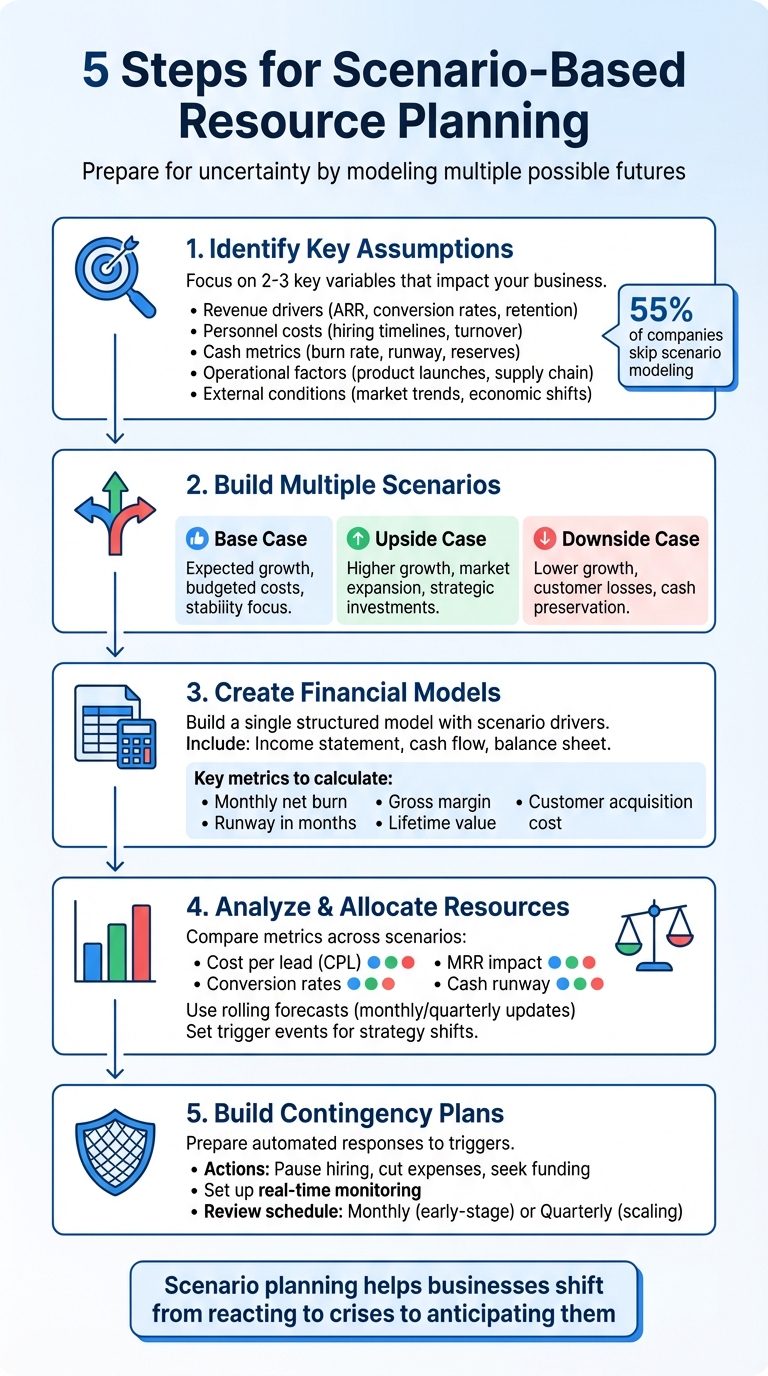
5-Step Scenario-Based Resource Planning Process for Startups
Scenario Planning Explained: Simple 5-Minute Example for Your Business
Step 1: Identify Your Key Assumptions and Drivers
Before diving into scenario planning, it's crucial to pinpoint the key variables that influence your business outcomes. Interestingly, 55% of companies skip scenario modeling when making forecasting adjustments. Start by distinguishing between what you can control - like hiring plans, marketing budgets, and product launch timelines - and external factors beyond your control, such as economic downturns or changes in regulations. Once you've done that, outline your core assumptions to zero in on the variables that matter most.
List Your Core Assumptions
Core assumptions typically fall into five major categories:
- Revenue drivers: Things like ARR growth, conversion rates, and customer retention.
- Personnel costs: Hiring timelines, sales team turnover, and critical roles.
- Cash metrics: Burn rate, runway, and minimum reserve thresholds.
- Operational factors: Product launch delays and supply chain dependencies.
- External conditions: Market trends and broader economic shifts.
Rather than trying to juggle everything, focus on the 2–3 key levers that have the biggest impact on your performance.
"Scenario planning simplifies this by identifying the company's key performance drivers. Instead of adjusting every variable, you test a few critical levers and show how they impact performance." - Ryan Winemiller, SaaS and Growth Marketing Professional
It's also essential to define your "non-negotiables" upfront - these are the elements you won't compromise on, like maintaining a minimum cash reserve or moving forward with essential hires even in tough times. For instance, if your monthly burn rate is $150,000 and you have $450,000 in reserves, your three-month runway becomes a hard constraint that will shape all other decisions.
Map How Drivers Connect
Once you've outlined your assumptions, the next step is to map how they interact. This isn't just about testing one variable in isolation - it’s about understanding how one event ripples across multiple outcomes. For example, if you miss a revenue target, analyze the financial and operational data to pinpoint the root cause. Was it due to lower conversion rates, sales team turnover, or rising customer acquisition costs? Then, assess how that shortfall impacts other areas of your business.
An increase in Cost Per Lead, for instance, doesn’t just strain your marketing budget - it can also lengthen your customer payback period, deplete cash reserves faster, and potentially force delays in hiring for critical roles like engineering. Collaborate with department leads to validate these connections. Your Customer Success team, for example, might suggest that reallocating priorities is more effective than reducing headcount when revenue takes a hit.
Step 2: Build Multiple Scenarios
To prepare for various potential outcomes, create distinct and realistic scenarios that challenge your business assumptions. This isn't just about optimism - it's about being ready for both opportunities and challenges.
"A financial model isn't supposed to just be aspirational. It's a tool to help you project what the financial future of your business will look like based on assumptions. Those assumptions shouldn't always be positive." - Dominique Jackson, Finmark
Each scenario should be grounded in realistic conditions and differ structurally while remaining plausible. For instance, in June 2023, a SaaS CRM startup analyzed a paid search campaign by modeling three scenarios: an Upside scenario with a $15 Cost Per Lead (CPL) and a 12% conversion rate, an Average scenario with a $30 CPL and a 7% conversion rate, and a Downside scenario with a $60 CPL and a 3% conversion rate. By comparing these against their base case (no ads), they found that the Downside scenario would deplete cash reserves and require an immediate halt if CPL hit $60.
This approach bridges the gap between identifying key drivers and creating actionable financial models.
Set Up Base Case and Edge Cases
Start with your Base Case - this is your current financial model, reflecting expected revenue growth, normal collection rates, and budgeted costs. It's essentially your most likely scenario based on current trends.
From there, develop your edge cases:
- Upside (Best Case): This explores what happens if things go better than expected, such as higher user adoption, faster market growth, or operational efficiencies.
- Downside (Worst Case): This models negative outcomes, like stagnant growth, customer churn, or unexpected costs. Stress tests can include extreme events, such as a significant revenue drop or supply chain issues.
| Scenario Type | Revenue Assumptions | Expense Assumptions | Key Focus |
|---|---|---|---|
| Base Case | Expected growth, current customers | Budgeted expenses, routine costs | Stability & steady growth |
| Upside Case | Higher growth, market expansion | Strategic investments, optimized costs | Growth & expansion |
| Downside Case | Lower growth, customer losses | Emergency spending, unexpected costs | Survival & cash preservation |
For each scenario, start with your base model and adjust 2–3 key variables, such as CPL, churn rate, or conversion rates. Avoid blanket percentage changes across all assumptions, as this can oversimplify the analysis.
Choose Key Metrics for Each Scenario
Once your scenarios are set, focus on metrics that directly reflect financial sustainability. Cash runway is a critical metric - calculate how long your business can operate under each scenario and identify the breaking point where your strategy becomes unsustainable.
Other important metrics include:
- Annual Recurring Revenue (ARR): Tracks top-line growth.
- Burn Rate: Helps monitor monthly cash usage.
- Minimum Cash Reserves: Ensures you maintain a financial buffer.
For example, if your base case shows a $150,000 monthly burn with $900,000 in reserves (six months of runway), your downside scenario might reveal that a failed marketing campaign could cut that runway to three months. This would prompt immediate actions, like freezing hiring or slashing spending.
"Scenario planning helps you provide that clarity. By modeling different choices - from conserving spend to reallocating resources - you can show leaders how to extend runway and safeguard the business against uncertainty." - Ryan Winemiller, Mosaic
Focus on levers you can control, such as hiring timelines and marketing budgets, rather than external factors beyond your influence. Set clear thresholds, like maintaining a specific cash reserve, to define your non-negotiables upfront. These guidelines ensure that when you move into financial modeling in Step 3, you'll have a solid foundation for making informed decisions.
Platforms like Lucid Financials can streamline this process by offering real-time insights and enabling swift, data-driven resource allocation.
Step 3: Create Financial Models for Each Scenario
Once your scenarios are clearly outlined, the next step is to translate them into financial models. These models help quantify how your assumptions impact financial outcomes. For each scenario, you’ll need a three-statement model - an income statement, cash flow statement, and balance sheet - along with a resource schedule that links staffing and expenses to revenue milestones. At a minimum, include key elements like revenue drivers (e.g., number of customers, average revenue per user, churn rates), cost of goods sold, operating expenses by function (engineering, sales, marketing), headcount with salaries and hiring schedules, non-people-related costs (like software and advertising), and cash inflows and outflows.
The most efficient way to do this is by creating a single, structured model with scenario drivers rather than juggling multiple spreadsheets. Use a scenario input table to define variables for growth rates, churn, pricing, and hiring pace for your Base, Downside, and Upside cases. A simple drop-down or flag can act as a scenario selector, pulling the relevant assumptions into your main model. By linking formulas to these drivers, you can instantly see how changes affect revenue, burn rate, and runway. This approach provides a flexible foundation for adjusting your financial strategy as circumstances evolve.
For each scenario, calculate crucial metrics like monthly net burn (cash outflows minus inflows, excluding new funding) and runway in months (current cash divided by average monthly net burn). Keep an eye on figures such as gross margin, customer acquisition cost, lifetime value, payback period, and cash coverage ratios. Adjusting drivers - like pausing hiring or slowing growth - should immediately show how these changes impact burn and runway. This makes it easier to determine if your downside scenario still provides the 12–18 months of runway typically expected by U.S. investors.
Leverage Scenario Modeling Tools
Once your structured model is ready, tools like Lucid Financials can simplify what-if analysis by integrating live data from your bank, accounting software, and payroll systems. Instead of manually updating spreadsheets, these platforms use AI to generate forecasts, calculate runway, and compare actual performance against your scenarios in real time. If your actuals start aligning more closely with a downside case, you can quickly pivot to a new resource plan.
Lucid connects directly to your financial systems, pulling in data like MRR, ARR, churn, expansion revenue, sales pipeline, and win rates. Its AI can produce board-ready reports and investor-level forecasts with a single click, while finance professionals review the outputs to ensure accuracy and compliance. For startups aiming to raise funds or scale rapidly, Lucid also offers CFO-level support, including financial forecasts, hiring plans, cash flow insights, and strategic advice delivered via Slack.
Add Real-Time Data
Incorporating real-time data transforms static financial models into dynamic tools that reflect current business conditions. Real-time updates allow you to compare actual results against your scenarios, helping you identify which path your business is following and adjust your resource plan accordingly. When your model automatically updates with every transaction, payroll run, or invoice, you gain early visibility into potential cash shortages or surpluses. This helps you better time key decisions like fundraising, hiring, or capital expenditures. Real-time monitoring ensures you can quickly address deviations, replacing guesswork with informed readiness. It gives you the confidence to act decisively - whether that means delaying a hire, cutting marketing spend, or adjusting the timing of a fundraising round - based on up-to-date performance rather than outdated projections.
sbb-itb-17e8ec9
Step 4: Analyze Results and Allocate Resources
Once you've built detailed financial models, the next step is to evaluate key metrics across your Base, Upside, and Downside scenarios. Pay close attention to how monthly recurring revenue (MRR), cash runway, and burn rate vary in each case. This comparison not only highlights which scenario aligns with your growth goals but also flags when your runway could be at risk. This analysis is crucial for making informed, flexible decisions about resource allocation.
Compare Resource Allocation Across Scenarios
Create a table to compare essential variables - like cost per lead (CPL), conversion rates, and runway impact - across all scenarios. This helps you spot trade-offs and prioritize where to invest or scale back.
| Scenario Type | Cost Per Lead (CPL) | Lead Conversion Rate | MRR Impact |
|---|---|---|---|
| Upside | Low ($15) | High (12%) | Hits target early (e.g., August) |
| Base | Moderate ($30) | Moderate (7%) | Hits target by year-end |
| Downside | High ($60) | Low (3%) | Fails to hit target; depletes cash |
This comparison allows you to define clear thresholds. For example, determine the CPL or conversion rate at which a campaign becomes unprofitable. If actual performance starts trending toward the Downside scenario, you'll know it’s time to pause spending or reallocate resources to protect your runway.
Plan for Flexible Allocations
Use these insights to adjust spending as performance changes. Instead of sticking to a rigid annual budget, consider adopting a rolling forecast that updates monthly or quarterly based on your latest financial data. This approach provides real-time feedback, helping you fine-tune resource allocations before small issues turn into big problems.
"Rolling forecasts lets you see how effective your strategic decisions were in getting you closer to what you were laying out on your financial forecast and gives you the feedback to correct course if necessary." - Curt Mastio, Managing Partner, Founder's CPA
To streamline this process, platforms like Lucid Financials can integrate real-time financial data with AI-driven forecasting, making scenario analysis more efficient. Use these tools to set "trigger events" that signal when to shift allocation strategies. For instance, if Q1 lead volume falls below a specific threshold or a competitor introduces a disruptive product, you could immediately pivot to your Downside plan - cutting non-critical expenses, halting hiring, or redirecting funds to better-performing channels.
Step 5: Build Contingency Plans and Track Progress
After allocating resources, the next step is to prepare for unexpected challenges with contingency plans. These plans should kick in automatically when certain predefined events occur. Essentially, this is where proactive planning meets responsive crisis management.
"Scenario planning is a way to assert some control by identifying assumptions or predictions about what may happen in the future and determining how an organization will respond" - Rami Ali, Senior Product Marketing Manager, NetSuite
Prepare Contingency Plans
Start by identifying key triggers that demand immediate action. For example, your plan might include steps like pausing non-essential hiring, cutting back on discretionary marketing expenses, or reaching out to current investors for additional funding. By setting specific thresholds ahead of time, you can ensure decisions are based on data rather than emotion.
A critical focus of your contingency plan should be protecting your cash reserves. Use break-even analysis to determine when adjustments are necessary. If cash flow becomes tight, you might consider altering sales compensation structures or suspending non-essential bonuses to maintain financial stability.
Set Up Real-Time Monitoring
Contingency planning works best when paired with real-time monitoring. By tracking key data continuously, you can turn insights into swift action. Implement a centralized system that eliminates guesswork and enables strategic decisions on the fly. Platforms like Lucid Financials can help by providing real-time alerts and integrated financial updates. For instance, its AI can flag potential issues - such as delayed receivables or unexpected expense increases - before they grow into larger problems. These updates can even be delivered directly to your team through tools like Slack.
"Scenario planning is not a one-and-done activity. After you put the strategies you've identified into action, it's important to revisit your scenarios and assess them again in the future as you gather new information" - Christopher Bailey, Director of Consulting Services at Lucid
Establish a regular review schedule that fits the pace of your business. Early-stage startups may benefit from monthly reviews, while more established companies might opt for quarterly evaluations. With investor-ready reporting, you'll always have up-to-date financial projections on hand, making it easier to engage stakeholders and support fundraising efforts when needed.
Conclusion
Scenario-based resource planning plays a critical role in helping startups navigate unpredictable markets. Instead of relying solely on a single forecast, asking "What might happen?" allows you to better anticipate changes and adapt with greater confidence. This guide outlined a clear, step-by-step process for managing uncertainty effectively.
"Scenario planning identifies risks, manages uncertainty, and sustains competitive advantage." - Christopher Bailey, Director of Consulting Services, Lucid
By following these steps, you can gain financial clarity and build resilience. You'll uncover the key assumptions driving your business, explore different possible futures, allocate resources wisely, and create contingency plans to stay prepared for unexpected challenges.
The trick is to keep things simple. Focusing on just two or three major uncertainties, as discussed earlier, makes the process manageable and actionable. For startups in their early stages, reviewing scenarios monthly is ideal, while scaling companies may find quarterly reviews more practical. Regular updates ensure your strategy stays aligned with the ever-changing market landscape.
To support this approach, Lucid Financials provides tools that keep your financial models up-to-date, helping you adapt quickly to shifting conditions. With AI-powered forecasting and real-time monitoring, Lucid Financials simplifies scenario planning, ensuring your numbers are always accurate. Whether you're raising funds, expanding your team, or pivoting your business, this platform helps you stay ready for whatever comes next.
FAQs
What makes scenario-based resource planning better than traditional forecasting?
Scenario-based resource planning is an effective way for startups to navigate uncertainty by considering various potential outcomes rather than sticking to a single fixed forecast. This method helps you spot risks and opportunities ahead of time, adjust resources as needed, and make real-time decisions based on data.
With its focus on flexibility and precision, scenario planning equips businesses to remain resilient and ready for different challenges, promoting smarter financial strategies and steady growth over time.
How do I identify the most important assumptions for my business planning?
To identify the key assumptions for scenario-based resource planning, start by mapping out all the factors that influence your cash flow. These could include revenue drivers like monthly recurring revenue growth or average contract value, customer metrics such as acquisition costs and churn rates, and expenses like payroll, cloud hosting, or the cost of goods sold. Focus on assumptions that are both high-impact - those that significantly affect your runway or profitability - and high-uncertainty, where future outcomes are harder to predict.
A quick sensitivity analysis can help you prioritize. Adjust each assumption by ±10% (or more) and see how it affects critical metrics like cash balance, burn rate, or runway. Pay special attention to high-impact variables such as revenue growth rate, customer acquisition cost (CAC), churn, or substantial operating expenses. Tools like Lucid Financials make this process easier by automating data collection, identifying volatile factors, and keeping your assumptions updated with the latest data. This ensures your plan remains accurate and ready to present to investors.
How can I use real-time data for scenario-based resource planning?
Using real-time data for scenario-based resource planning becomes much easier with an AI-powered financial platform that works seamlessly with your current systems. Take Lucid Financials as an example. It links directly to your accounting software and streams live updates straight into Slack. This means you get immediate insights into critical metrics like cash flow, burn rate, and key performance indicators (KPIs), letting you track financial shifts as they occur.
Lucid Financials also provides real-time dashboards that bring together financial, operational, and market data. These dashboards make it simple to tweak "what-if" scenarios on the fly - no manual updates required. By connecting to additional cloud data sources or setting up Slack alerts, you can ensure you're always working with up-to-the-minute information, enabling faster and smarter decision-making.