OAuth 2.0 is the standard for securely connecting fintech apps to banking APIs. It allows apps to access financial data without exposing sensitive credentials, using access tokens for limited, revocable permissions. This guide breaks down the process into five key steps:
- Register Your Application: Identify your app with the bank's system, obtain a
client_idandclient_secret, and configure sandbox and production environments. - Use Client Credentials Grant: Authenticate your app securely with the bank's token endpoint for automated processes.
- Execute the Authorization Code Flow: Obtain user consent for access by securely managing authorization codes with PKCE and MFA.
- Exchange Authorization Code for Tokens: Securely retrieve access and refresh tokens to interact with APIs, ensuring tokens are short-lived and scoped.
- Access APIs Securely: Validate tokens, enforce permissions, and use advanced security protocols like mTLS and FAPI standards.
OAuth 2.0 not only strengthens security but also aligns with regulations like PSD2 and Open Banking. By following these steps, you can build secure, compliant banking integrations while protecting user data.
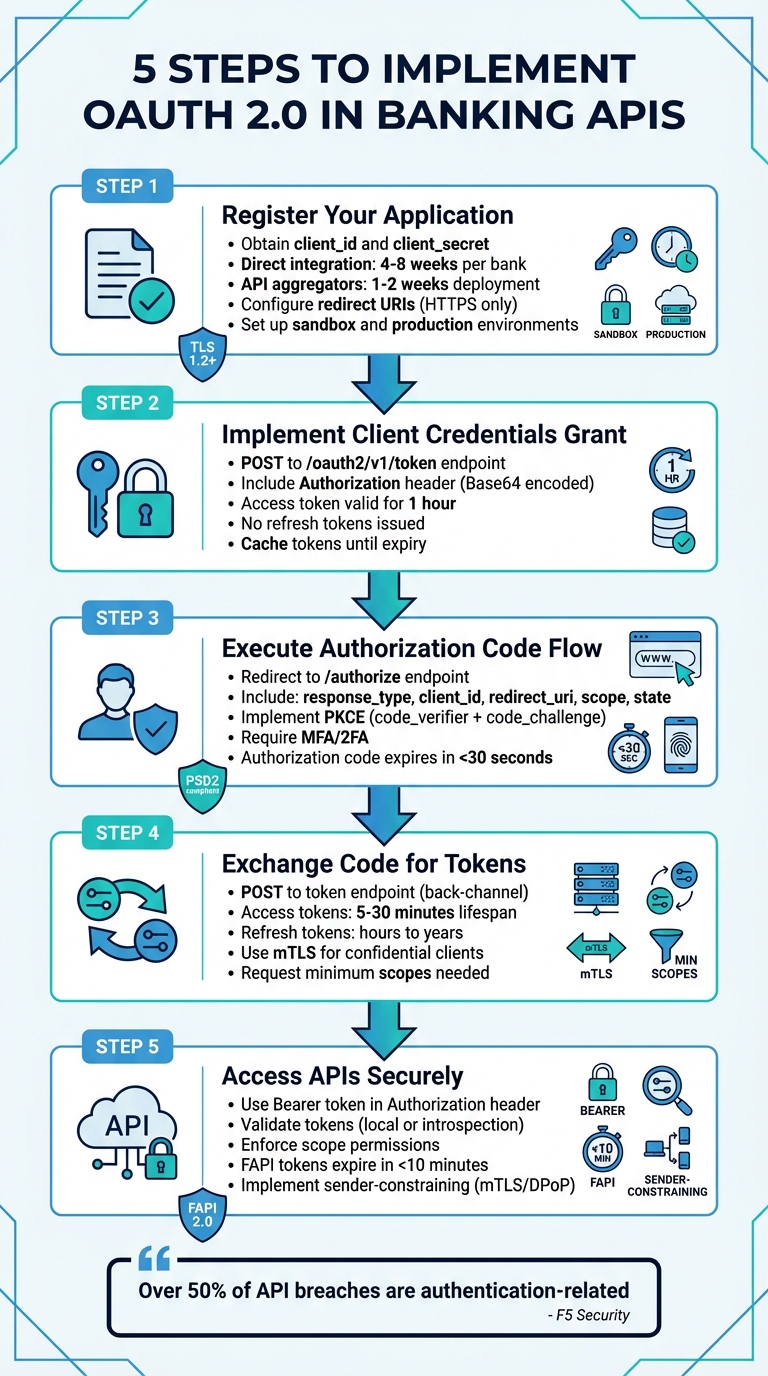
5 Steps to Implement OAuth 2.0 in Banking APIs
Building Secure APIs with Standards like FAPI, OAuth2, and OpenID Connect
Step 1: Register Your Application as an OAuth Client
To access banking data, the first step is registering your application with the bank's authorization server. This process identifies your app and defines what permissions it will have. Each bank or API aggregator has unique registration requirements, so understanding these specifics is key.
The approach you take depends on whether you're pursuing a direct bank integration or opting for an API aggregator. Direct integration gives you more control but can take 4–8 weeks per bank and requires meeting individual specifications. On the other hand, API aggregators like Plaid streamline the process, allowing deployment in just 1–2 weeks using a unified API, though they charge per-user fees. Once registered, you'll need to address the bank's specific requirements.
Following OAuth 2.0 security guidelines, registration will provide you with two critical pieces of information: a client_id (a unique identifier for your app) and a client_secret (a confidential key for authentication). These must be stored securely, such as in environment variables.
"Never share your
access_tokenwith anyone, as it can be used to access the banking data that you have access to and initiate transactions" – Revolut's documentation
Bank-Specific Registration Requirements
Banks typically separate their environments into sandbox and production, each with its own requirements. Accessing the sandbox is usually straightforward, requiring only a standard user account for testing with simulated data. However, gaining production access is more involved and often requires approval from a National Competent Authority (NCA) to operate as a Third-Party Provider (TPP).
Most banks mandate eIDAS certificates, such as Qualified Website Authentication Certificates (QWAC), issued by a Qualified Trust Service Provider (QTSP) to verify your identity. During registration, you’ll also need to define your TPP roles, such as PSP_AI for account information or PSP_PI for payment initiation. Some banks streamline this process with Dynamic Client Registration (DCR), based on RFC 7591, allowing you to register programmatically using a signed JWT that includes your application metadata.
Start in the sandbox environment and use the bank’s verification endpoints (e.g., /tpp/verify) to ensure your eIDAS certificates are properly configured for mutual TLS (mTLS).
Setting Up Redirect URIs
The redirect URI is the callback URL where the bank sends the authorization code after user authentication. This must be an HTTPS endpoint controlled by your app, and the URI must match exactly during the OAuth flow.
In February 2026, Lunar Open Banking introduced a client management API that allows TPPs to update their redirect URIs via the PUT /tpp/{clientId}/redirect-uris endpoint. This requires a valid eIDAS certificate and overwrites all previously registered URIs with the new list provided.
"If the
redirect_uriin the authorization request doesn't match the registered value for thatclient_id, don't redirect. Show an error page instead" – Plaid's documentation
For best practices, register separate redirect URIs for production, staging, and local development to maintain environment isolation. If you’re building a mobile app, avoid custom URI schemes - they can be exploited for app impersonation. Instead, use platform-specific identifiers like Package Names with SHA1 hashes for Android or Bundle IDs for iOS. Additionally, always include a state parameter in your authorization request and validate it upon callback to protect against Cross-Site Request Forgery (CSRF) attacks.
Step 2: Implement Client Credentials Grant for Initial Consent
Once your application is registered, the next step is to set up secure communication using the client credentials grant.
This process, often called "two-legged OAuth", lets your application authenticate itself using its own credentials instead of acting on behalf of a user. It’s particularly useful for automated processes that don’t require direct user involvement.
To implement this, send a POST request to the bank's token endpoint (e.g., /oauth2/v1/token). Include the following:
- An
Authorizationheader containing yourclient_idandclient_secretencoded in Base64. - A request body with
grant_type=client_credentialsand, optionally, ascopeparameter.
Here’s an example: BNP Paribas CIB used this flow with a POST request to /oauth2/v1/token. The response included an access_token (with scopes like pisp or aisp) valid for 1 hour.
Keep in mind:
- No refresh tokens are issued in this flow. When the token expires, you’ll need to request a new one.
- To optimize performance, cache the token and reuse it until it expires instead of requesting a new one for every API call.
For enhanced security, consider using the JWT Bearer profile (private_key_jwt). With this approach, the client signs a token using its private key, ensuring the key itself is never transmitted. Always store sensitive credentials, like private keys, in environment variables or a secure secret management system.
Step 3: Execute the Authorization Code Flow
The authorization code flow is a secure way for your application to get explicit permission from users to access their banking data. This approach keeps access tokens on the server side, reducing the risk of exposure in the user's browser.
Getting User Consent
To start, redirect the user's browser to the bank's /authorize endpoint. Your request should include the following parameters:
response_type: Set this tocode.client_id: Include your registered client identifier.redirect_uri: Specify the exact redirect URI you registered.scope: List the permissions your app needs, such asaccountsortransactions.state: Use a unique, random value to prevent Cross-Site Request Forgery (CSRF) attacks. Ensure the returnedstatematches what you sent. Avoid embedding sensitive data in thestate; instead, use it as a reference to securely stored information.
For added security, implement Proof Key for Code Exchange (PKCE). This involves generating a random code_verifier, hashing it with SHA-256 to create a code_challenge, and sending both along with code_challenge_method=S256.
"Securing APIs with OAuth with PKCE can ease APIs authorization challenges, such as authorization code flow interception attacks" – Shahnawaz Backer, Principal Security Advisor at F5
Many banks also require multi-factor authentication (MFA). For instance, Plaid emphasizes the importance of 2FA in its banking connections:
"Users must complete a second authentication factor beyond username and password. 2FA aligns with industry security standards and reduces the risk of account takeover" – Plaid's documentation
After the user approves the request, the bank redirects them to your redirect_uri with a short-lived authorization code. Handle this code securely as described below.
Managing Authorization Codes Securely
Authorization codes are designed to be short-lived (typically expiring in under 30 seconds) and can only be used once.
"The authorization code... is a nonce, not-more-than-once token, that is to be used a single time. It has a short lifespan (usually less than 30 seconds)" – Jacob Ideskog, CTO at Curity
Reusing an authorization code is a serious security risk. If a code is reused, the authorization server should revoke any tokens issued from it, preventing the possibility of replay attacks.
When exchanging the authorization code for tokens, ensure the following:
- The
redirect_urimatches exactly what was specified in the initial authorization request, including any query parameters. - The original
code_verifieris provided, corresponding to the previously sentcode_challenge.
Step 4: Exchange Authorization Code for Access and Refresh Tokens
In this step, the authorization code is exchanged for the tokens required to interact with banking APIs. This process is carried out via a secure, back-channel POST request to the bank's token endpoint. Keeping this exchange off the browser ensures sensitive credentials remain protected.
The POST request should include the following parameters with a Content-Type of application/x-www-form-urlencoded:
grant_type=authorization_code- The authorization code
- Your
client_id - The exact
redirect_uriused during authorization
If you employed PKCE during the initial authorization, also include the code_verifier.
For confidential clients, client authentication is mandatory. You can use methods like Basic Authentication (with your client secret), Mutual TLS (mTLS), or JWT assertions. Among these, mTLS is the preferred option in high-security environments, as it binds the connection to specific authorized certificates.
Once the bank validates your request, it will return a JSON response containing:
access_token: Used for API accessrefresh_token(optional): For obtaining new access tokenstoken_type(typically Bearer)expires_in: The token's validity period in seconds
Access tokens are short-lived to reduce risk if compromised, often lasting between 5 and 30 minutes. Refresh tokens, however, may have longer lifespans, ranging from hours to years, depending on the bank's policy. After receiving the tokens, verify that the scopes align with the principle of least privilege.
Working with Token Scopes
Token scopes define what actions your access token can perform. To maintain security, request only the scopes your application genuinely needs. For example, if your app only needs to check account balances, request read:accounts instead of broader permissions like write:transactions. If the bank grants fewer scopes than requested, the response will include a scope parameter listing the approved scopes. Your app should adjust its functionality accordingly.
Some banks offer incremental authorization, allowing your app to request additional scopes later when specific features are accessed. This approach ensures your app only uses permissions that are absolutely necessary.
Managing Token Expiry and Refresh
Access tokens in banking systems typically expire within 15 minutes. To avoid forcing users to re-authenticate frequently, use the refresh token to obtain new access tokens seamlessly. Send a POST request to the token endpoint with the following:
grant_type=refresh_token- Your
refresh_token
Refresh token rotation may occur during this process, meaning a new refresh token will be issued, and the old one immediately invalidated. If an outdated refresh token is used, it may indicate a security issue, prompting the bank to revoke the entire token chain.
"Over 50% of the cases studied for API breaches and disclosures were authentication and authorization related." – Shahnawaz Backer, Principal Security Advisor at F5
For optimal security, store refresh tokens in highly secure environments, such as hardware security modules (HSMs), rather than local storage or plain text. Additionally, implement a revocation endpoint to instantly invalidate tokens if users log out or suspicious activity is detected. To comply with standards like PSD2 and PCI-DSS, maintain a detailed audit trail by logging all token requests and API calls.
sbb-itb-17e8ec9
Step 5: Securely Access Banking APIs
Once you have an access token, you can use it to call banking APIs. It’s crucial to validate the token and ensure its permissions are enforced. Always include the access token in the HTTP Authorization header using the Bearer scheme, like this: Authorization: Bearer <access_token>. Avoid passing tokens in query parameters - this can expose them through server logs or browser history.
Token Validation Methods
Every access token must be verified by resource servers before granting access to sensitive banking data. There are two main ways to validate tokens: local cryptographic validation and remote introspection.
- Local validation: This involves verifying the JWT signature using the authorization server's public keys, which are typically retrieved from a JWKS URI. This method is quick but has a limitation - it doesn’t account for tokens that have been revoked unless you implement short cache timeouts.
- Token introspection: Defined in RFC 7662, this method checks the token in real time by sending it to the authorization server's introspection endpoint. The server responds with metadata, such as whether the token is active, its expiration time, associated scopes, and audience. While this adds a network round-trip, it ensures up-to-date revocation status, making it ideal for high-security environments. If you cache introspection results to boost performance, keep the timeout under 60 seconds to balance security and efficiency.
To further secure tokens, implement sender-constraining techniques like Mutual TLS (mTLS) or Demonstration of Proof-of-Possession (DPoP). These methods bind the token to the legitimate client, preventing misuse if the token is stolen. Also, ensure you only use secure algorithms such as PS256, ES256, or EdDSA (Ed25519), and disallow the "none" algorithm.
Finally, after validating a token, confirm that its scopes match the requested operation.
Enforcing Scopes and Permissions
Tokens must have the correct scopes to authorize specific actions. Resource servers should verify that the token’s audience (aud claim) matches their identifier and that the granted scopes align with the requested operation. For instance, a token with the read:accounts scope cannot be used to initiate a payment.
"The privileges associated with an access token should be restricted to the minimum required for the particular application or use case." – OWASP
For more granular control, such as limiting a payment to a specific account or dollar amount, use the authorization_details parameter instead of broad scopes. This approach supports the principle of least privilege, reducing risks if a token is compromised.
To aid in auditing and troubleshooting, include the x-fapi-interaction-id header in both requests and responses. This helps correlate log entries across systems. Additionally, follow FAPI guidelines by setting access tokens to expire in under 10 minutes unless they are sender-constrained. Plan your token refresh strategy to accommodate this.
Banking-Specific Security Requirements for OAuth 2.0
Once secure token exchanges are in place, it's crucial to implement additional layers of security tailored specifically for banking systems. These measures ensure financial data remains protected and compliant with industry standards. Strong encryption practices and advanced authorization flows are at the heart of secure bank API integrations.
Banking APIs operate under stricter security protocols compared to general OAuth implementations. The Financial-grade API (FAPI) profiles were specifically developed to counter sophisticated threats targeting financial data.
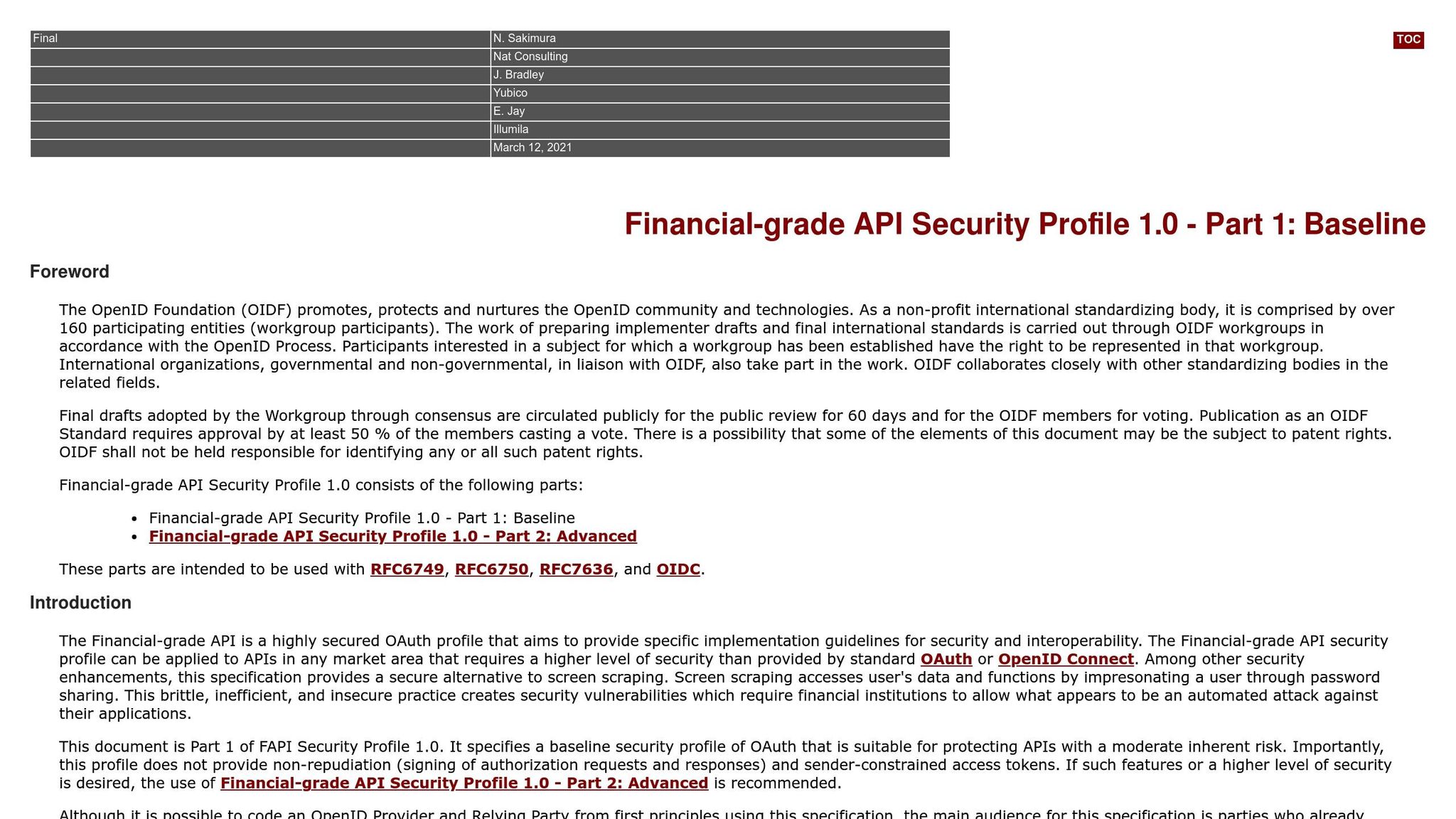
"The Financial-grade API is a highly secured OAuth profile that aims to provide specific implementation guidelines for security and interoperability... this specification provides a secure alternative to screen scraping." – OpenID Foundation
TLS and Encryption Standards
All communications must adhere to TLS 1.2 or later, as outlined in BCP 195. For TLS 1.2, only secure cipher suites like TLS_DHE_RSA_WITH_AES_128_GCM_SHA256 or TLS_ECDHE_RSA_WITH_AES_256_GCM_SHA384 should be allowed. Additionally, mTLS (mutual TLS) is required for client authentication.
Encryption key requirements include:
- RSA keys: At least 2,048 bits.
- Elliptic curve keys: Minimum of 160 bits for FAPI 1.0 and 224 bits for FAPI 2.0.
- Access tokens and credentials: Must have at least 128 bits of entropy.
To further enhance security:
- Enable HSTS (HTTP Strict Transport Security) on browser endpoints.
- Use DNSSEC with CAA records to guard against DNS spoofing.
These encryption practices lay the groundwork for securely managing JSON Web Tokens (JWTs).
Using JWT for Access Tokens
When using JWTs for access tokens, ensure they include the following mandatory claims: iss, aud, exp, iat, and nbf. JWTs must be signed with strong algorithms like PS256, ES256, or EdDSA, and the none algorithm should be strictly disallowed.
Key considerations for JWTs:
- Accept timestamps up to 10 seconds in the future, with a maximum drift of 60 seconds.
- Distribute public keys through a JWKS URI endpoint over TLS, instead of hardcoding them.
- Devices with inaccurate clocks should sync time using the server's
HTTP Dateheader.
Advanced Grant Flows: PAR and CIBA
Banking APIs benefit significantly from advanced grant flows, such as Pushed Authorization Requests (PAR) and Client-Initiated Backchannel Authentication (CIBA). These flows add layers of security beyond traditional OAuth methods.
Pushed Authorization Requests (PAR)
PAR moves authorization parameters from the browser to a secure, server-to-server channel. The client submits the full authorization request to the server's backchannel and receives a request_uri, which is then used during the browser redirect. This method:
- Prevents request tampering.
- Ensures sensitive data doesn’t appear in browser history.
FAPI 2.0 mandates PAR, requiring request_uri values to expire in 600 seconds or less.
Client-Initiated Backchannel Authentication (CIBA)
CIBA separates the transaction device from the authentication device. For example, a payment initiated on a point-of-sale terminal can be authorized on a user's smartphone. A binding code is displayed on both devices to link the sessions securely. Important guidelines for CIBA include:
- Use only "poll" or "ping" modes, as "push" mode is not allowed in FAPI profiles.
- All CIBA requests must be signed using JWS.
nbfandexpclaims in CIBA requests should not exceed 60 minutes.
Here's how PAR compares to the traditional authorization code flow:
| Feature | Traditional Auth Code Flow | Pushed Authorization Requests (PAR) |
|---|---|---|
| Request Channel | Front-channel (Browser URL) | Backchannel (Server-to-Server) |
| Integrity | Low (Subject to tampering) | High (Signed/Authenticated) |
| Confidentiality | Low (Visible in logs/history) | High (Payload never reaches the browser) |
| Client Auth | Occurs at Token Endpoint | Occurs at the start of Authorization |
These advanced flows and strict encryption measures ensure banking APIs meet the highest security standards, protecting both users and sensitive financial data.
Common Mistakes and Best Practices
When working with OAuth 2.0 for secure bank API integrations, it's important to avoid common pitfalls that can leave your system vulnerable. Mistakes in implementation can lead to serious security breaches - over 50% of breaches stem from authentication and authorization issues.
Never Hardcode Credentials
One of the riskiest errors developers make is embedding client secrets directly in application code. Hardcoded credentials are easily exposed through code leaks or reverse engineering, especially in mobile apps.
"It is possible for an attacker to reverse-engineer a mobile application to gain access to the client secret." – Shahnawaz Backer, Principal Security Advisor, F5
Instead of hardcoding, store credentials in environment variables or use secret management tools like Google Cloud Secret Manager. For server-side applications, opt for asymmetric authentication methods such as private_key_jwt or Mutual TLS (mTLS) to avoid storing sensitive symmetric secrets. If you're working with public clients that can't securely store secrets, implement PKCE with the S256 challenge method to safeguard against authorization code interception.
Beyond securing credentials, thorough testing is a must before going live.
Testing with Financial-Grade APIs
Before handling real financial data, always test your implementation in a sandbox environment with test accounts. Use OpenID Foundation certification tools to ensure compliance with Financial-grade API (FAPI) standards. Configure your server to allow JWT timestamps with a small clock skew (10–60 seconds) and test for edge cases like the "Cuckoo's Token" attack, where an attacker could try to inject a stolen token from another trusted authorization server.
Once testing is complete, ongoing monitoring is crucial to maintain security.
Monitoring and Auditing Token Usage
To enhance tracking and troubleshooting, include the x-fapi-interaction-id header in all API requests and responses. This unique UUID, as outlined in RFC4122, helps correlate logs between clients and servers. Regularly monitor token usage patterns to identify unusual activity that might signal a breach. Always issue tokens with the least privilege needed - distinguish between scopes like "read-only" and "payment-initiation" - and provide endpoints for token revocation to quickly disable access during suspicious events. Additionally, ensure access tokens have a short lifespan, typically under 10 minutes, unless they're sender-constrained.
Conclusion and Next Steps
Using OAuth 2.0 is a smart move for creating secure and scalable banking integrations that safeguard user data while meeting regulatory standards. By eliminating the need to handle raw credentials, OAuth 2.0 reduces risks, limits vulnerabilities, and empowers users to control what data they share.
Building on the steps for registration, token management, and secure API access, here’s a summary of key practices to keep in mind.
Key Takeaways
OAuth 2.0 enhances security by ensuring sensitive credentials stay with the bank, significantly lowering exposure risks. The use of scopes allows you to issue tokens with specific permissions - such as restricting access to read-only transactions or limiting payment initiation capabilities. This way, even if a token is compromised, the potential impact is contained.
It’s not just about security - OAuth 2.0 also improves the user experience. By layering OpenID Connect on top of OAuth, users can reconnect applications with simple phone verification instead of going through the full authentication process again.
"OAuth delivers secure, consumer-controlled access to financial data. Consumers authenticate directly with their bank, and the Data Provider issues a secure, scoped token." – Plaid
For compliance with regulations like PSD2, GDPR, and Open Banking frameworks such as FDX, consider advanced features like sender-constrained tokens and flows aligned with FAPI 2.0.
Additional Resources
To take your implementation to the next level, start by exploring the FAPI 2.0 Baseline Profile, which is ideal for high-value use cases, and RFC 9700 (OAuth 2.0 Security Best Current Practice) for updated security recommendations. Use the OpenID Connect Conformance Suite to self-certify your implementation and ensure it aligns with industry standards. For hands-on experience, check out Plaidypus, a demo that simulates OAuth flows, token exchanges, and consent management in a banking context.
When building your integrations, make use of OAuth 2.0 Authorization Server Metadata (RFC 8414) to simplify security configuration and enable cryptographic key rotation. Additionally, implement Token Introspection (RFC 7662) and Token Revocation (RFC 7009) endpoints to manage token lifecycles effectively. Always test thoroughly in sandbox environments provided by banks or aggregators to handle edge cases, such as expired tokens, revoked access, or service interruptions.
FAQs
When should I use client credentials vs authorization code?
When your app needs to authenticate users and perform actions on their behalf - like in web or mobile apps that require user consent - the authorization code flow is the way to go. This approach prioritizes security by managing tokens on the backend, reducing exposure to sensitive data.
On the other hand, the client credentials flow is ideal for machine-to-machine communication or backend services. In this scenario, the app operates independently without involving users, relying on its client ID and secret for authentication.
How can I securely store and rotate refresh tokens?
To keep refresh tokens safe, rely on a secret manager rather than hardcoding them or sending them in plain text. Use rotating refresh tokens, which generate a new token each time one is used, reducing the chances of misuse if a token is stolen. Always revoke tokens that are no longer needed and make sure to properly handle expired tokens. By combining secure storage, token rotation, and revocation, you can significantly enhance the security of your OAuth 2.0 setup.
Should I validate tokens locally or use introspection?
When it comes to validating tokens, introspection is often the go-to method, especially in scenarios where real-time validation and the ability to revoke tokens instantly are crucial. This process involves querying the authorization server to check if the token is still active and to retrieve its metadata. This ensures that the validation process remains secure and current.
While validating JWT tokens locally is quicker, it comes with a drawback - it doesn’t allow for immediate revocation. Because of this, introspection is typically the better option for secure implementations, such as those required for banking APIs.