Overtime errors get expensive fast. If I had to boil this down to one point, it’s this: the best AI tools help me spot overtime risk before payroll closes, apply the right state rule, show the cost in U.S. dollars, and keep a clean audit trail.
Here’s the short version of what matters most:
- Threshold monitoring shows when someone is getting close to overtime.
- Timecard checks catch missing punches, duplicate entries, and break issues.
- Schedule checks stop risky shifts before they go live.
- Forecasting estimates overtime days ahead of time.
- Rule updates keep state and local pay rules current.
- Anomaly detection flags odd payroll entries before money goes out.
- Alerts and approvals route issues to the right manager.
- Reporting and audit logs tie each pay line back to source records.
A few numbers stand out:
- Unplanned overtime can often drop by 15%–30%
- Payroll error fixes cost about $291 per error
- Wage and hour exposure can pass $200,000
- FLSA civil penalties can reach $2,014 per violation in some cases
If I’m reviewing overtime tools, I’d look for two things first: does it stop bad hours early, and can it prove what happened later?
Quick Comparison
| Feature | What it does | Main value |
|---|---|---|
| Threshold monitoring | Tracks hours as they build | Stops overtime surprises |
| Timecard validation | Checks punches in real time | Cuts payroll cleanup |
| Scheduling conflict prevention | Reviews shifts before publishing | Blocks risky schedules |
| Predictive forecasting | Estimates future overtime | Helps with labor planning |
| Compliance rule updates | Updates pay rules by location | Lowers rule errors |
| Payroll anomaly detection | Finds odd payroll patterns | Catches entries that slip through |
| Manager alerts and approvals | Sends issues to supervisors | Adds control before payroll |
| Reporting and audit trails | Logs rules, edits, and approvals | Supports audits and reviews |
So when I read this list, I don’t see “AI features.” I see eight ways to cut overtime cost, lower wage risk, and make payroll easier to defend.
sbb-itb-17e8ec9
Why AI Matters for Overtime Compliance and Cost Control
Overtime mistakes don’t usually blow up all at once. They pile up in the background, shift by shift, until the bill gets ugly. AI helps because it spots trouble while there’s still time to fix it. That’s why real-time financial insights for threshold monitoring is the first thing to look at.
Manual timesheets are a common source of costly overtime mistakes. For mid-market companies, overtime spend can reach $75,000–$150,000, while missed violations can top $200,000 in back pay and penalties. If the issue is judged willful under the FLSA, civil penalties can hit up to $2,014 per violation.
The rules also change depending on where people work. California, Colorado, and New York each use different overtime thresholds, so employers need to apply the right rule in the right jurisdiction every time. A basic time clock logs punches. AI goes a step further and applies the correct jurisdictional rules.
That matters for day-to-day cost control, too. Real-time tracking and automated scheduling can cut unplanned overtime by 15–30%. So when you’re weighing tools, start here: AI overtime threshold monitoring.
1. AI Overtime Threshold Monitoring
This feature turns overtime from a surprise into a live management signal. Instead of finding out at payroll close, managers can spot risk while there’s still time to do something about it.
AI can pull together schedules, demand signals, and hours worked so far to forecast overtime days in advance.
Pre-Payroll Risk Prevention
The main upside is simple: stop overtime before it gets locked into payroll. Managers get midweek alerts when an employee is trending over the limit, which gives them time to shift hours or reassign work.
State and Location-Based Rule Coverage
AI applies the right overtime rule based on worksite and jurisdiction. That matters a lot for remote teams and multi-state operations, where rules can change from one location to the next.
Overtime Cost Visibility
AI doesn’t just track hours. It also turns that risk into dollar figures. Managers can view projected overtime costs in a weekly cost view before the pay period ends, not just see hour variances.
That money view helps HR and finance teams decide where schedule changes matter most.
Once the system flags threshold risk, the next move is catching bad punches before they reach payroll.
Audit-Ready Documentation
AI timestamps every punch, edit, and approval. It also links each action to the payroll rule that was applied, creating tamper-evident logs with a clear trail for auditors to review.
That live alert only helps if the timecard behind it is valid.
2. Real-Time Timecard Validation
Threshold alerts help spot overtime risk early. Real-time timecard validation deals with the punch mistakes that often cause that risk in the first place.
It checks each punch as it happens, so teams can catch duplicate entries, missing clock-outs, and signs of off-the-clock work before payroll closes. That matters more than it might seem at first glance. Manual timesheets come with a 72% error rate for overtime calculations, and the average company spends about $291 per error to clean up payroll issues after the fact. When problems show up earlier, managers have time to fix them before they turn into payroll headaches.
Pre-Payroll Risk Prevention
AI reviews each punch the moment it posts. If someone swipes in twice, forgets to clock out, or misses a required break, the system flags it before payroll closes. That shift - from reactive payroll cleanup to proactive time management - cuts overtime errors before they flow downstream.
State and Location-Based Rule Coverage
Time rules aren’t the same everywhere. A punch in one state may need different checks than a punch at another worksite. AI applies the right rule set to each punch in real time, based on location and labor requirements.
Overtime Cost Visibility
A bad punch doesn’t just create a record problem. It can also drive up labor costs. AI shows managers the cost impact right away, which makes it easier to step in before overtime stacks up.
Audit-Ready Documentation
Every punch, edit, and approval is stored in a tamper-evident log. That record includes the exact rule applied - such as "CA daily OT after 8 hours," - plus the reason for any correction. Each edit stays linked to the rule used and the approver, which gives teams a clean audit trail.
Once timecards are clean, AI can shift from fixing errors to stopping the schedule from creating overtime in the first place.
3. AI Scheduling Conflict Prevention
Once timecards are clean, the next overtime risk sits in the schedule itself. AI scheduling conflict prevention stops those issues early by reviewing draft schedules before they’re published. If a shift would push someone into overtime or break meal and rest break rules, the system flags it right away.
That means risky shifts get stopped before they go live. AI can block back-to-back shifts, weekly overtime, and break violations before managers publish the schedule. Instead of fixing problems after the fact, teams catch them at the source.
Pre-Payroll Risk Prevention
AI checks draft schedules against labor rules, employee availability, skills, and fatigue limits before publication. That cuts down on last-minute compliance fixes and schedule rework.
But there’s a catch: this only works if the system knows which rules apply in each location.
State and Location-Based Rule Coverage
AI applies the right local rules to each shift. That includes overtime thresholds, meal and rest breaks, minor work limits, and required notice periods. It also avoids applying stricter rules where they don’t belong.
Once those rules are in place, the next issue is cost.
Overtime Cost Visibility
Before a schedule goes live, AI shows projected labor cost and overtime exposure in U.S. dollars. Managers can see the financial impact before they lock anything in.
And those forecasts matter even more when there’s a clear record behind them.
Audit-Ready Documentation
AI logs each alert, approval, and rule applied. That creates a full schedule history managers can review later if questions come up.
4. Predictive Overtime Forecasting
After AI blocks risky schedules, it can estimate the overtime those schedules are still likely to create.
Predictive overtime forecasting pulls from scheduling, timekeeping, and HR data to flag likely overtime days before they happen.
Pre-Payroll Risk Prevention
Managers don’t just get a warning. They get a clear next move, like shifting hours, adding coverage, or moving work to a lower-cost team.
That kind of forecast only helps if the rule set underneath it matches each worksite.
State and Location-Based Rule Coverage
Forecasting works only when AI applies the right overtime rule to each worksite and employee.
If the system gets that match wrong, the forecast can point teams in the wrong direction. And that defeats the whole point.
Overtime Cost Visibility
AI turns forecasted overtime into dollar exposure reports. Those reports show both the legal risk tied to non-compliance and the extra payroll cost that comes from applying stricter rules where they don’t belong.
Audit-Ready Documentation
Every forecast, input, action, and schedule change stays timestamped for audit review.
Once forecasted risk is visible and logged, the next step is keeping compliance rules current as laws change.
5. Automated Compliance Rule Updates
Forecasts only stay on track if the rules behind them change when laws change. That’s the whole game.
AI keeps scanning legal and regulatory sources, then turns new requirements into payroll rules inside the platform. So instead of waiting on manual updates, the system keeps pace as rules shift.
That matters even more when the platform can automatically match each worker to the right jurisdiction. If that mapping is off, everything downstream can go sideways.
State and Location-Based Rule Coverage
AI pulls each employee’s work location from the HRIS and applies the more protective rule when jurisdictions differ.
That’s a big deal for teams with employees spread across cities, counties, and states. One person may live in one place, work in another, and fall under a different set of labor rules. The platform sorts that out without forcing payroll teams to piece it together by hand.
Pre-Payroll Risk Prevention
When payroll closes, AI cross-references live punch data against the current rule library - so updated requirements are applied to real entries, not just historical records.
In plain English: the system checks what employees actually logged against the latest rules before payroll is locked. That helps stop errors at the point where they still can be fixed, instead of after money has gone out.
Overtime Cost Visibility
AI also flags overapplication of stricter rules to employees in states where they don't apply, surfacing unnecessary payroll cost before it's locked in.
That can save money in a very direct way. If a stricter overtime rule gets applied where it shouldn’t, payroll can catch the extra cost before it becomes a done deal.
Audit-Ready Documentation
Rule changes, version history, and source-law links are logged in a tamper-evident audit trail so the file is ready if the Department of Labor audits it.
That means the paper trail is already there:
- What changed
- When it changed
- Which source law triggered the update
Once the system updates the rules, payroll anomaly detection can catch entries that still slip through.
6. Payroll Anomaly Detection
Once rules are updated, AI still needs to catch the outliers those rules miss.
Even with current rules in place, payroll issues still slip through. AI can spot repeated rounding patterns, misclassified pay codes, and sudden overtime spikes by employee, role, or location before payroll runs. That matters because manual payroll processes see a nearly 20% payroll error rate. And fixing just one payroll error costs about $291 on average. AI anomaly detection goes straight at that problem.
Pre-Payroll Risk Prevention
Before money moves, AI scans HRIS, timekeeping, and payroll data for missing punches, misclassified earnings codes, and rounding anomalies. It keeps checking time, pay, tax, and filing data across systems before payroll closes.
Overtime Cost Visibility
AI doesn't just flag a problem - it shows the cost. Anomaly reports appear in dollar terms, so a CFO can see the financial exposure tied to each issue right away, whether that's a compliance gap or an over-compliance error flagged by the anomaly detection system.
Audit-Ready Documentation
Each flagged anomaly stores the source records, applied rules, calculation details, and remediation steps in an immutable audit trail.
After a flag appears, managers need a fast approval path to correct it.
7. Manager Alerts and Approval Workflows
Once AI flags an exception, the next step is simple: get it to the right manager FAST. If the system spots overtime risk, it sends an alert to the right supervisor before those extra hours happen.
The alert isn’t vague or generic. It spells out what’s going on and what action could help. As EverWorker notes:
"OT will hit 11.4% Friday due to uncovered second shift at Plant B; pulling two contractors from Plant C reduces OT by $14,600 and preserves output."
Pre-Payroll Risk Prevention
After a manager gets the alert, AI sends the request through role-based approvals before the hours are worked. That matters because it puts control up front, not after payroll is already locked in. For high-dollar requests, two approvals are required.
As Ameya Deshmukh of EverWorker puts it:
"Governance for payroll AI requires model and data risk controls, RBAC, SoD, human-in-the-loop for monetary changes, encryption, retention rules, and complete action logs with replayable evidence."
State and Location-Based Rule Coverage
AI applies the right rule set based on where each employee works. It also gives extra attention to jurisdictions with higher risk, which helps managers avoid rule mismatches across states and sites.
Overtime Cost Visibility
Before anyone approves a change, AI shows the labor cost tied to that decision. Managers can see the impact by shift, job code, or location, which makes the tradeoff much clearer.
Audit-Ready Documentation
Every alert, routing step, approval, and policy citation is logged automatically. If audit review comes up, AI can export a full evidence packet with the records needed to show what happened and why.
Those same logs also feed the reporting layer that comes next.
8. Automated Reporting and Audit Trails
Once managers approve exceptions, AI turns those decisions into a full payroll record. Automated reporting pulls timekeeping, payroll, and HR data into a single audit trail before payroll closes.
Pre-Payroll Risk Prevention
Before payroll is finalized, AI runs a simulation to catch wrong pay codes, missing tax rates, and wrong overtime calculations while there’s still time to fix them.
State and Location-Based Rule Coverage
AI records which state or local rule applied to each employee, so the payroll file is easier to verify later. That matters because the audit trail should show whether a rule was set up wrong from the start or applied the wrong way during payroll.
Overtime Cost Visibility
AI breaks labor variance down by location, job code, and shift, so finance can see the dollar impact before payroll posts.
Audit-Ready Documentation
Every clock-in, edit, approval, and rule change is logged with a timestamp and rule ID. AI then exports evidence packs that link each payroll line to its source data, calculation, and approval path.
These outputs make it easier to compare reporting depth, audit readiness, and finance visibility across AI tools.
Quick Feature Comparison
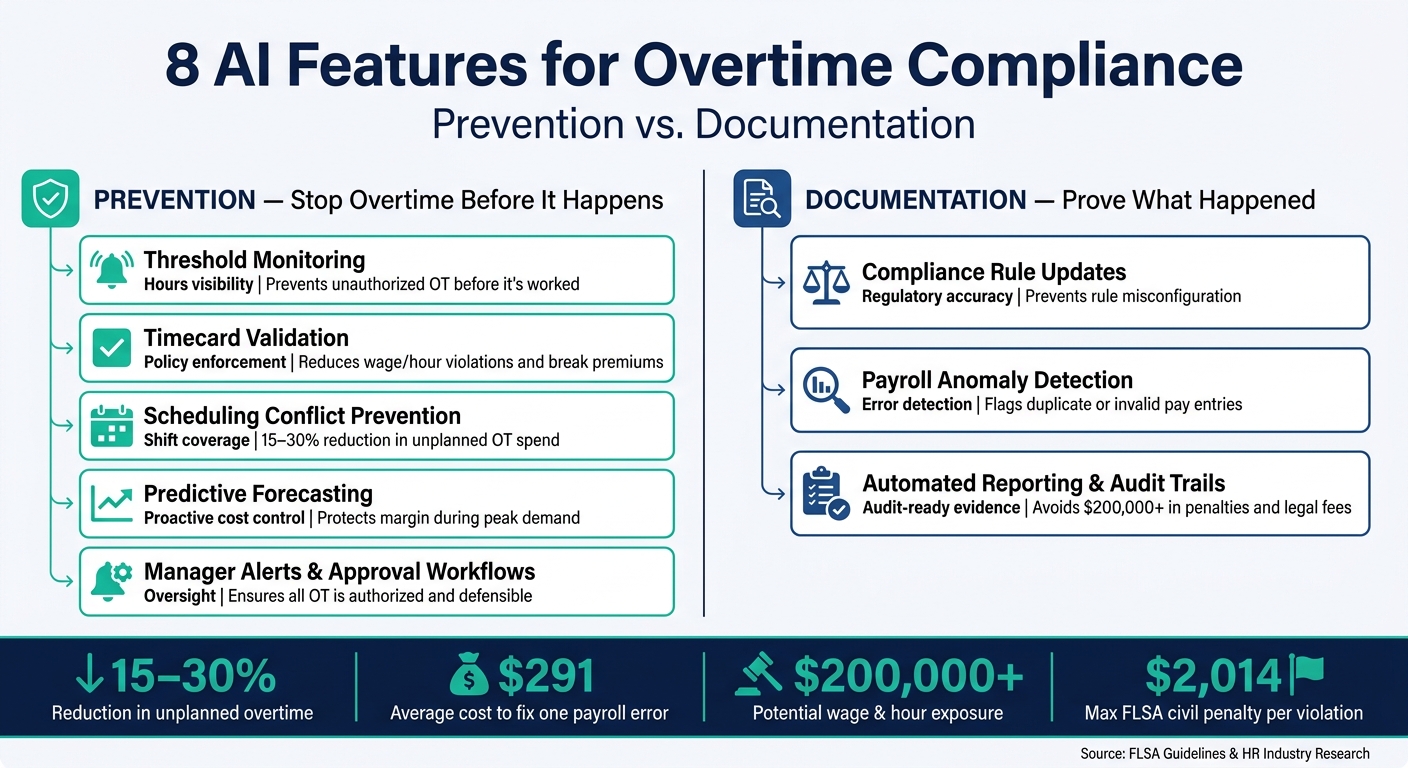
8 AI Features for Overtime Compliance: Prevention vs. Documentation
These features fall into two buckets: preventing overtime and documenting it. That split helps you decide what to roll out first. If your main problem is overtime happening in the first place, start with prevention. If the bigger issue is proving what happened later, focus on documentation.
The table below shows which features help stop overtime early and which ones help protect your team after the fact.
| Feature | Control Type | Primary Benefit | Best Use Case | Compliance/Cost Outcome |
|---|---|---|---|---|
| 1. Threshold Monitoring | Prevention | Hours visibility | High-volume hourly workforces | Prevents unauthorized OT before it's worked |
| 2. Timecard Validation | Prevention | Policy enforcement | Jurisdictions with strict break laws, such as CA and NY | Reduces wage/hour violations and break premiums |
| 3. Scheduling Conflict Prevention | Prevention | Shift coverage | Distributed teams and field workers | 15–30% reduction in unplanned OT spend |
| 4. Predictive Forecasting | Prevention | Proactive cost control | Seasonal surges and demand spikes | Protects margin during peak demand |
| 5. Compliance Rule Updates | Verification | Regulatory accuracy | Multi-state or multi-entity operations | Prevents rule misconfiguration |
| 6. Payroll Anomaly Detection | Verification | Error detection | Large-scale payroll runs | Flags duplicate or invalid pay entries |
| 7. Manager Alerts and Approval Workflows | Prevention | Oversight | Multi-site teams | Ensures all OT is authorized and defensible |
| 8. Automated Reporting and Audit Trails | Verification | Audit-ready evidence | DOL investigations and SOX compliance | Avoids $200,000+ in penalties and legal fees |
Use this comparison to spot your biggest gap: prevention, documentation, or both.
Conclusion
Overtime compliance works when prevention, monitoring, approvals, and audit trails all work together. Each one plays a clear role: catch overtime early, control it before it happens, and document every decision along the way.
In day-to-day use, the big change is simple. Teams move from fixing payroll problems after the fact to stopping them in real time. That’s the core value here. It cuts cost and helps prevent payroll surprises.
Labor is one of the largest controllable costs for mid-market teams. Features like monitoring and audit trails can help teams avoid the back pay and penalties that may surface in a DOL audit. The payoff is straightforward: fewer unauthorized hours, fewer payroll corrections, and a cleaner audit trail. For fast-growing teams, AI makes overtime compliance a controlled, auditable part of labor management.
FAQs
Which AI feature should I prioritize first?
Put AI features for pre-payroll variance checks at the top of your list, especially for overtime, taxes, and garnishments. That’s where payroll errors get expensive fast.
The reason is simple: these checks catch problems before money goes out the door. If overtime looks off, a tax amount spikes, or a garnishment doesn’t match past runs, the system can flag it early. That gives your team a chance to review the issue before payroll is finalized.
Start there first because these errors tend to have the biggest financial impact. A missed variance check can lead to overpayments, underpayments, tax filing issues, or compliance headaches that take time and money to fix.
In plain terms, pre-payroll checks act like a last-minute safety net. They don’t just save time. They help stop the kind of mistakes that are painful to clean up later.
How does AI handle different state overtime rules?
AI can handle overtime rules across different states by applying the right thresholds and calculations for each jurisdiction, including both daily and weekly overtime.
It can also account for state-level rules. For example, in California, overtime kicks in after 8 hours in a day. That helps teams stay aligned with local labor laws without having to sort through each rule by hand.
What records should an overtime compliance tool keep?
An overtime compliance tool should keep detailed records of payroll transactions, including:
- timesheets
- pay rates
- deductions
- tax calculations
- deposit deadlines
It should also track anomalies, exceptions, and the actions taken to resolve them. That paper trail helps support audit readiness and compliance.