If your ARR doubles but your burn jumps from $120,000 to $260,000 a month, you're not scaling well - you’re just spending more to grow.
I’d sum up the article like this: AI helps me scale with more control by showing burn, runway, margin, and CAC payback in near real time instead of weeks later in old spreadsheets. The point is simple: if I want growth that lasts, I need clean financial data, clear limits, rolling forecasts, spend tests, and regular budget shifts toward the best-return areas.
Here’s the short version:
- Revenue alone is not enough. I need to track gross margin, net burn, runway, burn multiple, CAC, LTV/CAC, and EBITDA.
- AI is most useful when data is connected. Accounting, payroll, CRM, billing, bank feeds, and product data need to work from one shared model.
- Forecasting matters more than static budgets. A rolling 12–24 month forecast helps me see cash risk before it turns into a problem.
- What-if planning reduces bad spend. I can test hires, price changes, and paid growth before committing cash.
- Alerts help me act sooner. For example, if revenue lands 10% below forecast or payroll runs 5%–10% over plan, I can respond right away.
- Budget should move to the best-return work. If one channel pays back in 8 months and another takes 24+ months, the better use of cash is obvious.
- AI does not make the final call. I still need a monthly review with my team to decide what the numbers mean.
A simple rule runs through the whole piece: use AI to make finance decisions faster, but base those decisions on clean books and hard cash limits.
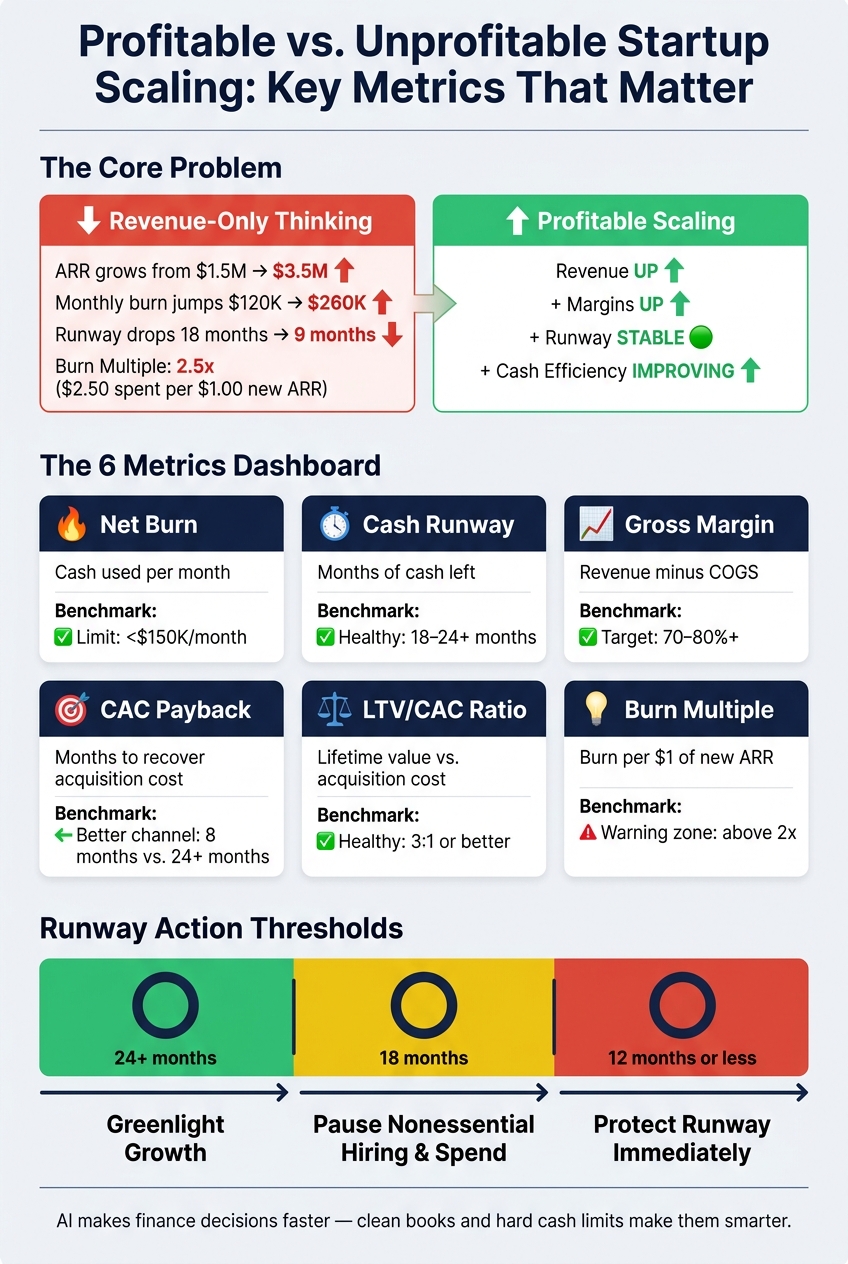
Profitable vs. Unprofitable Startup Scaling: Key Metrics Compared
MOST AI FOUNDERS STILL DO NOT UNDERSTAND PROFITABILITY | With Dan Melnick | The Business Spotlight
sbb-itb-17e8ec9
Introduction: What Profitable Scaling Looks Like for U.S. Startups
For U.S. startups with limited capital, profitable scaling means one simple thing: revenue goes up while margins, runway, and cash efficiency get better too.
Why Revenue Growth Alone Is Not Enough
A SaaS startup can grow annual recurring revenue (ARR) from $1.5 million to $3.5 million in a year and still be in a worse spot. Say monthly burn jumps from $120,000 to $260,000, runway drops from 18 months to 9 months, and burn multiple hits 2.5x. That's revenue growth, sure. But it isn't profitable scaling.
The numbers that tell the real story are:
- Gross margin
- CAC payback period, or how many months it takes to recover customer acquisition cost
- Burn multiple
- Cash runway, or how many months of cash you have left
A 2.5x burn multiple means you spend $2.50 for every $1.00 of new ARR. That's the kind of signal that can get buried when founders focus on headline ARR and don't tie decisions back to a clear view of the P&L and cash flow.
And here's the catch: those metrics only help if you can track them fast enough to do something about them.
How AI Changes the Way Founders Make Decisions
Most founders aren't short on data. They're short on a clean, current picture of the business.
The problem is fragmentation. Accounting, payroll, bank feeds, CRM, and billing each hold part of the story. So founders end up making hiring, pricing, and spending calls from spreadsheets that are two to six weeks old.
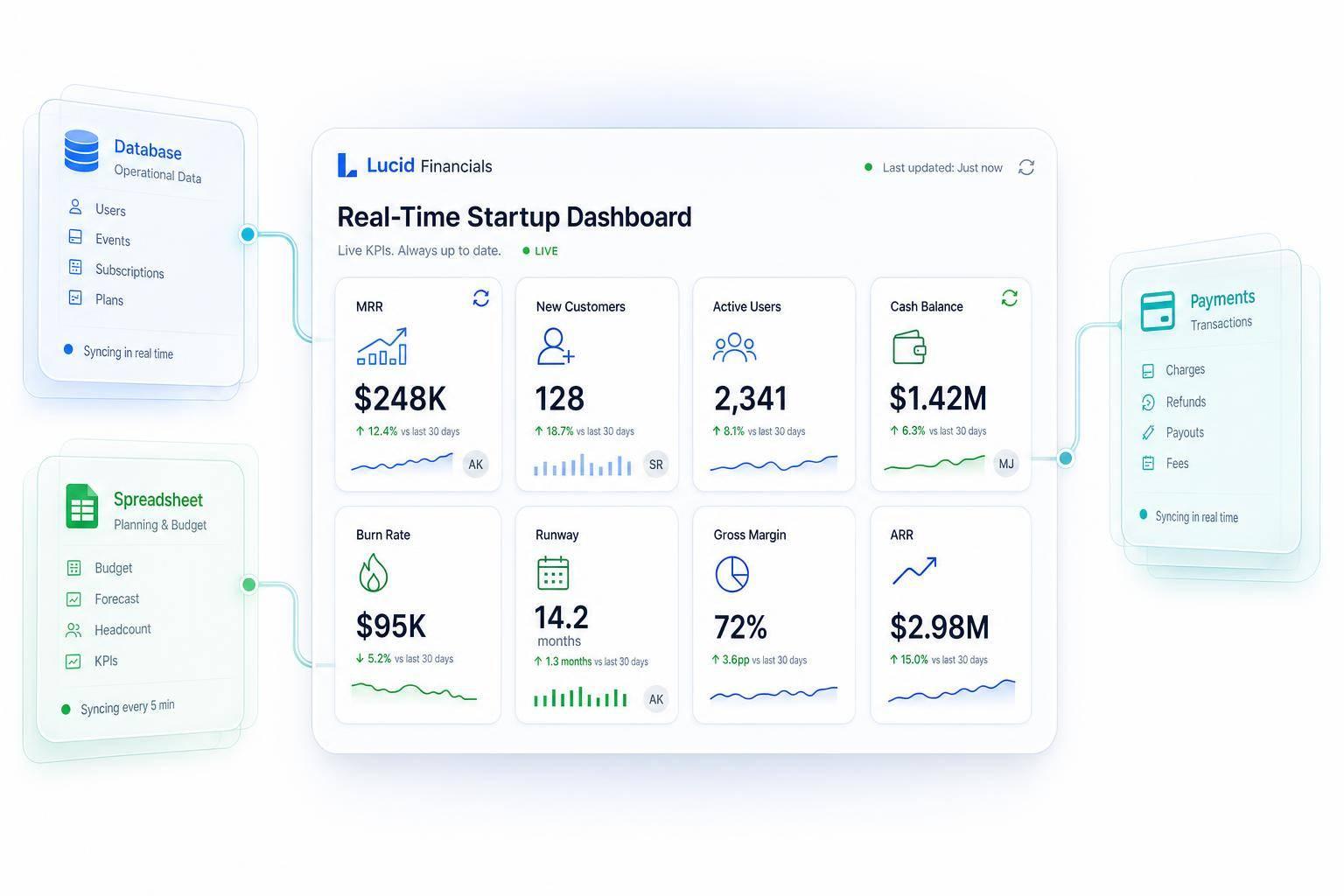
AI changes that by pulling those sources into one model that updates on a steady basis. Instead of waiting for backward-looking reports, founders can see what's changing as it happens. For example, AI can flag that burn multiple moved from 1.8x to 2.4x and point to the top three line items behind the jump.
That shift matters. It turns finance from a rearview mirror into something closer to a dashboard, helping founders move fast without burning through limited capital.
The next step is defining the financial targets AI should improve.
1. Define the Financial Targets AI Should Help You Improve
Before you plug AI into your financial data, get clear on the small set of metrics that show whether growth is actually profitable.
Pick the Essential Financial Metrics That Define Profitable Growth
For many U.S. startups, a practical dashboard includes net burn, cash runway, gross margin, CAC, LTV/CAC, and EBITDA.
Each one answers a specific question. Net burn shows how fast you're using cash. Runway tells you how much time you have left to make changes, and it's calculated by dividing your current cash balance by average monthly net burn. Gross margins above 70% to 80% often point to unit economics that can scale. LTV/CAC shows whether growth is efficient, and a 3:1 ratio or better is often seen as healthy when the payback period is reasonable. EBITDA helps you measure progress toward operating profit.
Those metrics give you the scorecard. Next, you need to set the limits AI can't ignore.
Map Your Limits on Cash, Hiring, and Fixed Costs
Metrics tell you how you're doing. Constraints tell you what you can't do.
Start by listing committed costs for the next 6 to 18 months. That includes monthly payroll by function, non-cancelable software contracts, office leases, marketing agency retainers, and any debt repayments or tax obligations. Then set hard limits, such as "net burn must stay under $150,000/month" or "runway must not drop below 12 months." Once those limits are in place, AI can flag the moment a hiring plan or spending increase crosses the line.
Turn those targets into hard operating limits.
| Constraint Type | Example | Why It Matters for AI |
|---|---|---|
| Payroll commitment | Monthly payroll by function | Sets a fixed cost floor AI must respect |
| Software contracts | Non-cancelable software subscriptions | Must be treated as committed costs |
| Office lease | Recurring lease obligation | Limits flexibility in AI vs. traditional scenario planning |
| Marketing commitment | Agency retainer or other committed spend | Helps distinguish fixed from discretionary costs |
| Debt and tax obligations | Scheduled repayments and tax liabilities | Must be included in cash planning |
| Net burn limit | Less than $150,000/month | Triggers alerts when forecasts exceed the cap |
| Minimum runway | 12 months or more | Screens out scenarios that create cash risk |
Give AI your actual operating constraints, not a made-up model.
2. Build a Clean Financial Data Foundation
Once you know which metrics matter, the next step is making sure AI can trust the numbers. Clean forecasts start with clean books. If your data is incomplete, mislabeled, or out of date, AI will just scale bad assumptions.
Clean Up Transaction Data and Reporting Categories
Start with a chart of accounts that matches how the business runs. Split revenue by product or pricing plan. Keep COGS separate from operating expenses. And make sure Sales & Marketing, Product/R&D, and G&A each have their own place. That setup helps AI read margin by product and spend by channel without guessing.
Every bank and credit card account should be reconciled monthly, down to the cent. Skip vague labels like Miscellaneous or Ask My Accountant. They make it harder for AI to interpret the data. Close the P&L, balance sheet, and cash flow statement by the 10th business day of each month. That steady rhythm gives AI a consistent structure to analyze over time.
Once the chart of accounts is cleaned up, the next move is to connect the rest of your tools into one source of truth.
Connect Your Core Systems Into One Source of Truth
A chart of accounts by itself isn't enough. AI also needs live, connected data from across the business to give you daily visibility into spend and runway. That usually means tying together:
- accounting software
- bank and credit card feeds
- payroll platform
- subscription billing
- CRM
- product analytics
Each system adds a different piece of the picture. Payroll feeds help AI break down headcount cost by department and model hiring scenarios. Billing data pushes MRR, churn, and net revenue retention straight into forecasts. CRM pipeline data links sales activity to future cash inflows. When these systems sync automatically - daily instead of monthly - burn rate and runway stay current without manual exports or spreadsheet cleanup.
Use Lucid Financials to Speed Up Finance Operations

Getting to clean, connected books takes time most founders just don't have. Lucid Financials handles this workflow in one platform. It combines bookkeeping, tax, tax credits, and CFO support in one place.
Lucid's AI engine standardizes your chart of accounts, fixes misclassifications, and delivers clean books in about seven days. After that, it keeps your financials current in real time. Founders can ask questions directly in Slack - about runway, spend trends, or cash position - and get immediate answers from Lucid's AI. Those answers are backed by a dedicated finance team that reviews outputs for accuracy. That gives you clean books and live data for the forecasting and scenario planning in the next section.
3. Use AI to Forecast Runway and Test Growth Decisions
Once your current financial data is in place, AI can show where your cash is going and how planned changes affect runway. That changes spending decisions into cash decisions.
Generate Rolling Forecasts for Revenue, Expenses, and Cash
Static budgets get old fast. A rolling 12–24 month forecast, updated each month, gives you a current view of revenue, expenses, and cash.
AI pulls together revenue, pipeline, headcount, and expense data to project monthly revenue, burn, and cash. That helps keep growth tied to cash efficiency, not just top-line expansion.
Pay close attention to projected net burn and ending cash. Those two numbers determine runway. Use these thresholds:
| Runway Remaining | Suggested Action |
|---|---|
| 24+ months | Greenlight growth |
| 18 months | Pause nonessential hiring and spend |
| 12 months or less | Protect runway immediately |
Once you have the baseline, you can test the decisions most likely to change it.
Run What-If Scenarios Before Increasing Spend
Model major spending moves before you commit cash.
For example, you can model three engineer hires by start date and fully loaded cost to see the effect on payroll, burn, and runway. You can use that same model to test price increases and paid acquisition changes under conservative, base, and aggressive assumptions. Run all three cases, but plan around the conservative one.
Set Alerts for Variance and Cash Risk
Forecasts only matter if you act on them in time. AI-driven alerts help close the gap between when something starts to go off track and when you notice it.
Set alerts for the cases that matter most:
- Payroll exceeds plan by more than 5–10% in a month
- Software or infrastructure spend runs more than 10–20% above budget
- Monthly revenue comes in more than 10% below forecast
- Days Sales Outstanding (DSO) slips from 30 to 45 days
Also set runway alerts at 18 months and again at 12 months so you have time to adjust spend or revisit fundraising plans. If those alerts land in Slack, you can act as soon as the numbers move instead of waiting for month-end closes. Then shift budget toward the areas with the best return.
4. Reallocate Budget to the Highest-Return Areas
Use current forecasts to move spend toward the areas with the best return and cut line items that drag down margin.
Find Profitable Customers, Channels, and Products
Not all revenue is worth the same amount. AI can sort customers by cohort, acquisition channel, industry, or plan, then calculate contribution margin, churn, CAC payback, and LTV for each segment. That gives you a ranked view of where each added dollar in marketing, sales, or product is most likely to improve profit and stretch runway.
Put more money behind the segments with the best unit economics. Say AI shows that paid social campaigns aimed at mid-market companies pay back in 8 months at 80% gross margin, while broad SMB campaigns take 24+ months to pay back. The move is pretty clear: shift spend from SMB to mid-market campaigns and partner-led channels. That can lower CAC and extend runway.
Use the same thinking for products. If a premium add-on delivers 75% gross margin and low churn, while a legacy feature set is expensive to maintain and mostly used by low-ACV customers, it makes sense to wind down the legacy work and focus on the add-on.
Make Hiring and Operating Spend More Disciplined
Every new hire and vendor contract should be checked against revenue and margin targets before you commit. AI can tie your headcount plan to your forecast by modeling the fully loaded cost of each role - salary, benefits, payroll taxes, and expected raises - and estimating its effect on revenue or cost savings over the next 12–24 months.
A useful guardrail is to keep headcount growth below 60% of ARR growth and G&A below 15% of total headcount. If a hiring plan breaks those limits, AI can flag it before you lock it in. The same approach works for operating spend. AI can point out low-use software, weak contractor spend, and nonessential travel or events.
Those dollars can then be moved into higher-ROI work, like lifecycle marketing or product improvements, to extend runway without slowing growth.
Before-and-After Budget Comparison Table
Use this table to turn AI findings into budget moves.
| Budget Category | AI-Driven Insight | Expected ROI Impact | Recommended Action |
|---|---|---|---|
| Marketing | Paid social campaigns targeting mid-market companies show 8-month CAC payback and 80% gross margin, while broad SMB campaigns sit at 24+ months payback. | Higher efficiency and extended runway | Shift spend from SMB to mid-market and partner-led channels. |
| Product | A premium add-on has 75% gross margin and low churn, while a legacy feature set is costly to maintain and mostly used by low-ACV customers. | Improves overall gross margin | Retire the legacy feature set and prioritize the add-on. |
| Operations | A small but noisy customer segment drives 30% of support costs but only 8% of revenue. | Cuts support cost per dollar of revenue | Raise pricing, tighten usage limits, and expand self-serve support. |
| Hiring | Headcount growth is projected to exceed 60% of ARR growth or push G&A headcount above 15% of total headcount. | Protects runway | Pause or redesign the hiring plan before adding roles. |
Review this table monthly or quarterly, using AI-generated ROI, payback, and runway data to guide each decision.
Conclusion: Build an AI-Driven Finance Cadence That Protects Profitability
AI doesn't make startups profitable by itself. What it does is make finance calls faster, clearer, and more disciplined.
But there's a catch: it only works when the inputs are clean. You need clean books, clear targets, and a monthly review cadence. Once you've cleaned up the books, built your forecasts, and adjusted budgets, the last piece is simple in theory and hard in practice: discipline.
The Core Steps to Put in Place Now
The goal is to turn those tools into a monthly operating rhythm.
Track 3–5 metrics that tell you what's happening in the business:
- gross margin
- burn
- runway
- CAC payback
- burn multiple
Update a rolling 12–18 month forecast every month. Before any major spend change, run both a base case and a downside case. That way, you're not making a call on gut feel alone.
Then block a monthly 60–90 minute leadership review with the founder, finance lead, and functional heads. Use that meeting to look at actuals vs. forecast, what drove the variance, and any AI-generated alerts. From there, decide what needs to change this month.
One point matters more than anything else: AI recommends; founders decide.
AI may flag that a product line is pulling down gross margin. That matters. But maybe that same product is helping you land enterprise logos or making bundling possible in a way that helps the rest of the business. A model can't judge that tradeoff. You can.
How Lucid Financials Fits Into This Workflow
This cadence is easier to run when bookkeeping, forecasting, and the review loop sit in one place.
Lucid Financials brings together bookkeeping, tax, tax credits, and CFO support in one platform. It offers clean books in seven days, Slack access, and finance-team review. Founders can ask financial questions in real time and get answers in Slack, backed by an experienced finance team that reviews every AI-generated output.
FAQs
What metrics should I track first?
Start by automating accounts payable, accounts receivable, and your month-end close so your data stays accurate. That gives you a clean base to work from. From there, keep a close eye on the numbers that matter most: cash runway, burn rate, and revenue trends.
Lucid Financials makes this easier with real-time, investor-ready reporting. You can track metrics like customer acquisition cost and lifetime value without digging through messy spreadsheets, and spot cash flow problems before they turn into bigger ones.
How clean does my financial data need to be?
Your financial data needs to be clean enough to support accurate insights, better decisions, and dependable forecasting. When records are wrong or incomplete, they can skew unit economics, hiring plans, and cost choices.
Lucid Financials helps keep your data in shape by automating transaction matching, spotting duplicates, sorting expenses, and giving you real-time reconciliations. The result: clean, investor-ready books in seven days.
How often should I update my forecast?
Skip static forecasts that only get refreshed once in a while. Use AI-powered tools to keep your forecast up to date in real time.
With Lucid Financials, projections are continuously recalibrated as new transaction data, expenses, and market conditions come in. That means your runway, burn rate, and revenue models reflect what’s happening now, not old assumptions.