
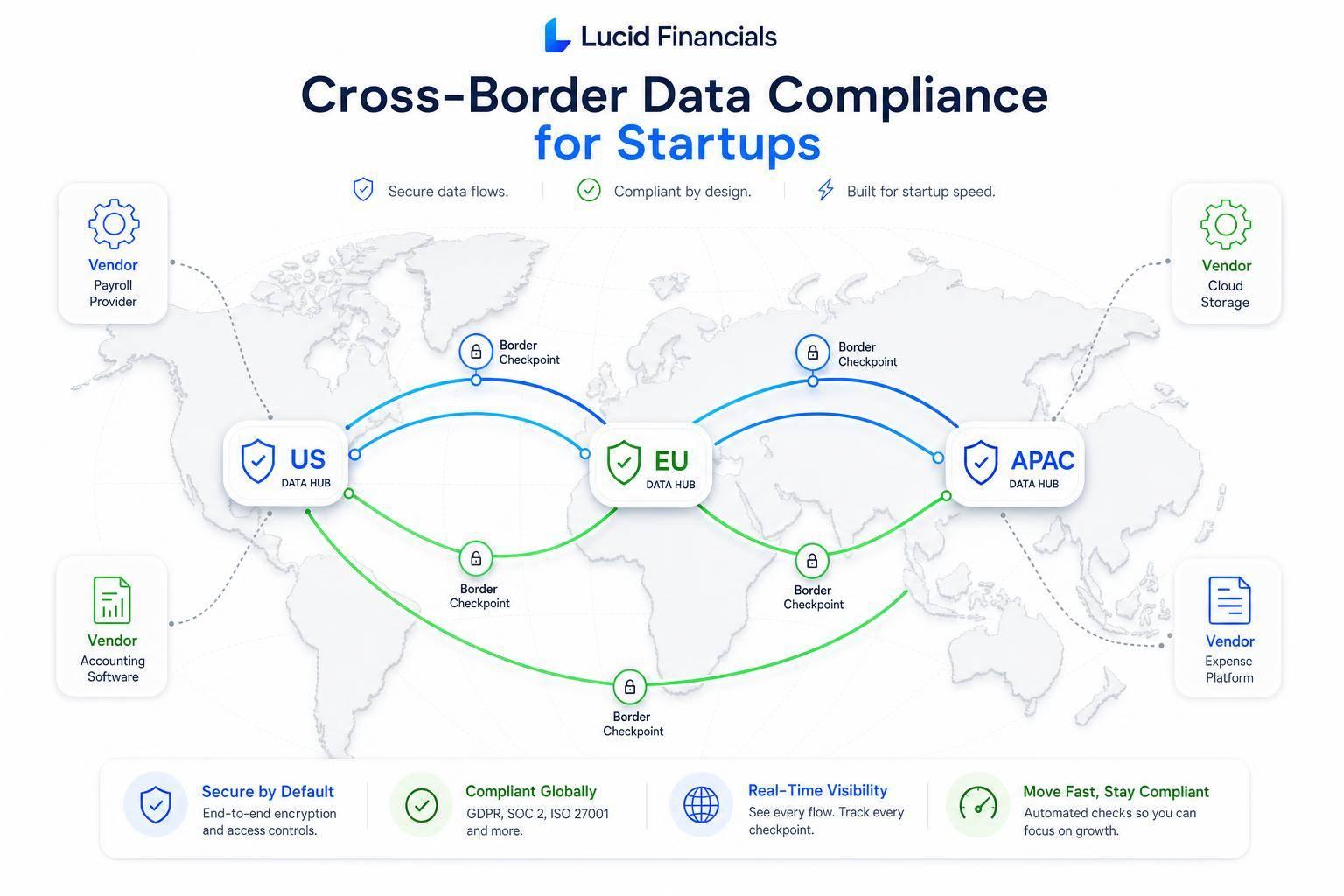
Cross-border finance data risk starts earlier than most founders think. If I use global payroll, cloud accounting, investor portals, or an overseas bookkeeper, I may already be moving payroll files, bank details, invoices, or tax records across borders.
Here’s the short version:
- I start by mapping every finance data flow
- I list who can access what, and from which country
- I match each transfer to the right rule, such as GDPR, CCPA/CPRA, PCI DSS, or SOC 2
- I use the right transfer path, such as adequacy, SCCs, UK addendum, or localized storage
- I lock down regions, backups, logs, encryption, keys, and access
- I assign an owner and review vendors, subprocessors, and contracts on a set schedule
That matters because cross-border transfer mistakes can lead to fines, audit issues, and deal friction. The article points to more than €2 billion in GDPR penalties tied to cross-border data flows since 2023, which shows this is not just a legal footnote.
If I want a simple rule, it’s this: know where finance data lives, who touches it, why it moves, and what rule covers that move. Everything else flows from that.
A few data types need extra care right away:
- Payroll records
- Card data
- Tax filings
- Bank details
- Investor and cap table records
And a few weak spots show up again and again:
- Emailing invoices
- Slack screenshots of payroll or billing data
- CSV exports saved on laptops
- Global cloud backups and logs
- Vendors adding subprocessors or changing regions
When I boil the article down, the process is simple: map, document, configure, review. That gives me cleaner controls, cleaner audit trails, and fewer surprises when customers, investors, or auditors ask hard questions.
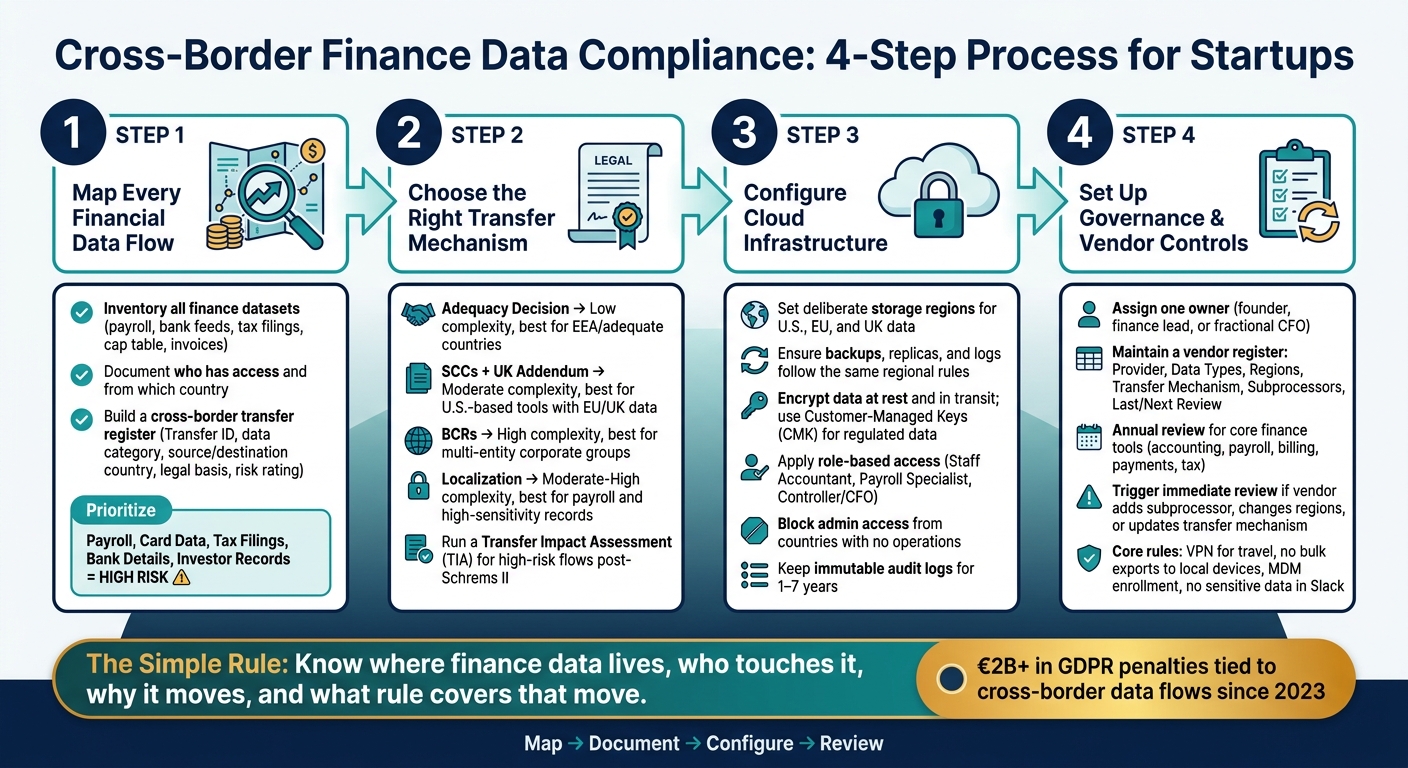
Cross-Border Finance Data Compliance: 4-Step Process for Startups
Cross-Border Data Transfer Regulations and Compliance Requirements | Exclusive Lesson
sbb-itb-17e8ec9
Step 1: Map every financial data flow before choosing tools or policies
You can't pick the right storage region, vendor terms, or transfer method until you know exactly what financial data you have, where it sits, and who can get to it. Start with the data flow, not the tool.
Inventory financial data, systems, and people with access
Begin by listing every core finance dataset your startup handles: general ledger, bank feeds, payment processor data, payroll files, expense records, tax filings, investor and cap table data, audit folders, system logs, and backups. Then map each dataset to the systems that store or process it, such as accounting, payroll, banking, FP&A, and file storage.
Next, document who has access and where they are located. That includes employees, contractors, fractional CFOs, bookkeepers, and tax advisors, especially if any of them are outside the U.S. or sign in from abroad. You should also flag indirect access. For example, engineers may be able to query production databases, and support agents may be able to view billing histories inside a helpdesk tool.
Email-forwarded invoices, payroll screenshots in Slack, and CSV exports saved on laptops all count as data flows. They also create compliance risk.
Use that inventory to build a transfer register for every cross-border flow.
Build a cross-border transfer register
Turn each cross-border transfer into a documented row in a transfer register. A transfer happens when data crosses a national border, including remote access from another country.
Use this template:
| Transfer ID | Data category | Data elements | Source system & country | Destination system & country | Direction | Business purpose | Legal basis & transfer mechanism | Security controls | Retention & deletion trigger | Internal owner | Risk rating |
|---|---|---|---|---|---|---|---|---|---|---|---|
| T-001 | Payroll records | Name, address, SSN, salary, bank account details | Payroll system (U.S.) | Bookkeeping portal (India) | Read-only remote access | Monthly close & reports | Contract necessity; SCCs | TLS, MFA, role-based access, VPN | 7 years after FY end | Controller | High |
| T-002 | Card transaction logs | Last 4, token, amount, currency | Payment processor (U.S.) | Analytics warehouse (EU) | One-way export | Revenue analytics | Legitimate interest; SCCs or DPF | Encryption at rest, SSO, least privilege | 3 years; pseudonymized after 1 year | Head of Data | Medium |
| T-003 | Tax filings | EIN, revenue, expenses, SSNs on W-2s | Tax tool (U.S.) | Audit folder in cloud (U.S.) | One-way export | Compliance & audit | Legal obligation | Encryption, access logging, IP controls | 7 years after filing | Tax manager | High |
Write down why each transfer exists. This register becomes the working record for compliance reviews.
Once the register is done, sort the rows by sensitivity and exposure.
Prioritize the highest-risk finance data first
Not all financial data brings the same level of risk. Start with payroll data, card data, tax filings, bank details, and investor records. Those deserve attention first. Aggregated analytics, financial dashboards, and anonymized reporting data usually sit lower on the list.
After you map the highest-risk flows, match each one to the right transfer mechanism or localization approach.
Step 2: Choose the right transfer mechanism and localization approach
Use the transfer register to give each data flow a legal basis. Then localize the most sensitive finance data.
Match each transfer to a legal basis
For early-stage U.S. startups, the usual starting point is adequacy decisions, SCCs, and, in limited situations, derogations. BCRs are usually a better fit for larger corporate groups that can handle regulator approval and the added paperwork.
If data stays inside the EEA or goes to a country with an adequacy decision, you don't need an extra transfer tool. But when data goes to the U.S. or another non-adequate country - which is common with payroll, accounting, and billing software - SCCs under Commission Implementing Decision (EU) 2021/914 are the standard route. They use a modular format and cover several transfer setups. If you also handle UK data subjects, pair the SCCs with the UK International Data Transfer Addendum (IDTA) or use another UK transfer tool.
Use derogations for one-off transfers only, like a single investor due diligence data room. They are not a good fit for repeat finance work such as monthly payroll or invoicing. If a transfer includes high-risk data, a large share of EU or UK data subjects, or a messy multi-party setup, bring in privacy counsel before go-live. For higher-risk transfers, document the choice in a transfer impact assessment.
Run a transfer impact assessment for higher-risk flows
After Schrems II, SCCs by themselves may not be enough for some transfers to third countries, including some U.S. transfers. That matters for flows like payroll, billing, tax filings, and investor data. For those cases, run a Transfer Impact Assessment (TIA). Keep it tight: assess, document, update.
A lean TIA should do four things:
- Identify the transfer
- Assess risks in the destination country
- Review vendor safeguards
- Document supplementary measures
Use public sources to review local law and government access, not just the text of the statute. Then record supplementary measures such as strong encryption with keys controlled by the EU exporter, pseudonymization of analytics fields, role-based access that limits who can view identifiable EU data, and access logging. Store the TIA with your compliance records. Update it when your vendor, jurisdiction, or data use changes.
If the risk still looks high, move that flow to localized storage or split the processing.
Compare localization options for startup finance stacks
For EU payroll, employee bank details, and tax IDs, localization often cuts risk more than SCCs alone. A simple rule helps here: keep identifiable data in region-specific payroll and accounting systems, and send only aggregated or pseudonymized metrics to a central reporting layer. So, for instance, an EU subsidiary's payroll system can keep all identifiable employee data in EU data centers, while the U.S. parent gets totals and other non-identifiable reporting data.
The table below compares the main options for lean startup finance teams:
| Mechanism | Complexity | Scalability | Best Use Case |
|---|---|---|---|
| Adequacy decision | Low | High | EU-hosted vendors; transfers within the EEA or to adequate countries |
| SCCs + UK addendum | Moderate | High | U.S.-based finance tools processing EU/UK personal data |
| BCRs | High | High within a corporate group | Later-stage startups with integrated multi-entity finance infrastructure |
| Localization (region-locked storage, split processing) | Moderate to high | High | Payroll, HR, and high-sensitivity financial records where transfer risk is hardest to mitigate |
For most early-stage U.S. startups, the pattern is pretty clear: use adequacy where you can, SCCs where you must, and localization for the highest-risk records. Those decisions should shape your cloud regions and access controls in Step 3.
Step 3: Configure cloud infrastructure and finance operations to support compliance
Now turn those transfer decisions into actual cloud settings, not just a policy doc. Each cloud control should line up with the transfer basis you documented in Step 2. If you skip this part, cloud defaults can send data all over the place. Backups may copy across borders. Logs can end up in the wrong region. It happens more often than teams expect.
Use your transfer register to set regions, access rules, and logging for each system.
Set storage regions, backups, and logs deliberately
Keep U.S. billing and tax data in approved U.S. regions. Use the approved EU or UK region for HR and customer data tied to EU or UK residents. Then check the rest of the chain: backups, replicas, failover, and log archives should follow the same rules as primary storage. Many cloud providers default to multi-region or global replication, which can quietly move regulated payroll or HR data across borders.
Review each system on its own. Your accounting platform, payroll system, and BI or analytics tools may all behave differently. Centralized logging pipelines are a common trouble spot because they often default to a global cluster. For finance systems, set region-specific log storage instead. And don’t let logs collect raw sensitive fields like Social Security numbers or full bank account numbers. Record IDs and user IDs usually do the job.
Use encryption, key management, and location-based access controls
Once storage is set, tighten access. Encrypt finance data at rest and in transit across databases, backups, archives, and logs. Most major cloud and SaaS providers turn this on by default, but don’t assume. Check the configuration dashboard and the vendor’s security documentation.
For key management, many early-stage startups start with provider-managed keys. Move to customer-managed keys (CMK) when you’re handling regulated card or bank data at scale, dealing with enterprise customer demands, or working in places with higher government-access concerns. If you use CMK, keep keys in the same jurisdiction as the data when you can. Split key administration roles from finance operations roles. Require MFA for key management actions. Log every decryption operation.
For access control, tie roles to business functions like Staff Accountant, Payroll Specialist, and Controller/CFO. Give each role only the access it needs. Apply that across your accounting platform, payroll system, expense tool, and bank portals, using SSO groups where possible. For cross-border risk, block administrative access to finance systems from countries where you have no operations. You can do that with conditional IAM policies tied to approved IP ranges, country codes, or corporate VPNs.
Centralize reporting and audit trails for ongoing oversight
Once storage and access are under control, make the audit trail simple to review. Standardize your chart of accounts, naming, and approvals across entities so auditors and investors can see how revenue, expenses, payroll, and tax obligations are recorded in each region without having to piece it all back together.
Your finance tools should keep immutable audit logs showing who created, approved, and changed records. They should link transactions to supporting documents and let you export cross-entity flows on demand. Logs should show who changed what, when, from where, and which record or system was accessed. Keep logs for 1–7 years, based on your tax and audit duties, and spell out that retention policy in your data governance standards.
Step 4: Set up governance with clear owners, reviews, and vendor controls
Step 4 turns cloud controls into day-to-day governance. Without it, the storage regions, access rules, and transfer decisions from Steps 1–3 can drift over time. A new subprocessor shows up, a region setting changes, or a vendor updates its infrastructure without much fanfare.
Assign ownership and write clear internal rules
Start by naming one person to oversee cross-border finance data. In many early-stage startups, the founder or CEO keeps overall accountability, while the finance lead or controller manages the day-to-day work. A fractional CFO or outside accounting advisor can also help here. They can turn compliance requirements into practical controls, which is useful if you don't want to hire a full in-house compliance team.
That owner should keep the transfer register up to date, enforce approved storage regions, and make sure access controls stay current.
Put the rules on one page. Keep them plain and specific. Cover approved storage regions, travel access, approved devices, and the only systems allowed to store sensitive data. The core rules should be clear:
- Use a VPN when accessing finance systems while traveling
- No bulk exports to local devices while traveling
- Enroll personal laptops in MDM before accessing payroll or payment data
- Don't copy sensitive data into Slack or ad hoc docs
Use the handbook as the default rule set for travel, device access, and sensitive-data handling.
Review vendors, subprocessors, and contract terms on a set schedule
After ownership is set, lock in vendor reviews. Group vendors by sensitivity and review them on a schedule that fits the risk. Core finance tools - accounting, payroll, billing, payments, and tax - should get at least an annual review.
Some changes shouldn't wait for the next calendar check. If a vendor adds a new subprocessor, changes regions, or updates its transfer mechanism, treat that as a trigger for an immediate review. Those changes can undo earlier compliance work.
For each core vendor, check the latest SOC 2 or ISO 27001 reports. Verify that data residency options haven't changed. Then confirm that the DPA still lists the right transfer mechanism and covers every processor and subprocessor. Ask for contract terms that require notice before a vendor adds or replaces a subprocessor, and check where any new subprocessors are located.
Keep a simple vendor register with:
- Provider
- Data types
- Regions
- Transfer mechanism
- Subprocessors
- Last review
- Next review
When you hire in another country, enter a new market, or replace a core finance tool, review the register before the change goes live - not after.
Conclusion: A simple compliance process startups can maintain
The process is straightforward: map flows, document transfers, configure systems, and review owners and vendors on a set schedule.
The business case is just as clear. Good governance reduces breach risk, keeps audit trails in order, and gives startups a process they can repeat without building a large compliance team.
FAQs
What counts as a cross-border data transfer?
A cross-border data transfer happens when personal data moves from one country to another for processing or storage. And it’s not just about sending files to a server overseas.
It also includes remote access. So if an IT team in one country logs in to view or handle data stored in another country, that can still count as a restricted cross-border transfer.
When do startups need SCCs or a UK Addendum?
Startups need the UK Addendum to the EU Standard Contractual Clauses (SCCs) when they transfer personal data from the UK to countries outside the UK. This has been mandatory since March 21, 2024.
The EU SCCs apply to data transfers from the European Economic Area. The UK Addendum modifies those clauses so they fit the UK’s post-Brexit data protection rules.
Which finance data should I localize first?
Put your most sensitive financial data at the top of the list. That includes payroll records, tax documents, investor information, banking credentials, and cardholder information. These data types carry the highest regulatory risk, so they need the strongest protection, such as AES-256 encryption.
The first step is to inventory your financial data. You need to know where it lives, who touches it, and how sensitive it is. Lucid Financials can help you categorize, document, and route that data based on regional requirements.